

 Business Process

Enterprise AI needs more than a useful chatbot. Businesses need to control who can use AI, what information it can access and what happens to the data and outputs it generates.
Role-based access control (RBAC) and audit logging are therefore essential when evaluating business AI copilots. But having these features doesn’t automatically mean an AI platform is fully auditable.
This guide compares six enterprise AI platforms based on documented capabilities for access control, AI activity auditing, prompt and response capture, data visibility and audit export.
- Microsoft 365 Copilot
- Google Gemini for Google Workspace
- Salesforce Einstein and Agentforce
- ServiceNow Now Assist
- Slack AI
- IBM watsonx
The key question isn’t simply whether an AI copilot has audit logs and RBAC. It’s what those logs allow your organisation to prove.
What Does Role-Based Access Mean for Business AI?
Role-based access control (RBAC) determines which employees can use AI features and what they’re authorised to access or perform.
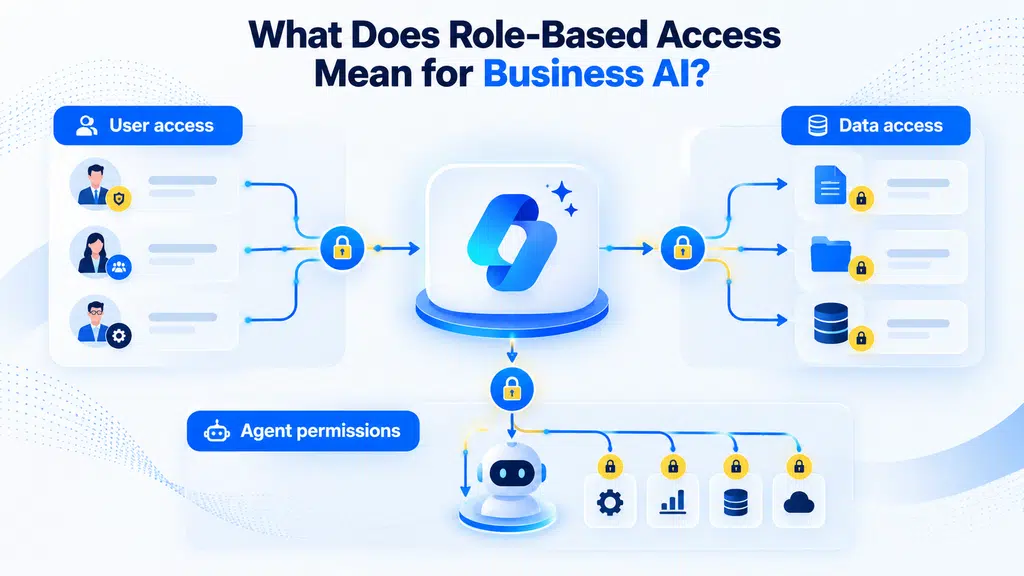
For business AI copilots, this typically involves three levels of control:
- User access: Restricting AI features to specific users, groups or roles.
- Data access: Ensuring AI respects existing permissions for documents, conversations and business records.
- Agent permissions: Controlling which systems AI agents can access and what actions they’re authorised to perform.
These distinctions matter because giving someone permission to use an AI copilot doesn’t automatically mean your organization has appropriate controls over the information it can retrieve or the actions it can execute.
Effective RBAC combines existing enterprise permissions with AI-specific controls to reduce unnecessary access and limit security risks.
What Should an Enterprise AI Audit Log Show?
An AI audit log should give your team enough information to understand who used AI, what happened during the interaction and what happened afterward.
At a minimum, look for:
- Who used the AI and when
- What AI feature, model or agent was used
- What information or resources the AI accessed
- What prompt or instruction was submitted
- What response or action was generated
- Whether the activity can be retained, searched and exported
The more information your audit logs capture, the easier it is to investigate security incidents, demonstrate compliance, and understand how AI is being used.
The important distinction is that a basic activity log isn’t necessarily enough. Logging that a user accessed an AI feature is very different from being able to reconstruct what the AI did.
What Should an Enterprise AI Audit Log Show?
An AI audit log should give your organization enough information to understand who used AI, what happened during the interaction and what happened afterward.
At a minimum, look for:
- Who used the AI and when
- What AI feature, model or agent was used
- What information or resources the AI accessed
- What prompt or instruction was submitted
- What response or action was generated
- Whether the activity can be retained, searched and exported
The more information your audit logs capture, the easier it is to investigate security incidents, demonstrate compliance and understand how AI is being used across your organization.
The important distinction is that a basic activity log isn’t necessarily enough. Logging that a user accessed an AI feature is very different from being able to reconstruct what the AI did.
Which Business AI Copilots Support RBAC and Audit Logs?
We reviewed six business AI platforms against the same core criteria: AI access controls, activity auditing, prompt and response capture, data visibility and audit export.
We only included platforms where current vendor documentation provides enough evidence to assess these capabilities confidently.
| AI copilot | Access controls | AI audit logs | Prompt & response visibility | Rating |
| Microsoft 365 Copilot | Strong | Detailed | Yes, with licensing considerations | ⭐⭐⭐⭐ |
| Google Gemini | Strong | Strong | Experience-dependent | ⭐⭐⭐ |
| Salesforce Einstein & Agentforce | Strong | Detailed | Yes | ⭐⭐⭐⭐ |
| ServiceNow Now Assist | Strong | Strong | Agent-focused | ⭐⭐⭐⭐ |
| Slack AI | Strong | Strong | More limited | ⭐⭐⭐ |
| IBM watsonx | Strong | Strong | Requires additional configuration | ⭐⭐⭐ |
1. Microsoft 365 Copilot
Microsoft 365 Copilot has strong enterprise access controls as it operates within the existing Microsoft 365 security model. Copilot respects the permissions applied to Microsoft 365 data, including SharePoint and OneDrive content, rather than creating a separate permission model for the information it retrieves.
Role-based access
Your admins can use Microsoft Entra and Microsoft Purview roles to control who manages Copilot and related security and compliance capabilities. Microsoft also provides an AI Administrator role for managing Microsoft 365 Copilot and AI-related enterprise services.
This means you can separate responsibilities between people who manage Copilot, security controls and compliance rather than giving everyone broad administrative access.
AI audit logs
Microsoft Purview provides dedicated auditing for Copilot interactions. Audit records can show who interacted with Copilot, when and where the interaction occurred, as well as references to files, sites and other resources accessed to generate a response.
You can also audit administrative activity around Copilot, including changes involving settings, plugins, promptbooks and workspaces.
Prompt and response visibility
Microsoft goes beyond basic activity metadata. Depending on the applicable Purview capabilities and licensing, you can access prompt and response content through eDiscovery and AI activity monitoring. Microsoft also documents visibility into referenced files and, in relevant DSPM for AI experiences, web queries used for grounding.
Verdict ⭐⭐⭐⭐
Excellent. Microsoft 365 Copilot provides a mature combination of existing Microsoft 365 permissions, AI-specific administrative roles, and detailed auditing. The main consideration isn’t whether these controls exist. It’s whether your organization has configured its Microsoft 365 environment, permissions and Purview controls correctly before deploying Copilot.
2. Google Gemini for Google Workspace
Google Gemini has strong enterprise access controls as it inherits the existing security model of Google Workspace. Gemini only accesses Workspace data that the user is already authorized to access, while administrators can restrict access to Gemini and the data it can use.
Role-based access
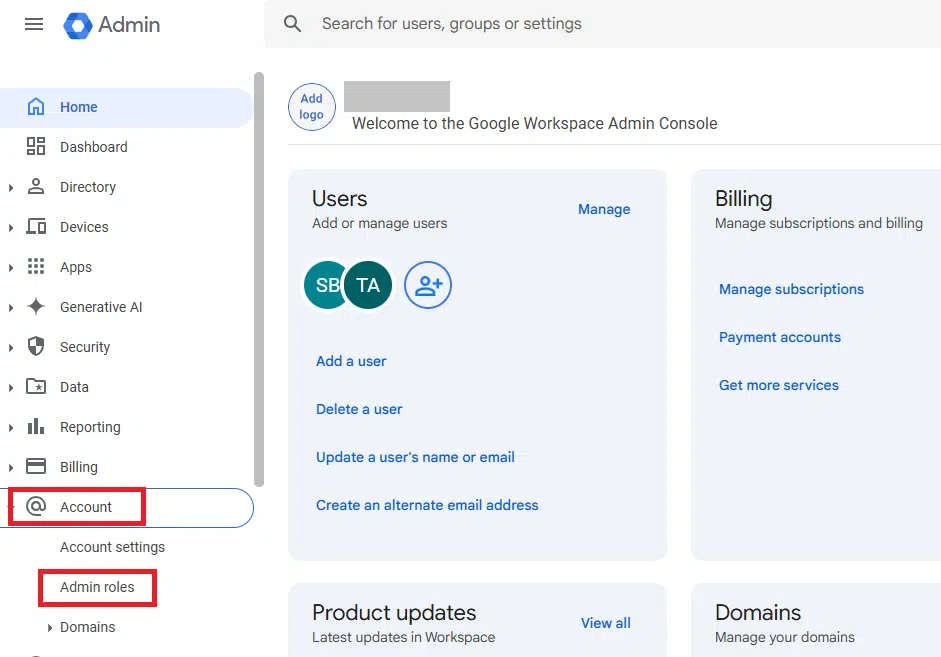
You can control access to Gemini features through Google Workspace administration, including restricting Gemini entirely or limiting its access to some or all Workspace data. Google also provides controls for Gemini Enterprise and its agents.
You can also use data protection controls to restrict Gemini from accessing sensitive Drive content. Google’s DLP for Gemini can block Gemini from using a protected source, with the event logged for auditing.
AI audit logs
Google provides logging and investigation capabilities for Gemini activity. You can review Gemini usage and data access, including instances where Gemini accessed a Drive file to fulfill a user query. These logs can be queried and exported through Google’s reporting and security investigation tools.
Prompt and response visibility
This is where Gemini gets particularly interesting, but you need to distinguish between Gemini experiences.
For the Gemini app, Google Vault can retain, search and export user prompts and Gemini responses. Vault exports include the conversation content, including prompts and responses.
Gemini in Workspace apps works differently. Google explicitly states that Gemini in Workspace apps doesn’t save prompts or responses in the same way as the Gemini app, so you shouldn’t assume that one audit capability applies across every Gemini experience.
Verdict ⭐⭐⭐
Strong. Gemini provides granular access controls, visibility into AI data access and strong audit capabilities. The key consideration is understanding which Gemini experience you’re deploying, because logging and retention capabilities differ between the Gemini app and Gemini features embedded within Workspace applications.
3. Salesforce Einstein and Agentforce
Salesforce is one of the strongest platforms in this comparison for AI auditability. Its Einstein Generative AI Audit and Feedback capability can capture detailed information about AI interactions and store it in Data 360 for analysis, compliance and governance.
Role-based access
You can control access to Einstein audit and feedback data using Salesforce’s Data 360 governance controls. These support both role-based access control (RBAC) and attribute-based access control (ABAC), allowing you to determine who can view or query sensitive AI audit data.
Agentforce also operates within Salesforce’s existing security and data access model, while its agent capabilities provide additional controls around AI-driven actions.
AI audit logs
Salesforce provides a dedicated audit trail for generative AI. Depending on the capability being used, the audit data can include the prompt template, request metadata, retrieved data, LLM details, response text and safety and toxicity scores.
For Agentforce, Session Tracing adds visibility into what an agent did during a session, while Audit and Feedback provides visibility into the underlying LLM interactions.
Prompt and response visibility
This is where Salesforce stands out.
The documented audit data can include the hydrated prompt, PII-masked prompt, retrieved data, LLM response and final response. Salesforce also captures relevant trust and safety signals, giving you considerably more than a simple record that “AI was used.”
Verdict: ⭐⭐⭐⭐
Excellent. Salesforce provides unusually detailed AI audit capabilities, particularly for organizations using Agentforce. The combination of RBAC/ABAC, prompt and response capture, retrieved data, trust signals and agent session tracing makes it one of the strongest options for organizations where AI auditability is a priority.
4. ServiceNow Now Assist
ServiceNow has built a strong governance layer around Now Assist and its AI agents. Its AI Control Tower provides centralized visibility across AI agents, models and identities, while ServiceNow’s platform permissions and ACLs control what agents and users can access.
Role-based access
You can control who can discover and use individual AI agents and determine which identity an agent runs as. Agents can inherit the permissions of the user who invokes them or run under a dedicated AI user identity. Standard t then constrain what that agent can access.
AI audit logs
AI Control Tower provides monitoring and governance for AI activity, including agent identities, permissions, and runtime behavior. ServiceNow also provides audit logs and execution records that can be used to investigate agent activity and export evidence for compliance and security investigations.
Prompt and response visibility
ServiceNow’s observability capabilities go beyond basic usage logging. AI Control Tower can provide runtime visibility into agent behavior, while execution records and traces can help you understand the tools and actions involved in an agent run.
Verdict ⭐⭐⭐⭐
Excellent. ServiceNow is particularly strong if you’re deploying AI agents that can take actions across business workflows. Its combination of RBAC, ACLs, agent identities, runtime monitoring and AI Control Tower makes it one of the strongest platforms for enterprise AI governance.
5. Slack AI
Slack provides strong controls over who can use its AI features and what Slack content those features can access. Its Enterprise plans also provide extensive audit logging and API access for security monitoring.
Role-based access
You can control AI feature access for everyone, no one, specific people and groups, or everyone except specific people and groups. On Enterprise+, you can also restrict AI from reading specific channels, canvases and lists.
Slack AI also respects the user’s existing permissions. AI-generated responses only include information that the user is already authorized to access.
AI audit logs
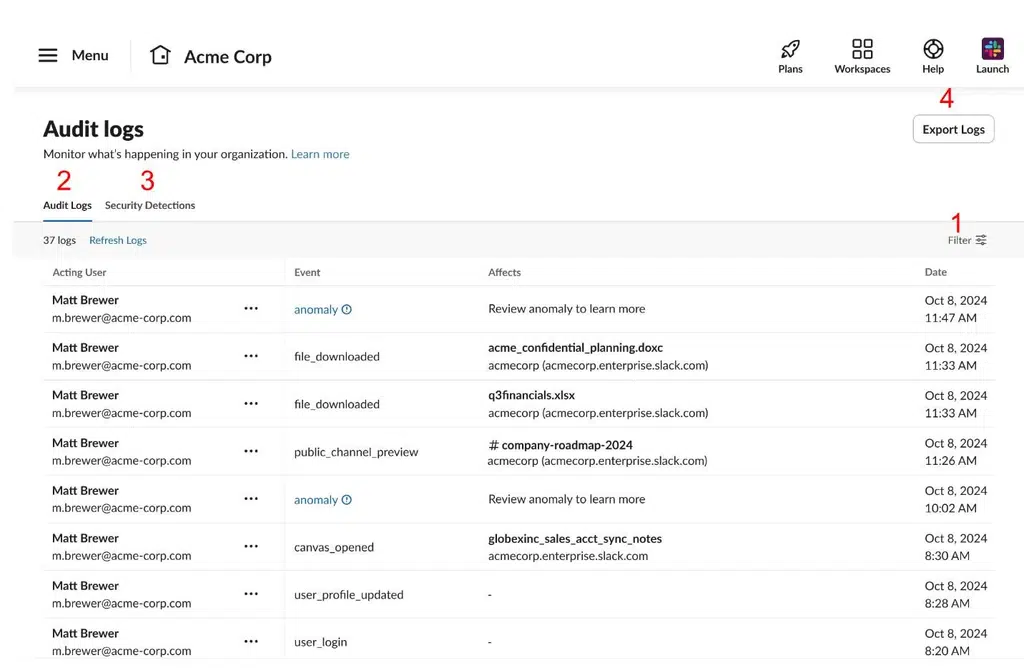
Slack’s Enterprise audit logs record changes and usage, with filters for users, affected resources and events. You can export the logs as CSV or JSON, use the Audit Logs API and send audit data to a SIEM. Slack also identifies when Slackbot has taken an action on behalf of a user.
Prompt and response visibility
This is where Slack scores lower than Microsoft 365 Copilot and Salesforce (despite Salesforce now owning Slack).
Slack provides strong visibility into AI access, platform activity and actions, but its standard Enterprise audit logs shouldn’t be treated as a complete archive of every AI prompt and response. The strength is governance around access and activity rather than comprehensive AI conversation auditing.
Verdict ⭐⭐⭐
Strong. Slack provides excellent AI access controls and enterprise audit infrastructure, including channel-level AI restrictions and SIEM integration. Its main limitation is that the documented audit model isn’t as comprehensive for prompt and response content as the dedicated AI audit capabilities available from Microsoft and Salesforce
6. IBM watsonx
IBM watsonx provides mature enterprise access controls through IBM Cloud IAM, access groups and workspace roles. It also provides documented audit events for AI activity, including requests sent to foundation models and chat interactions.
Role-based access
You can assign platform, service and workspace roles to control what users can access and what actions they can perform. Access groups let you apply the same permissions to multiple users, while workspace roles can provide different levels of access to individual projects.
AI audit logs
IBM documents specific auditable events for watsonx.ai, including prompts sent to foundation models and chat messages sent to models. These events are forwarded through IBM’s Audit Logging Service.
Prompt and response visibility
This is where IBM differs from some of the other platforms in this comparison.
IBM states that prompts and model-generated messages aren’t logged by default in the Prompt Lab or through the API. If you provision watsonx.governance, however, you can enable monitoring and store foundation model input and output in a database that you control.
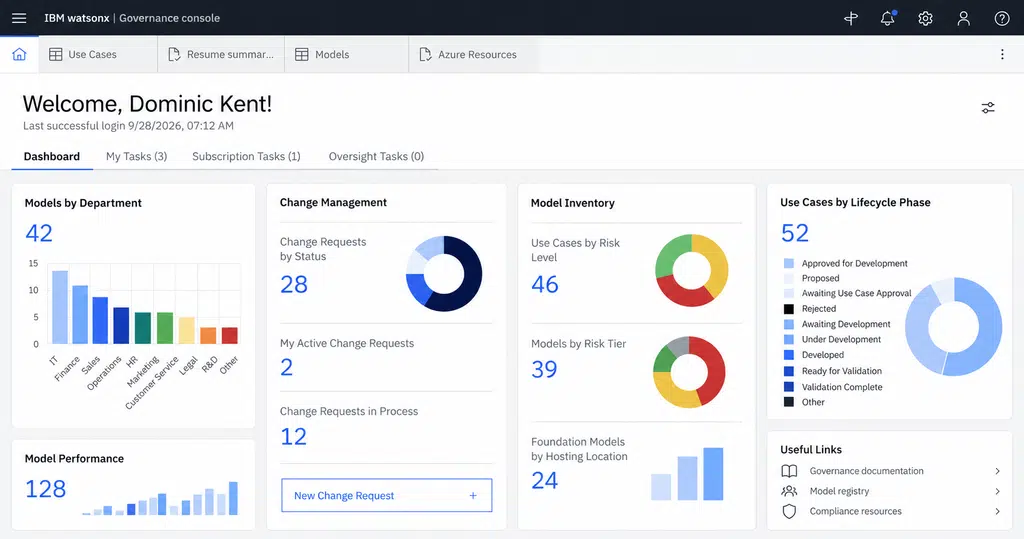
That gives you a strong governance option, but it requires additional configuration rather than being the default audit experience.
Verdict: ⭐⭐⭐
Strong. IBM provides robust enterprise RBAC and documented AI audit events, with the option to capture model inputs and outputs through watsonx.governance. The main limitation is that detailed prompt and response monitoring isn’t enabled by default.
What Should You Check Before Deploying an AI Copilot?
Before choosing an AI copilot, look beyond the feature list. You need to understand how the platform will work with your data, users and existing technology.
Check:
- Data and permissions
- AI access and audit controls
- Agent security and governance
- User adoption and training
- Measurement and ROI
- Ongoing management
These considerations are particularly important when you’re deploying AI across hundreds or thousands of users. A successful implementation depends on more than selecting the right technology.
How Cloud Revolution Helps You Implement Copilot (And Integrate Other Business AI Tools)
Most businesses won’t use a single AI tool. You may have Microsoft Copilot alongside specialist AI platforms, business applications and AI agents.
Cloud Revolution helps you make those tools work together with your existing Microsoft stack, rather than creating another collection of disconnected AI systems.
Envision
Map your existing Microsoft environment, AI tools and business priorities. Identify where Copilot and other AI tools can add value, where they overlap and how they should work together.
Deploy
Implement Copilot and integrate other AI tools with your Microsoft 365 environment, while establishing the permissions, security, governance and workflows needed to use them effectively.
Optimize
Measure business value, improve adoption and continuously identify opportunities to connect, automate and improve the AI tools your business uses.
The goal isn’t to add another AI tool to your technology stack. It’s to create an AI environment where Copilot, specialist tools and AI agents work with your existing Microsoft infrastructure, data and workflows.
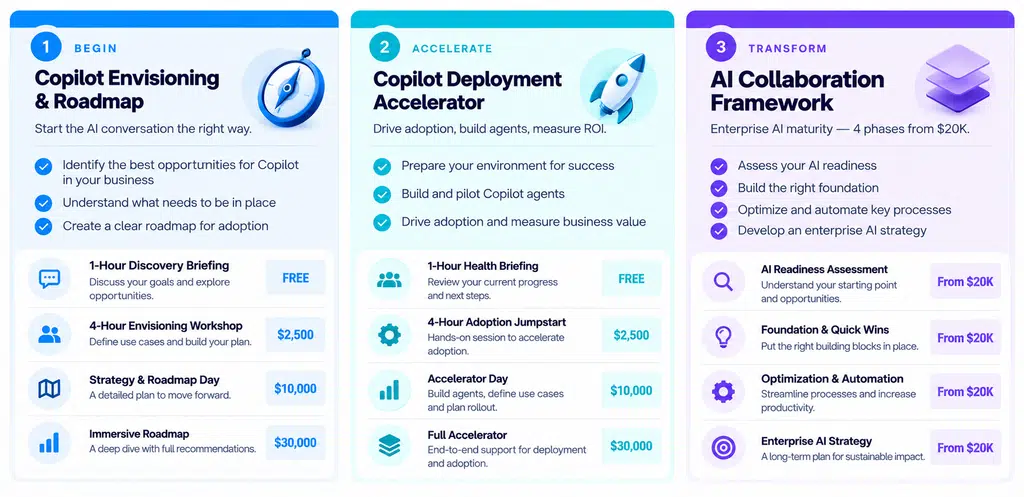
Our typical engagement looks like the above image. And existing Microsoft customers often qualify for funding directly from Microsoft to offset the spend.
Choosing the Right Business AI Copilot
Role-based access and audit logs are important indicators of whether an AI platform is ready for enterprise use. But they’re only part of the decision.
The right platform needs to fit your existing technology, data, security model and business processes. It also needs to be implemented in a way that gives you control over how AI is used and the value it delivers.
For Microsoft 365 customers, that means looking beyond the Copilot license. Your existing permissions, data, governance and applications all influence what you can safely achieve with AI.
If you’re considering Microsoft Copilot, other business AI tools or a combination of both, Cloud Revolution can help you assess where you are today, define the right strategy and implement an AI environment that works with your existing Microsoft stack.
Want to understand what’s possible in your environment?
[Talk to Cloud Revolution about your AI strategy →]
You must be logged in to post a comment.