

 Business Process

You have 1,000 Microsoft 365 users. Should you buy 1,000 Copilot licenses?
Not necessarily ❌
The right number depends on what those people actually do, where Copilot can create measurable value, and how you plan to roll it out.
What we need to realize is that Microsoft 365 Copilot is an add-on license. So you don’t have to license every eligible Microsoft 365 user.
Note: Microsoft also distinguishes between the full Microsoft 365 Copilot experience and Copilot Chat, which is available to eligible users without the full add-on license.
That creates an important commercial decision.
- If you buy too many licenses, you risk paying for Copilot that isn’t being used enough to justify the investment.
- If you buy too few, you may limit the number of users who can demonstrate where Copilot delivers value.
The answer isn’t to find a universal percentage of employees to license.
It’s to identify the users with the strongest business cases, start there, and expand when the evidence supports it.
Which Employees Should Get Microsoft 365 Copilot First?
I asked this question to Patrick Kelly, 12-year Microsoft veteran now creating tons of useful content for businesses managing both Microsoft and Zoom environments:
“If I were a CIO, I would only buy Copilot for my workforce that were primarily in charge of communication and content creation. I think AI can help a lot in this area and using Copilot to assist users be more creative or to automate mundane tasks would be the only way I can see an ROI on $30 per user per month.”

Your answer will be specific to your own business and user types.
The best Copilot candidates aren’t necessarily the people with the most senior job titles.
They’re the people whose day-to-day work gives Copilot enough opportunities to create meaningful value.
Microsoft recommends being intentional with seat assignments and focusing initial deployments on areas where users already make heavy use of Microsoft 365 applications. It also recommends defining specific use cases for each team rather than distributing licenses thinly across the organization.
Start with the work, not the job title
Look for people who regularly spend time:
- Reading and writing large amounts of information
- Preparing for and following up on meetings
- Creating or reviewing documents
- Searching across business information
- Turning existing information into new content
These are the workflows where Copilot has more opportunities to remove repetitive work or help users get to an outcome faster.
A salesperson who spends hours preparing for customer meetings may have a stronger business case than a senior executive who rarely uses Microsoft 365 applications.
Look for measurable opportunities
The strongest candidates also give you something you can measure.
If someone spends a significant amount of time producing reports, preparing meeting summaries, drafting communications, or searching for information, you can establish a baseline and look for changes after Copilot is introduced.
That makes the license easier to justify.
It also gives you something to take back to the business when you’re deciding whether to expand the deployment.
Don’t spread the first licenses too thinly
There’s another reason to concentrate on your initial licenses.
If you give 100 people across 20 different departments a Copilot license, you may end up with 20 small experiments that produce very little useful evidence.
Microsoft recommends concentrating initial seats in a few key areas and, where appropriate, giving licenses to whole teams so users can learn from each other.
Which Roles Are Most Likely to Benefit From Copilot?
The strongest candidates aren’t determined by job title alone. Look for roles where employees spend significant time working with information, communicating, and creating content.
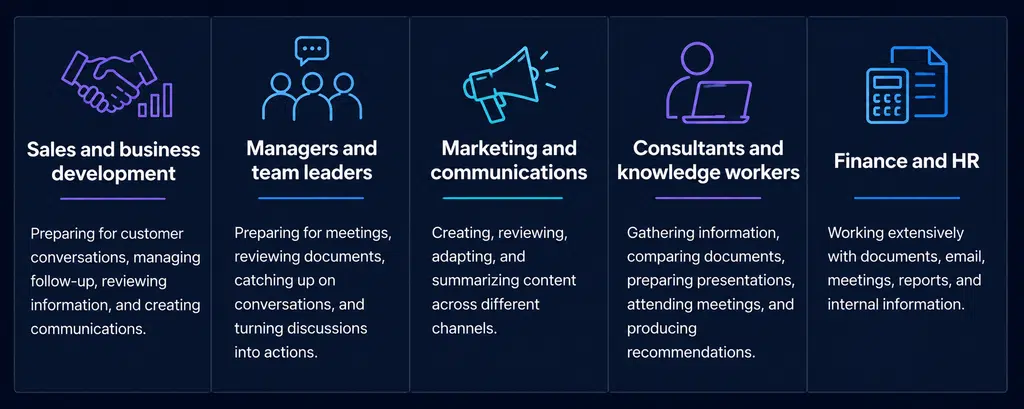
- Sales and business development: Preparing for customer conversations, managing follow-up, reviewing information, and creating communications.
- Managers and team leaders: Preparing for meetings, reviewing documents, catching up on conversations, and turning discussions into actions.
- Marketing and communications: Creating, reviewing, adapting, and summarizing content across different channels.
- Consultants and knowledge workers: Gathering information, comparing documents, preparing presentations, attending meetings, and producing recommendations.
- Finance and HR: Working extensively with documents, email, meetings, reports, and internal information.
The common thread is the workflow, not the department. Look for people who regularly process large amounts of information and have clear opportunities to save time or improve their output.
How Many Copilot Licenses Should You Start With?
Once you’ve identified the users and roles most likely to benefit from Copilot, you can start working out how many licenses you actually need.
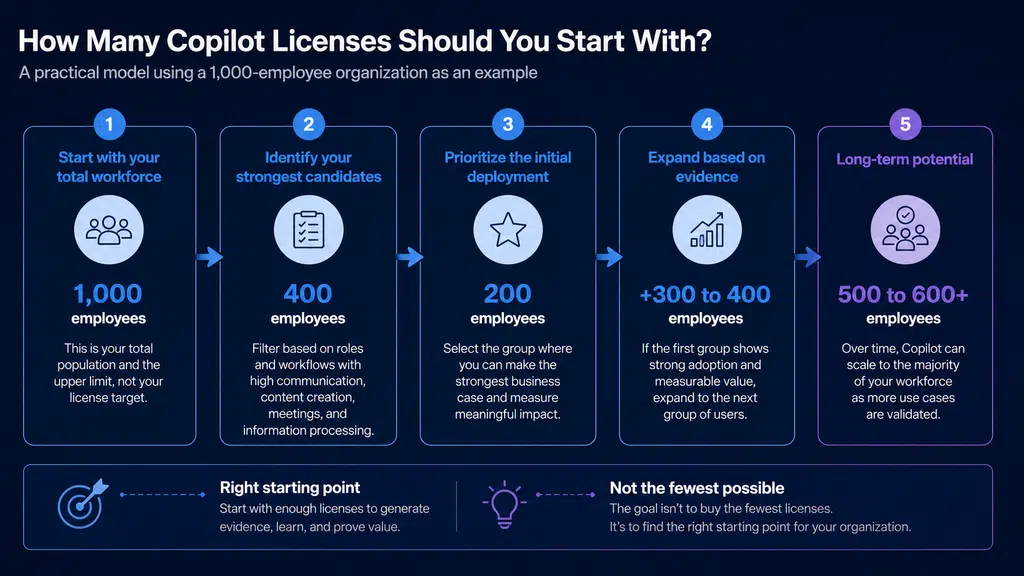
There isn’t a magic percentage that works for every organization. A 10% deployment might make sense for one company and be completely wrong for another.
Instead, work backwards from your strongest use cases.
Start with your total workforce
First, establish how many people could potentially use Copilot.
This gives you the upper limit, but it shouldn’t determine your final license count.
Identify your strongest candidates
Next, filter your workforce based on the characteristics we covered earlier.
Look for users with high volumes of communication, content creation, meetings, and information processing.
This gives you your potential Copilot population.
Prioritize the initial deployment
From that group, identify the users where you can make the strongest business case.
You might find that 150 of your 1,000 employees are obvious candidates. You might find 400. You might find that almost everyone has a strong use case.
The important thing is that the number comes from your users and their workflows rather than an arbitrary target.
But there might also be a number that simply won’t use it. Factor in habits and resistance to change here, too. It’s very real.
Leave room to expand
Your first license purchase doesn’t have to be your final one.
A sensible approach is to start with a group large enough to generate meaningful evidence, measure where Copilot delivers value, and expand the deployment based on what you learn.
For example, an organization with 1,000 employees might start with 200 licenses rather than immediately buying 1,000.
If those 200 users demonstrate strong adoption and measurable value, expanding to another 300 or 400 users becomes a much easier decision to justify.
The goal isn’t to buy the fewest licenses possible.
It’s to find the right starting point for your organization.
How Do You Calculate the ROI of Copilot Licenses?
The license cost is easy to calculate (though Copilot pricing is subject to change).
The harder question is what you expect to get in return.
A useful Copilot business case should connect the number of licenses you buy to the work those users actually perform. That means looking at where time is spent, what could be improved, and whether the resulting value can be measured.
Start with the license investment
Your first calculation is straightforward.
If you’re considering 200 Copilot licenses, multiply the number of licenses by the annual cost per user.
That gives you the investment you need to justify.
But the license cost alone doesn’t tell you whether Copilot is good value.
Estimate the productivity opportunity
Next, look at how much time your selected users spend on work where Copilot could help.
For example, consider time spent preparing for meetings, producing documents, or processing information.
You can then estimate how much of that time could potentially be recovered.
The important word is potentially.
A calculation based on five hours saved every week might produce an impressive ROI figure, but it won’t necessarily be credible. A more conservative assumption can give you a business case that is easier to defend.
Connect the calculation to your users
This is where your license selection and ROI calculation need to work together.
If you’ve identified 200 users because they have particularly strong Copilot use cases, your ROI model should be based on those users.
Don’t calculate the potential value across your entire workforce and then compare it with a smaller license purchase. That can make the business case look better than it really is.
Instead:
Number of licenses → potential time recovered → potential productivity value → license investment
That gives you a clearer picture of whether your proposed deployment makes financial sense.

Should You Run a Copilot Pilot Before Buying More Licenses?
A pilot can help you validate the business case before committing to a larger deployment.
But a pilot shouldn’t simply answer whether people like Copilot.
It should tell you where Copilot creates value, which users are actually adopting it, and whether those results justify expanding the number of licenses.
Choose the right users
Your pilot group should represent the types of users you’re considering for wider deployment.
Include people with strong use cases, different working patterns, and enough Microsoft 365 activity to use Copilot regularly.
Avoid selecting participants simply because they’re enthusiastic about AI. Enthusiasm helps, but it isn’t the same as a strong business case.
Define what success looks like
Before the pilot starts, decide what you’re going to measure.
That could include adoption, usage frequency, time spent on specific workflows, or feedback from users.
The measurements don’t need to be complicated. They just need to give you enough evidence to answer whether Copilot is creating meaningful value.
Use the results to make the licensing decision
The pilot should ultimately lead to a decision.
If users are adopting Copilot and demonstrating value, you have a stronger case for expanding the deployment.
If adoption is weak or the expected benefits aren’t materializing, investigate why before buying more licenses.
That might mean changing the user group, improving training, addressing readiness issues, or reconsidering the use cases.
The objective isn’t to prove that Copilot works.
It’s to establish whether it works for your organization, for your users, and for the workflows you’re prepared to invest in.
A well-designed pilot therefore becomes more than a technology test. It becomes the evidence you need to decide whether your next 100, 250, or 500 Copilot licenses are worth buying.
What Are the Risks of Buying Too Many Copilot Licenses?
Buying more licenses than your organization can realistically use can weaken the business case.
- Unused licenses: Users without clear Copilot use cases may rarely use their licenses after the initial enthusiasm fades.
- Weak ROI: Licensing users who aren’t generating meaningful value reduces the return on your overall investment.
- Pressure to justify the investment: A large deployment creates pressure to prove value, which can lead to focusing on usage statistics rather than meaningful business outcomes.
The goal isn’t to buy as few licenses as possible. It’s to avoid paying for licenses before you’ve established why those users need them.
What Are the Risks of Buying Too Few Copilot Licenses?
Let’s address the Copilot-sized elephant in the room, too.
Starting too small can create problems as well.
- Limited evidence: A very small deployment may not give you enough data to understand where Copilot delivers value across the organization.
- Missed use cases: If you only license a narrow group, you may overlook workflows in other teams where Copilot could have a stronger impact.
- Poor representation: A pilot made up of one type of user won’t necessarily tell you how Copilot will perform across different roles and working styles.
- Limited momentum: Too few users can make it harder to build internal champions, share successful use cases, and create wider interest.
The answer isn’t to license everyone immediately. Your initial deployment should be large enough to generate useful evidence while remaining focused on users with a credible business case.
Need help assessing how many licenses you need? Book a free consultation with a Microsoft specialist (no purchase necessary).
A Simple Microsoft 365 Copilot Licensing Framework
You don’t need a complicated formula to decide how many Copilot licenses to buy.
A practical approach is to move through five stages:
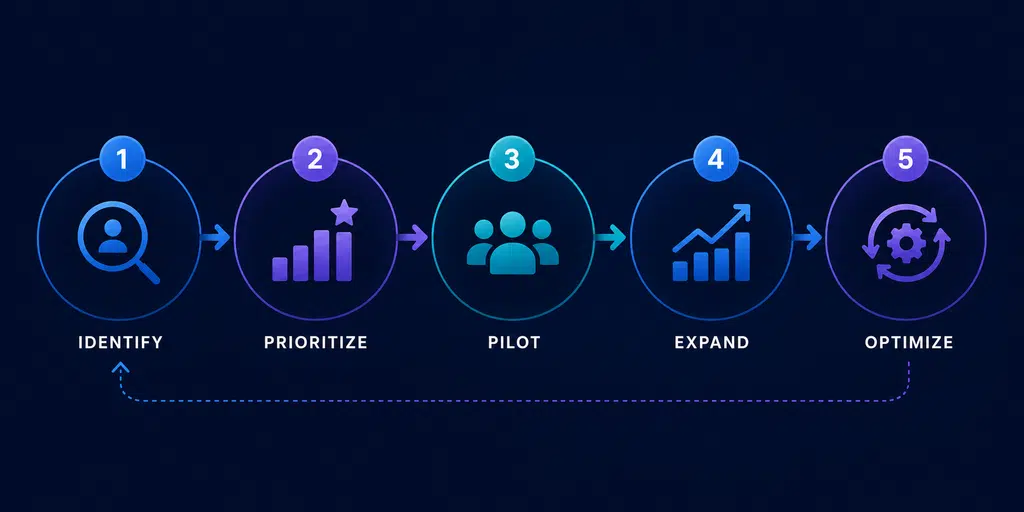
1. Identify
Start with your full Microsoft 365 user base.
Then identify the people whose work involves significant amounts of communication, meetings, content creation, and information processing.
This gives you your potential Copilot population.
2. Prioritize
Not every potential user needs to be licensed immediately.
Rank users based on the strength of their use cases and the potential value Copilot could deliver.
Focus first on people where you can make a credible business case.
3. Pilot
Give your initial group enough licenses to generate meaningful evidence.
Measure adoption, gather feedback, and look at whether Copilot is improving the workflows you identified.
The pilot should answer a commercial question:
Is Copilot delivering enough value to justify expanding the deployment?
4. Expand
If the evidence supports the business case, increase your license allocation.
Prioritize the next groups based on what you’ve learned rather than simply rolling Copilot out to everyone.
This lets successful use cases guide your expansion.
5. Optimize
Licensing shouldn’t be a one-time decision.
Continue reviewing adoption and value to understand which users are getting the most from Copilot.
Over time, you may identify new users who should receive a license and others whose licenses aren’t delivering enough value to justify continuing.
The result is a licensing strategy that evolves with your organization rather than locking you into a single seat count.
Identify → Prioritize → Pilot → Expand → Optimize
That’s a much stronger basis for deciding how many Microsoft 365 Copilot licenses you actually need than simply applying a percentage to your employee count.
Conclusion: Don’t Buy Copilot Licenses Based on Headcount
The right number of Microsoft 365 Copilot licenses isn’t simply the number of people in your organization.
It should reflect where Copilot has a strong use case, where you can measure its impact, and how confidently you can justify the investment.
For some organizations, that could mean starting with 100 or 200 licenses. For others, a much larger deployment may make sense from the outset.
The important thing is to have a reason for the number.
A practical approach is to:
- Identify users with strong Copilot use cases.
- Prioritize the people with the clearest business case.
- Pilot with enough users to generate meaningful evidence.
- Expand where adoption and value are demonstrated.
- Continue optimizing your license allocation as your use cases develop.
This avoids two common mistakes: buying hundreds of licenses that aren’t being used, or starting with such a small group that you never get enough evidence to make an informed decision.
If you’re currently trying to work out how many Copilot licenses your organization should buy, Cloud Revolution can help.
Our free Copilot Licensing Review looks at your potential users, use cases, and deployment approach to help you establish a sensible starting point.
Don’t guess your Copilot license count. Build the business case for it.

You must be logged in to post a comment.