

 Communication, Collaboration

If your organization operates in financial services, healthcare, emergency services, government, or any regulated environment, “recording calls” is no longer a nice-to-have. It is a legal, operational, and reputational requirement.
The challenge is that Microsoft Teams compliance recording is deceptively complex.
On the surface, it looks simple:
- Enable Teams
- Add recording
- Stay compliant
In reality, most organizations discover the hard way that compliance recording impacts:
- User experience
- Call routing
- Survivability
- Data retention
- Licensing
- Storage architecture
- International regulations
- Security posture
- Incident response
- AI governance
- Legal discovery
And if you get it wrong, the consequences are not technical inconvenience — they are regulatory exposure, failed audits, financial penalties, and internal accountability issues.
That is why Teams compliance recording projects are rarely successful as “DIY” deployments.
For organizations modernizing communications safely, there is a right way to do this.
Why Microsoft Teams Compliance Recording Exists
Microsoft Teams was designed as a modern collaboration platform first.
Industries like:
- Financial services
- Trading environments
- Healthcare
- Public sector
- Contact centers
- Emergency services
- Insurance
- Legal services
…then needed Teams to satisfy strict recording obligations tied to regulations like:
- MiFID II
- FCA requirements
- Dodd-Frank
- HIPAA
- GDPR
- PCI DSS
- FINRA
- SEC retention rules
These regulations often require:
- Automatic recording
- Immutable storage
- Encryption
- Policy-based retention
- Legal hold
- Tamper-proof auditing
- Supervisory review
- Fast retrieval during investigations
That is fundamentally different from simply pressing “record” in a Teams meeting.
Why Microsoft Doesn’t Offer Full Native Compliance Recording
This is one of the biggest misunderstandings in the market.
Microsoft provides the compliance recording framework inside Teams — but not the full end-to-end regulated recording solution.
That is intentional.
Microsoft understands that:
- Compliance rules differ massively by industry and geography
- Recording requirements evolve constantly
- Financial services requirements differ from healthcare or government
- Storage, supervision, analytics, and retention needs vary
- Some customers need voice only
- Others require screen, video, chat, SMS, or omnichannel capture
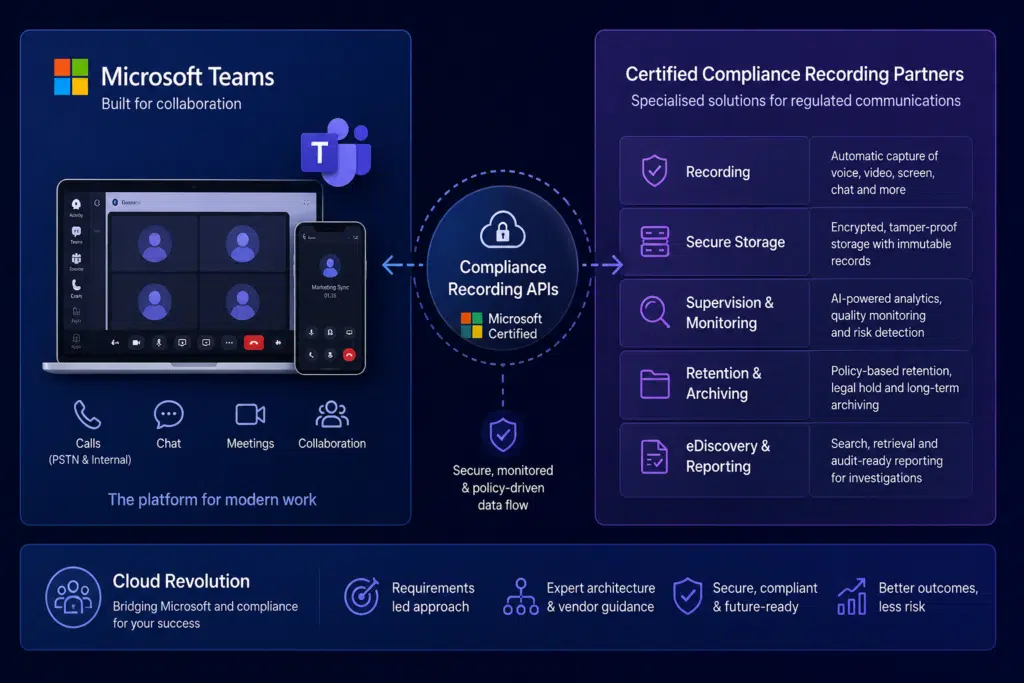
Instead of building one rigid global solution, Microsoft created a certified compliance recording ecosystem.
This allows specialist vendors to integrate directly into Teams using Microsoft-certified APIs.
The result:
- Flexibility
- Regulatory specialization
- Faster innovation
- Industry-specific compliance tooling
But it also means organizations now face a second challenge: choosing the right architecture and partner.
The Main Microsoft Teams Compliance Recording Options
There is no single “best” Teams compliance recording platform.
There is only the right solution for your regulatory environment, operational model, and risk profile.
1. Native Teams Recording (Not True Compliance Recording)
Many organizations initially assume standard Teams recording is enough.
It usually is not.
Standard Teams recording:
- Can be manually stopped
- Is not designed for regulated capture
- Does not provide immutable compliance storage
- Lacks supervisory workflows
- Is unsuitable for most financial compliance scenarios
This is collaboration recording — not regulated communications recording.
2. Microsoft Certified Compliance Recording Partners
This is the enterprise-grade approach.
Certified vendors integrate directly with Microsoft’s compliance recording APIs to provide:
- Policy-based recording
- Automatic capture
- Secure storage
- Compliance retention
- Auditability
- Search and retrieval
- Supervisory tooling
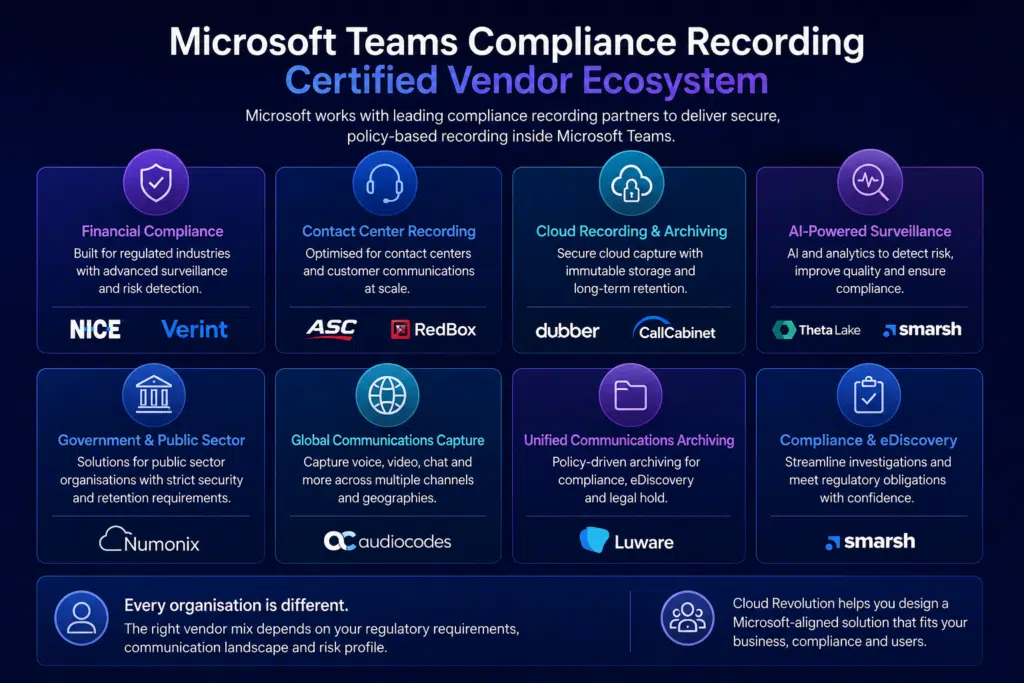
Common Teams compliance recording vendors include:
- ASC Technologies
- CallCabinet
- Cloud World Wide Services
- Dubber
- Imagicle
- Insightful Technology
- Liquid Voice
- Luware
- NUSO
- NICE Engage
- NICE NTR-X
- Numonix
- Oak Innovation
- Theta Lake
- Tollring
- Touch Call Recording
- Verint
- Verba
- Verint EDM
Each has different strengths.
Some are strongest in:
- Financial trading compliance
- AI-powered surveillance
- Contact center recording
- Government-grade retention
- Multi-channel communications capture
- Global data sovereignty
- Long-term archival
This is where architecture decisions become critical.
The Hidden Problems Most Organizations Discover Too Late
This is where Teams compliance recording projects become difficult.
User Experience Can Break Fast
Poorly designed recording deployments can introduce:
- Delayed call setup
- Audio quality issues
- User confusion
- Recording notifications appearing inconsistently
- Routing complexity
- Failed transfers
- Broken mobile experiences
Users do not care about compliance architecture.
They care whether calls work reliably.
If the experience deteriorates, adoption suffers immediately.
Regulatory Scope Is Often Underestimated
Most organizations start by asking:
“How do we record Teams calls?”
The better question is:
“Which communications are legally required to be captured, retained, supervised, and discoverable?”
That expands quickly into:
- Internal calls
- External PSTN calls
- Mobile calls
- Contact center interactions
- Teams meetings
- Chat
- SMS
- Video
- Screen sharing
The scope definition stage is where most risk originates.
Retention and Data Governance Become Massive Issues
Recording everything creates a second challenge:
managing enormous volumes of sensitive data securely.
Key considerations include:
- Retention duration
- Geo-location requirements
- Encryption
- Access control
- Insider risk
- eDiscovery
- Purging policies
- AI access rules
- Backup strategy
- Disaster recovery
This becomes even more important as organizations adopt Microsoft Copilot and AI services.
How to Prepare for a Teams Compliance Recording Project
Successful projects typically follow a structured approach.
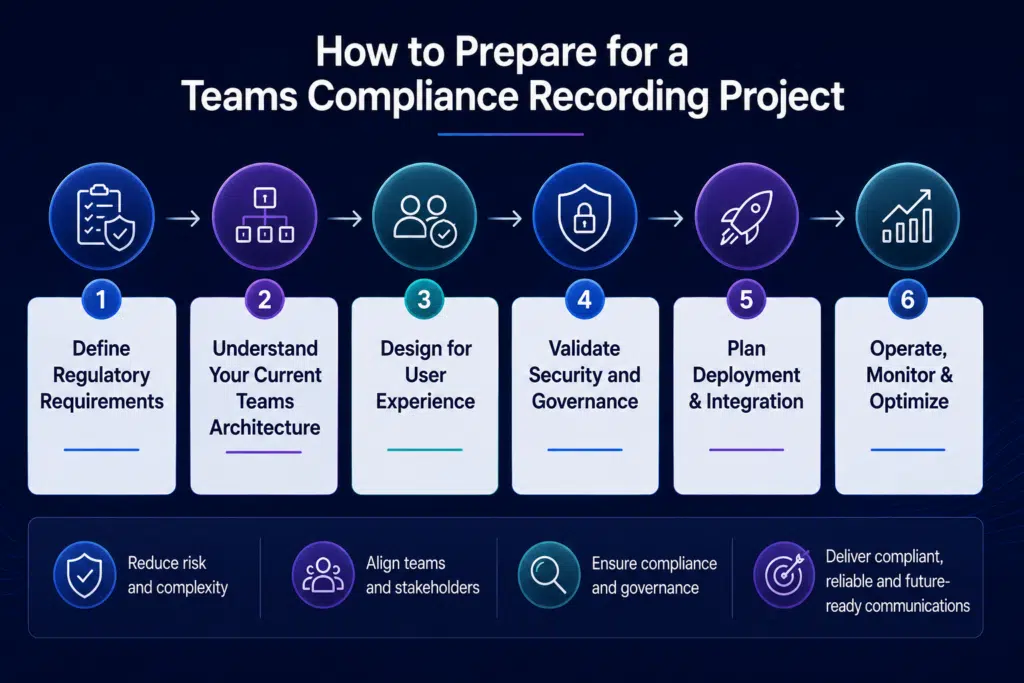
Step 1: Define Regulatory Requirements First
Do not start with vendors.
Start with:
- Which regulations apply?
- Which users require recording?
- Which communication types must be captured?
- What retention policies exist?
- Which countries are involved?
- What supervisory processes are required?
Technology comes second.
Step 2: Understand Your Current Teams Architecture
Compliance recording affects:
- Teams Phone
- Direct Routing
- Operator Connect
- SBCs
- Contact centers
- Calling policies
- Identity
- Conditional Access
- Mobile devices
- Meeting governance
You need a full dependency map before deployment begins.
Step 3: Design for User Experience
The best compliance recording deployments are almost invisible to users.
That requires:
- Correct policy assignment
- Intelligent routing
- Failover planning
- Bandwidth validation
- Mobile testing
- Clear communication
- Change management
This is where experienced Teams specialists matter most.
Step 4: Validate Security and Governance
Your compliance recording solution becomes part of your regulated data estate.
That means involving:
- Security teams
- Legal teams
- Compliance officers
- Records management
- Risk management
- IT leadership
Early alignment prevents major redesigns later.
Why a Specialist Partner Matters
This is not simply a Teams deployment.
It is:
- A communications transformation project
- A compliance program
- A governance initiative
- A security architecture exercise
- A user adoption challenge
Most internal IT teams only implement compliance recording once.
Experienced Microsoft partners have already seen:
- Failed recording rollouts
- Misaligned retention policies
- Broken Direct Routing configurations
- Vendor incompatibilities
- Regulatory misunderstandings
- Poor user adoption
- Escalations during audits
The safest path is working with a partner that understands both:
- Microsoft Teams architecture
- Real-world regulatory environments
That is especially important for organizations with 400–1,000 users modernizing legacy telephony and communications environments — where internal IT leaders are accountable for delivery success and cannot afford experimentation.
Why Organizations Work With Cloud Revolution
Cloud Revolution helps organizations modernize Microsoft communications safely, securely, and in alignment with Microsoft best practices.
As a 4x Microsoft Partner of the Year, Cloud Revolution is trusted to help organizations:
- Replace legacy communications platforms
- Deploy Microsoft Teams Phone
- Design compliance-ready architectures
- Integrate certified recording solutions
- Reduce transformation risk
- Improve adoption and user experience
- Align with Microsoft’s long-term roadmap
Most importantly, we help IT leaders deliver change without unnecessary operational or career risk — using proven Microsoft-aligned methods rather than experimentation.
Common Mistakes to Avoid
| Common Mistake | Why It Creates Risk |
| Treating Compliance Recording as “Just Another App” | It is infrastructure, governance, security, and compliance combined. |
| Choosing Vendors Before Defining Requirements | Technology should support policy — not define it. |
| Ignoring End User Experience | Compliance that destroys usability creates shadow IT immediately. |
| Forgetting International Regulations | Cross-border recording laws vary significantly. |
| Underestimating Storage and Retention Costs | Long-term regulated storage becomes expensive fast. |
| Assuming AI Governance Is Separate | Copilot and AI access to recordings must be governed carefully. |
The Future of Teams Compliance Recording
The market is evolving rapidly.
Organizations are increasingly demanding:
- AI-powered supervision
- Sentiment analysis
- Automated risk detection
- Multi-channel capture
- Unified communications archiving
- Better eDiscovery
- Intelligent policy automation
Microsoft Teams is becoming the center of regulated communications — not just collaboration.
That means compliance recording strategy is now part of broader:
- AI readiness
- Digital transformation
- Governance modernization
- Cybersecurity planning
Final Thoughts
Microsoft Teams compliance recording is not difficult because the technology is bad.
It is difficult because the stakes are high.
The organizations that succeed are the ones that:
- Define requirements clearly
- Prioritize user experience
- Align security and governance early
- Choose the right certified vendors
- Work with experienced Microsoft specialists
There is a tried-and-tested, Microsoft-aligned way to modernize communications safely.
Cloud Revolution helps organizations get there without unnecessary risk.
Ready to Assess Your Teams Compliance Recording Strategy?
Whether you are:
- Replacing legacy telephony
- Rolling out Teams Phone
- Preparing for AI governance
- Responding to regulatory pressure
- Evaluating compliance recording vendors
Cloud Revolution can help you design the right Microsoft-aligned approach.
Speak to a Microsoft Teams Compliance Specialist today.
You must be logged in to post a comment.