

 Business Process
Three very similar names; three very different tools. That’s what we’ve got from Microsoft so that’s what we’re running with.
In Microsoft’s AI ecosystem, the term “Copilot” is an umbrella phrase for three distinct offerings rather than a single product.
While we use the word, “Copilot”, when referring to all types in general conversation, confusing them can stall your AI strategy.
For example, assuming every Copilot is the same can lead to:
- Poor adoption: Users get frustrated if they expect one Copilot to do everything.
- Delayed ROI: Buying the wrong Copilot licenses wastes budget and time.
- Frustration with AI investments: Unrealistic expectations lead to distrust in AI.
Fortunately, Microsoft now offers three main Copilot brands, each aimed at a different stage of your AI journey:
- Copilot Chat: A secure, web-based AI chat experience.
- Microsoft 365 Copilot: AI helpers embedded in Office apps using your work data.
- Copilot Agents: Custom AI assistants that automate tasks and integrate with line-of-business systems.
These exist in different products and span across your entire Microsoft ecosystem when configured and governed correctly. In this post, we aim to break down the differences so you can pick the right Copilot at the right time.
Let’s start with a comparison table showing the differences between Copilot Chat, Microsoft 365 Copilot, and Copilot Agents, then dig into the details further on.
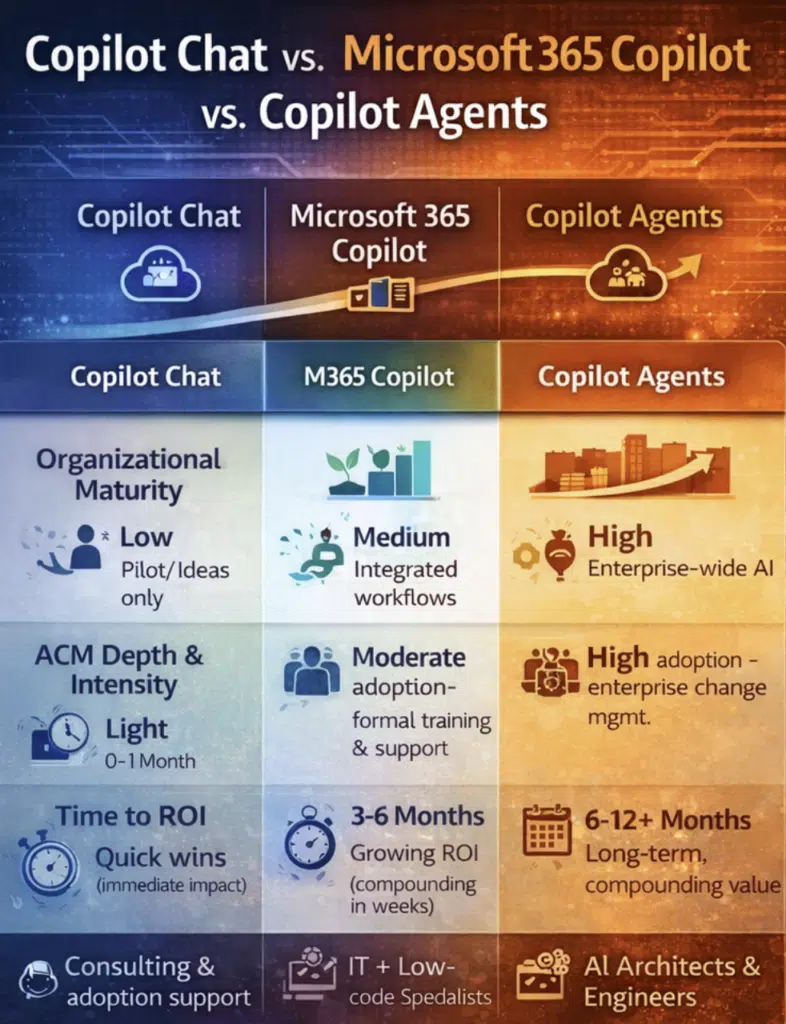
Copilot Chat vs Microsoft 365 Copilot vs Copilot Agents
- Copilot Chat is easy and low-risk to deploy, but limited to conversation and creative support.
- M365 Copilot requires more setup and rollout, but boosts daily productivity across apps using your data.
- Copilot Agents take the most work to plan and govern, but can automate whole processes for transformative ROI.
| Capability | Copilot Chat | M365 Copilot | Copilot Agents |
| Web-based AI chat | ✅ | ✅ | ✅ |
| Microsoft 365 data grounding | ❌ | ✅ | ✅ |
| Context (email, meetings, files) | ❌ | ✅ | ✅ |
| Role-specific intelligence | ❌ | ❌ | ✅ |
| Workflow automation | ❌ | Limited | ✅ |
| Customization/extensibility | ❌ | ❌ | ✅ |
| Governance complexity | Low | Medium | High |
| Change management required | Low | Medium | High |
| Time to ROI | Short (quick wins) | Medium (incremental) | Long-term (strategic) |
1 – Copilot Chat: AI as an Entry Point
Copilot Chat is a web-based AI chat experience for work and education. It’s secure and enterprise-ready for day-to-day use. (All chats carry a green-shield icon indicating enterprise-grade protection and data governance.)
Copilot Chat is grounded in web search (using the latest language models) and can also use content you open in Word, Excel, PowerPoint, or other Office apps. It even offers features like file upload, image generation, and “pay-as-you-go” agents (you summon specialized bots from the chat on demand).
Importantly, Copilot Chat doesn’t require a paid license. It’s available to many organizations with Microsoft 365 already.
What Copilot Chat includes:
- Secure AI chat: A user-friendly interface (green shield icon) that protects your queries with enterprise controls.
- Web-grounded answers: AI answers based on internet data and whatever you provide.
- Context awareness (open documents): The chat can pull in content from any Office document you have open side-by-side.
- Built-in features: Easy file upload in chat, on-the-fly image generation, and Copilot Pages for collaborative brainstorming.
- Pay-as-you-go agents: Access to specialized AI “agents” for tasks (metered, as needed).
What Copilot Chat does not include:
- No tenant data access: By default it can’t read your internal data (emails, SharePoint files, Teams chats). It only uses what you paste, upload, or have open in Office.
- No inbox or calendar context: Copilot Chat doesn’t automatically review your email threads, calendars, or Teams meetings unless you manually feed it that information.
- No built-in automation platform: It’s not designed to automate workflows or connect to business apps out of the box (that’s what Copilot Agents are for).
Copilot Chat is a good fit for:
- AI beginners: Organizations or teams just starting to experiment with AI. (It requires almost no setup.
- Individual productivity: Knowledge workers or students who want a safe, enterprise-governed AI playground for research, drafting, or ideation.
- Quick wins with minimal change: Since it’s free and web-based, you can try it without major IT changes or training.
2 – Microsoft 365 Copilot: AI Embedded in Daily Work
Microsoft 365 Copilot is the AI tool that’s woven directly into your Office apps. Think of it as the “premium” Copilot that requires a paid license but delivers productivity boosts across Outlook, Teams, Word, Excel, PowerPoint, and more.
This Copilot is deeply integrated with Microsoft Graph, meaning it can access your organization’s emails, files, calendars, and chat (all data you have permission to use). This makes it contextually aware: for example, it can summarize your last meeting, draft emails based on your inbox, or crunch the numbers in your spreadsheets.
What Microsoft 365 Copilot includes:
- Embedded AI in Microsoft apps: Tools in Word, Excel, PowerPoint, Outlook, Teams, etc., that help you draft, edit, analyze, and summarize content (e.g., drafting a report, generating a chart, or summarizing an email thread).
- Graph-powered intelligence: It uses your work data (emails, documents, chats, calendars) to generate answers or content that’s relevant to your organization. The system only pulls data the user already has access to.
- Copilot Search: A unified AI search that scans all your Microsoft 365 and connected data sources so you can quickly find what you need, then dive into Copilot for deeper insights.
- Priority access to advanced models: Copilot license holders get priority use of larger LLMs (like GPT-4 and beyond), so you experience faster, higher-quality responses (including image generation) even at peak times.
- In-app editing and assistance: Copilot shows up in the ribbon or side pane of Office apps, letting users ask follow-up questions and edit AI-generated drafts directly.
What Microsoft 365 Copilot doesn’t include:
- No role-specific agents out-of-the-box: Unlike custom Copilot Agents, the built-in Copilot tools don’t include ready-made bots tailored for specific business roles (beyond generic ones). You’ll need to build agents separately for specialized tasks.
- Limited customization: You can prompt it naturally, but you can’t program new workflows or business logic directly into Copilot itself. (For custom behavior, you’d use the Copilot Studio or Power Platform.)
- Not a full automation suite: While it can streamline tasks, Microsoft 365 Copilot isn’t designed to automate multi-step business processes on its own – that’s the domain of Copilot Agents or existing tools like Power Automate.
Microsoft 365 Copilot is a good fit for:
- Organizations with clean data: Companies that have good data hygiene and governance (so Microsoft Graph is reliable and compliance is managed).
- Everyday knowledge workers: Teams that live in Microsoft 365 apps and want smarter search, summarization, and content creation in their normal tools.
- Structured adoption: Since it touches daily workflows, it benefits from planned rollout, training, and governance (change management that’s more than a quick pilot).
Read More: ROI of Microsoft 365 Copilot: Real-World Performance Metrics
3 – Copilot Agents: AI Designed for Business Outcomes
Copilot Agents (sometimes called Copilot Studio Agents or Microsoft 365 Copilot Agents) are the custom, business-process-focused side of Copilot. These are AI “assistants” you build or configure to handle specific tasks—essentially custom workflows with AI.
Agents can connect to your line-of-business systems, use external data sources, and even trigger actions on your behalf. In other words, they turn Copilot into an extensible platform.
Imagine a bot that reads orders from your CRM, processes invoices, or monitors social media sentiment for your brand. That’s what we’re talking about here.
What Copilot Agents include:
- Role- or task-specific bots: Pre-built and custom AI assistants geared to particular functions (e.g. a “writing coach” to polish emails, a “shipping agent” that checks order status, or a “learning coach” for onboarding).
- Declarative and custom development: You can configure simple agents with no-code tools (Agent Builder on SharePoint) or build fully custom agents with Copilot Studio and the M365 Agents Toolkit. Custom agents can choose models, integrate APIs, and run autonomously.
- Integration with systems: Agents connect to your organization’s data—databases, CRM/ERP, Teams, Outlook, etc.—to fetch and process information. For example, a sales agent might pull CRM data to analyze leads, or an HR agent might query the payroll system.
- Workflow automation: Agents can automate repetitive tasks and complex processes. They work alongside you by triggering actions (even without a prompt), generating reports, sending notifications, and essentially acting like virtual assistants for business processes.
- Scalable productivity: Once built, agents can be reused by teams and departments, delivering consistent, repeatable results (for example, generating standardized reports or responding to routine queries).
What Copilot Agents require:
- Microsoft 365 Copilot foundation: You need a Microsoft 365 Copilot (premium) license to create and run these agents. Agents are an extension of Copilot, so at least the team building/using them needs proper licensing.
- Clear use cases and ownership: Successful agents start with well-defined business scenarios and stakeholder buy-in. Each agent should have a clear purpose (e.g. an invoicing agent for finance, a query agent for HR) and an owner who understands the data and process.
- Governance and compliance: Because agents often connect to critical data, strong governance is essential. This includes data security reviews, approval workflows (admins must publish/approve custom agents), responsible AI checks, and lifecycle management.
- Technical resources: Depending on complexity, you’ll need IT and possibly developers. Declarative agents are simpler for business users, but custom agents may require coding (with Azure, APIs, or other tools).
- Change management: Deploying agents usually means process redesign. Users may need training on new AI-driven workflows, and IT must monitor performance and ROI over time.
Copilot agents are a good fit for:
- Mature organizations: Enterprises that have already mastered Copilot Chat and Microsoft 365 Copilot and want to tie AI to concrete business KPIs.
- Repeatable processes: Departments like sales, customer service, or operations that have high-volume, structured tasks (e.g. lead analysis, expense processing) can see big gains.
- Strategic AI initiatives: When leaders are ready to invest in transformational AI solutions, linking them to ROI (e.g. time saved, error reduction, revenue impact).
The Copilot Journey: A Maturity-Based Model
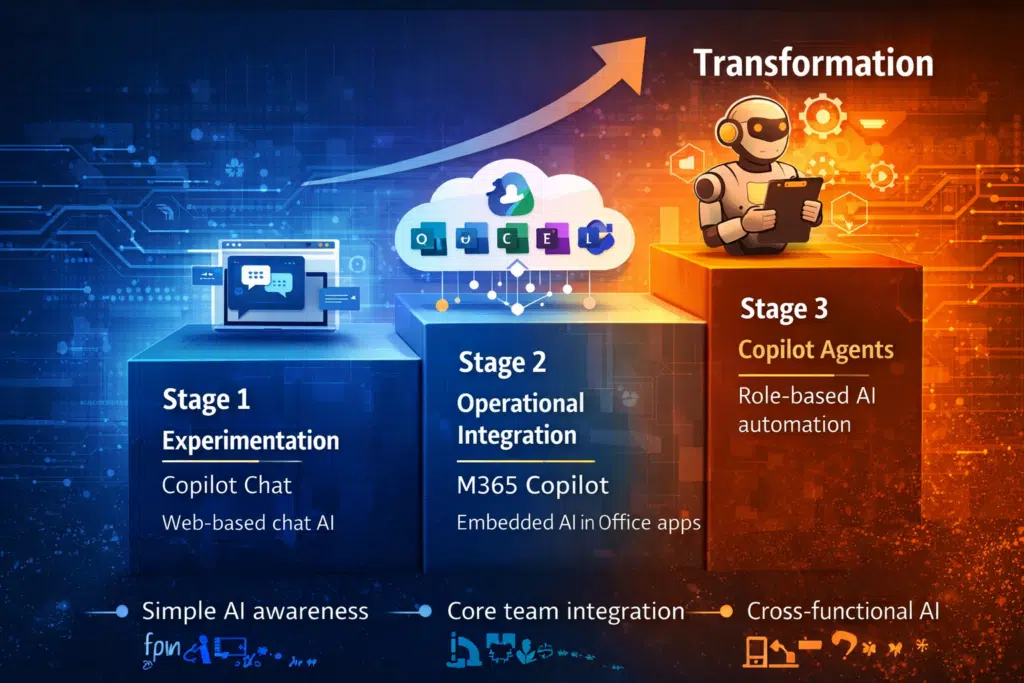
Think of adopting Copilot as a journey through stages of maturity:
- Stage 1 – Experimentation (Copilot Chat): At this entry stage, teams use Copilot Chat to learn what generative AI can do. Little infrastructure change is needed. Users just access the chat UI and start asking questions or brainstorming. ROI is immediate (quick drafts, basic research) and adoption hurdles are low (no new licenses, minimal training).
- Stage 2 – Operational Integration (Microsoft 365 Copilot): Next, organizations roll out Microsoft 365 Copilot to weave AI into everyday workflows. This requires mid-level adoption efforts: training employees on in-app AI features and possibly cleaning up data so Graph works well. The benefits come faster over time: knowledge workers start getting time back in Word, Excel, Outlook, or Teams. Copilot Chat may continue to be used for general queries, but now AI also lives in email, documents, and spreadsheets. ROI grows incrementally as more people use it.
- Stage 3 – Transformational (Copilot Agents): The final stage is building Copilot Agents for strategic gains. This is a significant change management effort. Business processes may be redesigned around AI. Agents work behind the scenes or on request to automate tasks (e.g. reporting, data lookup, creative assistance). At this stage, ROI is compounding: once an agent is built, it repeatedly saves time or reduces errors across the organization. Deep expertise is needed (governance, data architecture, custom development), often with specialized partners.
Why Getting This Wrong Hurts ROI
Building out your Copilot portfolio without a clear plan can backfire. Simply “buying more Copilot” doesn’t guarantee more value. In fact:
- Underused seats: If users don’t understand what each Copilot does, they may ignore the tools. Expensive licenses for Microsoft 365 Copilot or Copilot Studio can sit idle.
- Low trust in AI: Skipping steps erodes confidence. For example, if you deploy Copilot Agents before establishing clean data or training users on basic Copilot Chat, the agents might give poor answers and users will lose faith in the technology altogether.
- Poor data outcomes: Without proper data governance and training, AI can hallucinate or misuse information. The result? Bad insights, frustrated staff, and potential security issues.
- Wasted investment: Rushing into the latest Copilot Agents before your organization is ready often means more time and money spent fixing mistakes than actually moving the needle.
Where expert guidance pays dividends
Deploying Copilot effectively isn’t plug-and-play. Working with experienced partners (like CloudRevolution, 4x Microsoft Partner of the Year finalist) helps you:
- Assess readiness honestly: Understand if your data, governance, and culture are ready for each Copilot stage.
- Align tools to scenarios: Match Copilot Chat, Copilot in 365, or Agents to real business problems (don’t force a solution that doesn’t fit).
- Design scalable adoption: Build training and governance programs that grow with each phase.
- Deliver measurable gains: Ensure that any Copilot Agents built actually tie back to KPIs (time saved, revenue gained, costs cut).
Succeeding with the Right Copilot for Your Business
Success with Microsoft Copilot isn’t about picking the most advanced AI upfront. It’s about choosing the right Copilot at the right time.
For most organizations, that means starting small with Copilot Chat, then expanding into Microsoft 365 Copilot, and finally adding custom Copilot Agents as your maturity grows.
Next steps: Take the free Copilot Readiness Assessment and find out how best to proceed.
