

 Thought Leadership, Business Process

The Microsoft E5 license is the most powerful yet most underused license in all of IT and telecoms.
Due to lack of adoption, confusion in marketing, and sometimes through sheer requirement for functionality, while there has been major uptake of the E5 license, the value gained doesn’t represent anywhere near its potential.
We’re talking about implementing E5 for advanced features but disabling components that help you extract real value. We’re talking about misalignment, misconfiguration, and fear of change stopping your business from tapping into the real potential, plugging skill gaps, and genuinely transforming businesses.
That’s the potential power of E5. When businesses talk about digital transformation, very few ever see complete or genuine transformation from Microsoft. That’s because they suffer from value leaks.
In this guide, we address five value leaks, find the underlying problem, and offer safe fixes you can implement in your organization.
Value Leak #1: Paying for Capabilities No One Turns On
What’s Happening
Many organisations end up purchasing Microsoft 365 E5 licenses primarily to unlock Teams Phone capabilities, then never use the rest of the E5 suite beyond basic voice functions. This creates a cost centre instead of a value driver.
Teams Phone requires a license that includes the Microsoft 365 Phone System application — and an E5 license includes that phone system entitlement.
Similarly, there’s confusion around provisions for Copilot in E5. While Security Copilot (the AI assistant for security workflows) is included at no extra cost with Microsoft 365 E5, full productivity Copilot features (in apps like Word, Outlook, Teams) are separate add-ons, not automatically provided with E5.
The result? Organisations hold a premium E5 license for specific single-use functionality instead of broader strategic value.
Common Symptoms
- E5 licence purchased primarily for Teams Phone (voice/PSTN support)
- Minimal activation of Defender, Purview, or identity enhancements
- Copilot productivity AI not deployed despite expectations
- No tracking of broader feature adoption
Why This Happens
- Teams Phone requirements drive licence selection early in the procurement cycle
- Copilot branding leads to assumptions about inclusion
- E5’s broad feature surface feels overwhelming without clear rollout plans
How Enterprises Lose Value
- High spend for narrow use (often voice only)
- Missed risk reduction and productivity opportunities
- Unused security and compliance investments sitting idle
- Copilot licences purchased but not strategically deployed
Safe Fix
- Perform a Licence Need Assessment before purchasing E5 just for voice
- Clarify which Copilot experiences a licence actually entitles a user to
- Plan staged activation of E5 capabilities tied to specific outcomes
Suggested Resources
| Capability | Included in E5 | Activated by Default | Often Used | Value Realized |
| Microsoft 365 Phone System | ✔ | ❌ | Voice only | Partial |
| Teams PSTN Calling (with plan or routing) | Add‑on | ❌ | Voice use | Partial |
| Defender/EDR | ✔ | ❌ | Rarely | Low |
| Purview Compliance | ✔ | ❌ | Rarely | Low |
| Entra ID P2/Risk CA | ✔ | ❌ | Rarely | Low |
| Security Copilot (AI for security) | ✔ | Auto or soon | Rarely | Low |
| Microsoft 365 Copilot (productivity) | ❌ | Not included | Rarely | N/A |
Value Leak #2: Tools Without Measurable Outcomes
What’s Happening
Even when organisations technically deploy E5 features, they often don’t tie those features to measurable security or productivity outcomes.
Take Copilot as an example. Many businesses purchase Copilot licences expecting broad productivity gains, but without adoption planning, governance, or metrics, internal use stays low and unmeasured.
Also, E5 includes Security Copilot, but if teams don’t integrate this into their security operations workflow, the benefit remains unrealized.
Common Symptoms
- Copilot licences assigned but little or no usage data
- Copilot adopted but not integrated with broader collaboration analytics
- Security Copilot available but not surfaced in defender or incident workflows
Why This Happens
- Focus on enabling tools rather than designing outcomes
- Metrics tracked around enablement, not real impact
- Lack of adoption support and governance
How Enterprises Lose Value
- High licence cost without transparent ROI
- Tools generate noise, not insights
- Business leaders question value due to poor measurement
Safe Fix
- Define success metrics before tool deployment
- Use Copilot adoption dashboards and usage analytics
- Integrate Security Copilot into incident response playbooks
Suggested Resources
- Microsoft Copilot 365 Prerequisites
- Microsoft 365 Copilot Implementation Plan
- Understand how Security Copilot is auto provisioned for Microsoft 365 E5 customers
Value Leak #3: Compliance That Slows the Business
What’s Happening
Many organisations enable Purview and other compliance controls aggressively, without aligning policies to actual business workflows or data sensitivity tiers.
This can stifle productivity and paradoxically drive users to unmanaged tools outside the secure ecosystem. In a phenomenon commonly referred to as shadow IT, the more we drive users to use tools differently, unproductively, or out of habit, the more they’re likely to find unsanctioned alternatives.
As a result, adoption of your E5 tooling stalls or even decreases, while adding new tools to be managed through sheer popularity and demand. If we don’t align security and compliance with usability, we’re shooting ourselves in the foot before we’ve even started.
Common Symptoms
- Broad DLP policies block legitimate work
- Auto-labeling rules cause confusion
- Copilot functionality limited by over-restrictive data access rules
Why This Happens
- Compliance seen as checkbox exercise rather than user-centric design
- Teams don’t define valid use cases before deployment
How Enterprises Lose Value
- Productivity loss
- Users bypass compliant tools
- E5 compliance features seen as overhead rather than enablers
Safe Fix
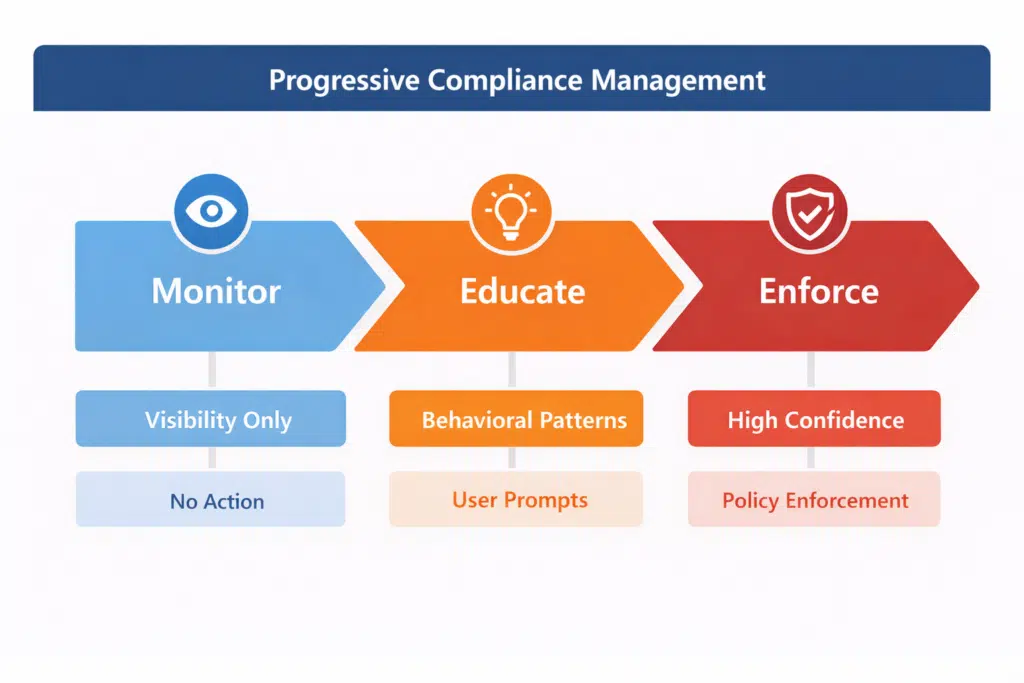
- Run compliance in monitor → educate → enforce stages
- Align compliance policies with real workflows
- Test Copilot usage scenarios against compliance guardrails
Suggested Resources
- Microsoft 365 Copilot Gotchas to Avoid
- Use Microsoft Purview to manage data security & compliance for Microsoft 365
Value Leak #4: Identity Controls That Hurt Productivity
What’s Happening
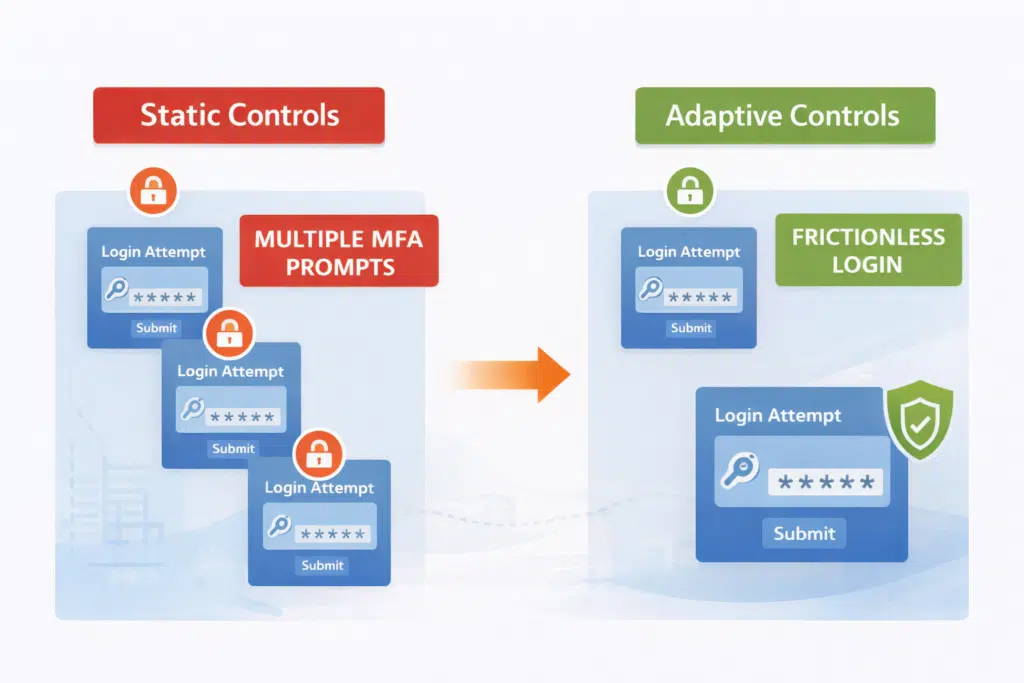
Strong identity controls are a major strength of E5 but poorly configured rules create friction that undermines productivity, especially in collaboration contexts like Teams and Copilot interactions.
Common Symptoms
- Excessive MFA prompts
- Conditional Access rules that block legitimate workflows
- Copilot blocked from accessing data needed to generate value
Why This Happens
- Static identity rules in dynamic environments
- Lack of risk‑based policy tuning
- Lack of testing for hybrid work scenarios
How Enterprises Lose Value
- Users seek shadow tools
- Productivity drops despite licensing investment
- IT spends time on support rather than strategic initiatives
Safe Fix
- Use adaptive, risk‑based access rules
- Test identity rules against real Teams and Copilot workflows
- Educate users on security flows and MFA expectations
Suggested Resources
- Microsoft 365 Copilot Performance Requirements
- Learn about Security Copilot inclusion in Microsoft 365 E5 subscription
What’s Happening
Many organisations deploy Microsoft 365 E5, enable the features, and assume value will appear automatically.
But here’s the thing: E5 is continuously evolving.
New capabilities like Security Copilot, updates in Defender, Purview, and productivity Copilot require ongoing attention to unlock full ROI. Left alone, they idle and stop returning an investment.
Common Symptoms
- Features enabled once and never revisited
- No adoption tracking for Teams, Copilot, or security tools
- Licensing renewals feel like cost events rather than value review
Why This Happens
- Lack of a continuous improvement model for E5
- Ownership ends at deployment, leaving features idle
- Teams assume value will appear automatically without monitoring
How Enterprises Lose Value
- Features become underutilized and outdated
- Security and compliance gaps persist unnoticed
- Copilot and Teams Phone adoption remain low, limiting productivity gains
Safe Fix
- Conduct quarterly E5 value reviews with adoption metrics
- Align updates and new features to real business workflows
- Provide ongoing training for users and administrators
Suggested Resources
| Stage | Adoption | Value Delivered |
| Deploy | Features enabled | Low |
| Stabilise | Noise reduced, workflows baseline | Moderate |
| Optimise | Outcomes measured, productivity tracked | High |
| Evolve | Continuous improvement, adoption, and monitoring | Maximum |
How To Get E5 Licensing Right
The reality is that organizations often buy Microsoft 365 E5 for Teams Phone or Copilot, but most of the potential value remains untapped.
The five value leaks we’ve explored — paying for unused features, under-measured tools, compliance friction, rigid identity controls, and one-time deployment thinking — are all symptoms of treating E5 as a “set it and forget it” investment.
To close this gap, business leaders need a structured, Microsoft-approved path that turns capability into measurable outcomes. That’s where the CloudRevolution Maturity Model comes in. (Note: Our maturity model takes the Microsoft components, simplifies them, and puts them to more practical, ROI-driven modals.)
| Stage | What it Means | Business Outcomes |
| Activate | Licenses are live; Teams Phone, Copilot, and security features deployed | Legacy platforms retired safely; workflows functional |
| Adopt | Users start engaging with Teams and Copilot; adoption tracked | Productivity gains begin; secure collaboration across teams |
| Measure | Usage and outcomes are tracked; ROI and risk metrics visible | Board-level insight into adoption, security posture, and efficiency |
| Maximize | Continuous improvement, feature optimization, and workflow alignment | Full ROI realized; strategic, Microsoft-approved adoption; reduced career risk for IT leaders |

Next Steps: Take Your E5 Assessment
Auditing your licenses is like herding sheep. Actually, sheep are probably attentive and you’ve got a trusty dog to help you out.
Take this free E5 Licensing Assessment to help you understand where you are, where you could be extracting more potential from your licenses, and (sorry about this) reveal where you’re overspending.
From here, you get a lie of the land and can start to plan and maintain a healthier-looking Microsoft environment.
You must be logged in to post a comment.