

 Business Process

With customer-facing Microsoft organizations under pressure to implement capable virtual agents, better quality assurance, and clearer insights into customer interactions, shopping around for a Microsoft-integrated contact center can become a burden.
Microsoft Contact Center Intelligence (CCI) is designed to address that challenge. You no longer need to buy a new contact center if you’re already using one of the integrated vendors that supports Microsoft’s new CCI product.
Announced in October 2026, Microsoft CCI brings Microsoft’s AI capabilities to existing contact center environments, including platforms from third-party providers.
Instead of requiring you to start with a full platform migration, CCI provides another route to introducing AI into customer interactions and contact center operations.
But what exactly is Microsoft CCI? Is it a contact center platform in its own right, which providers can it work with, and who should consider using it?
1. What Is Microsoft Contact Center Intelligence?
Microsoft Contact Center Intelligence is a product that extends Microsoft’s AI capabilities into existing contact center environments. It uses AI agents to help automate customer interactions, evaluate service quality, and, as further capabilities become available, support contact center operations.
The central idea is that you can introduce Microsoft’s AI into your existing contact center setup without replacing the underlying platform. Sounds ideal, right?
CCI builds on agentic capabilities developed for Microsoft Dynamics 365 Contact Center and extends them to third-party contact centers through connectors.
Microsoft names the following vendors as integration-ready:
- Five9
- Cisco Webex Contact Center
- Avaya
Genesys Cloud CX connectors are also covered in further Microsoft Learn documentation.
CCI brings together three main agent capabilities:
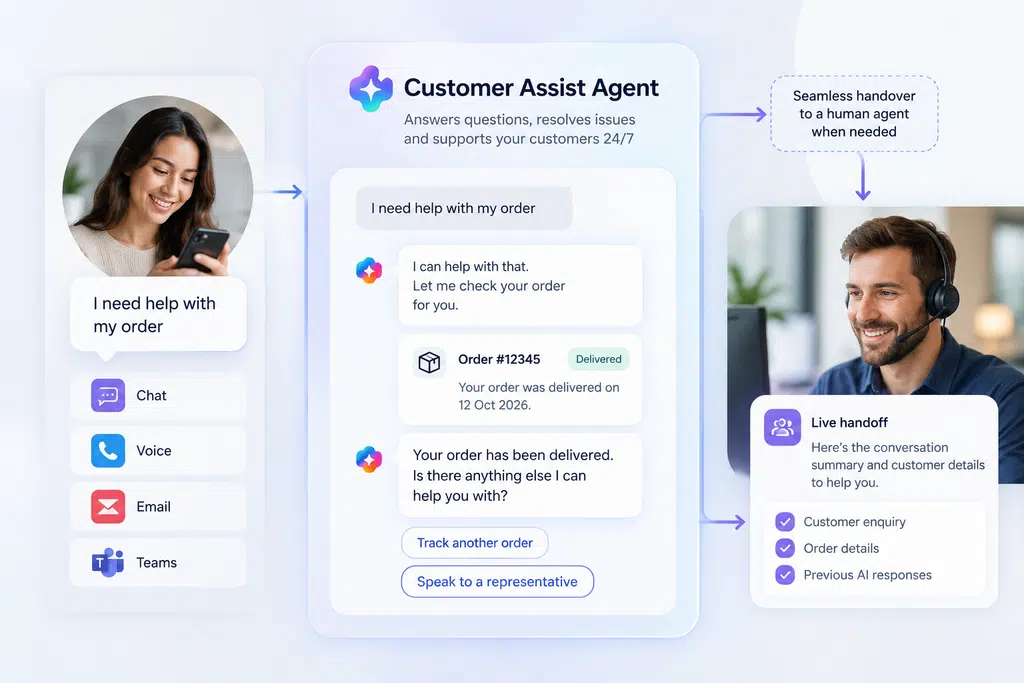
- Customer Assist Agent: Helps resolve customer enquiries autonomously or supports human representatives in real time.
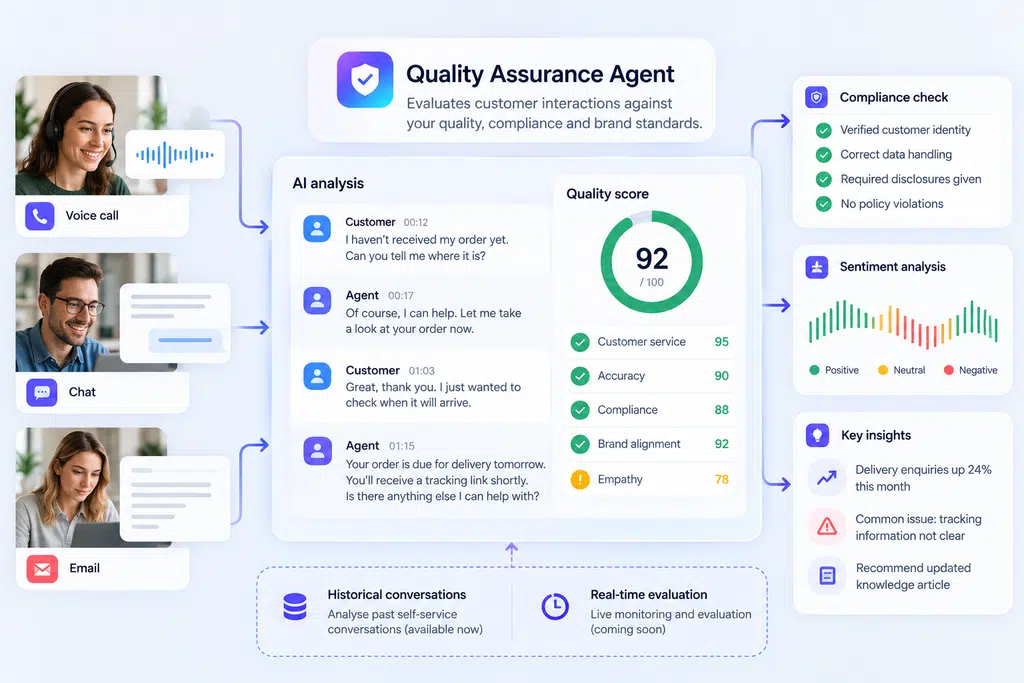
- Quality Assurance Agent: Evaluates customer interactions against defined quality, compliance, and brand standards. Microsoft says historical self-service conversations are supported, with real-time evaluation planned for a later release.
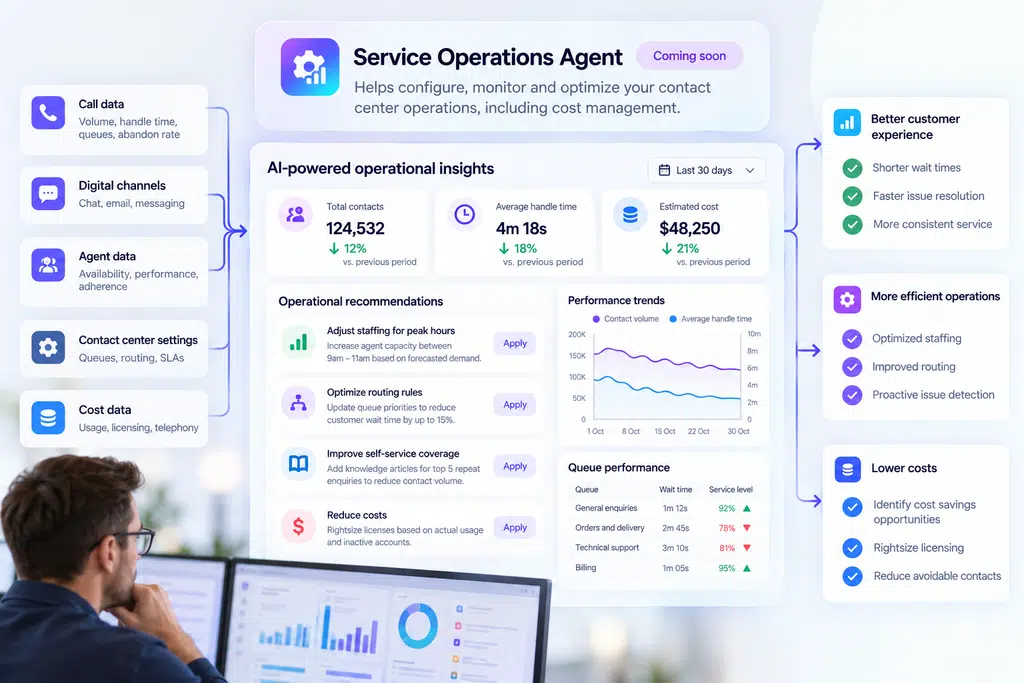
- Service Operations Agent: Intended to help configure, monitor, and optimize contact center operations, including cost management. Microsoft has described this agent as coming soon as of October 2026.
These capabilities are designed to help you improve customer service while giving your teams better tools to understand and manage interactions.
CCI also works with Microsoft’s broader AI and agent ecosystem, including Copilot Studio for configuring agents and Agent 365 for agent governance. Microsoft describes its Microsoft IQ capabilities as providing organizational context to help agents work with relevant business information.
The result is a way to introduce AI-driven customer service capabilities into an existing contact center environment, rather than treating platform replacement as a prerequisite.
It’s important to distinguish this from simply adding a chatbot to a website. CCI is intended to support customer interactions across voice and digital channels, with options for automated experiences, interactions with human representatives, and a combination of the two.
The exact capabilities available depend on the connector, configuration, and stage of product availability. Make sure to verify which features are supported for their chosen contact center before planning your implementation.
2. What Microsoft Contact Center Intelligence Is Not
Microsoft Contact Center Intelligence can add AI capabilities to your existing contact center, but it’s important to understand what it does and doesn’t do.
CCI isn’t a complete contact center platform
CCI isn’t designed to replace your entire contact center. If you already use a platform like Five9, Cisco Webex Contact Center, Avaya, or Genesys Cloud CX, the idea is to introduce Microsoft’s AI capabilities into your existing environment.
Your contact center platform can continue to provide core capabilities like telephony, call routing, queues, and the infrastructure used to connect customers with your team. Then CCI adds AI capabilities around customer interactions, quality assurance, and, as further functionality becomes available, service operations.
You may be able to introduce AI-powered customer service without taking on the cost, disruption, and complexity of replacing your contact center first.
However, integration isn’t automatic for every platform. You’ll need to confirm that your existing system is supported, which features are available through its connector, and whether additional API access or voice-channel licensing costs apply.
CCI isn’t the same as Dynamics 365 Contact Center
Microsoft Dynamics 365 Contact Center is Microsoft’s own contact center platform. Microsoft Contact Center Intelligence builds on agentic capabilities developed for Dynamics 365 Contact Center and extends them to third-party contact center environments.
If you already use Dynamics 365 Contact Center, you should assess the AI capabilities available within that product before assuming you need a separate CCI implementation.
If you use another provider, CCI offers a different route: bringing Microsoft’s AI capabilities into your existing contact center environment without necessarily migrating to Dynamics 365 Contact Center.
The right approach depends on your current platform, the capabilities you already have, and the customer service outcomes you’re trying to achieve.
CCI doesn’t mean every AI capability is available today
It’s also important to distinguish between the capabilities Microsoft has announced and those you can use now.
The Customer Assist Agent and Quality Assurance Agent address customer interactions and service quality. The Service Operations Agent, intended to help configure, monitor, and optimize contact center operations, has been described as coming soon (as of October 2026).
There are also differences in the availability of individual features. For example, Microsoft says its Quality Assurance Agent supports the evaluation of historical self-service conversations, while real-time evaluation is planned for a later release.
Check the current preview status, connector capabilities, and feature availability before building your implementation plan around a particular use case.
CCI offers a way to introduce Microsoft’s AI into your contact center without committing to a full platform replacement. It doesn’t remove the need to assess integration, licensing, security, and operational requirements before you deploy it.
3. How Much Does Microsoft Contact Center Intelligence Cost?
Microsoft Contact Center Intelligence uses usage-based billing (UBB) through Copilot Credits, rather than relying solely on a fixed per-user subscription. This means your costs can scale with how much you use its AI capabilities.
For you, that creates an opportunity to start with a specific customer service use case, measure the results, and expand adoption as you demonstrate value.
How does CCI pricing work?
Microsoft’s CCI announcement confirms that usage is billed through Copilot Credits. However, Microsoft hasn’t published a single fixed price for CCI that applies to every deployment.
Your costs will depend on how you use the service, including the agents you deploy, the volume of interactions they handle, and the work they perform. A simple self-service enquiry may have different consumption requirements from a more complex interaction that retrieves information, takes actions, or transfers a customer to a human representative.
Microsoft offers Copilot Credits through pay-as-you-go billing and prepaid purchasing options. Its general Copilot Studio pay-as-you-go rate is $0.01 per Copilot Credit, although you shouldn’t interpret this as a fixed cost per call or customer interaction. Actual consumption depends on the work performed by the agent.
What other costs should you consider?
Copilot Credits aren’t necessarily your only expense. Microsoft specifically warns that some contact center providers charge separately for API access or licenses required to access their voice channels. These charges aren’t included in Microsoft CCI.
You should also account for your existing contact center licensing, integration requirements, implementation work, and any additional services needed to support your chosen use cases.
Before committing to a deployment, ask your Microsoft partner to help estimate consumption for your expected interaction volumes and agent configurations. A pilot based on a high-volume, clearly defined customer service scenario can help you establish a more realistic cost baseline.
4. Who Should Use Microsoft Contact Center Intelligence?
Microsoft Contact Center Intelligence is worth considering if you want to introduce AI into customer service without replacing your existing contact center platform.
Your suitability depends on your current technology, the problems you want AI to solve, and whether CCI supports the features you need.
You want to introduce AI without replacing your contact center
If you already use Five9, Cisco Webex Contact Center, Avaya, or Genesys Cloud CX, you may be able to introduce Microsoft’s AI capabilities without migrating your entire contact center to Dynamics 365 Contact Center.
This is particularly relevant if your existing platform meets your telephony, routing, and workforce requirements, but you want to improve how you handle customer interactions.
Before committing, check the available connector for your platform and confirm which CCI capabilities it supports.
You handle a high volume of repetitive customer enquiries
If your contact center handles large numbers of routine enquiries, Customer Assist Agent may help you automate suitable interactions.
Examples include checking an order status, answering common product questions, and retrieving information to help resolve a customer enquiry. More complex requests can be directed to a human representative where the configured workflow supports that handoff.
Start by identifying the enquiries that consume the most agent time but follow predictable processes. These provide a practical starting point for evaluating whether AI automation could reduce handling effort without compromising customer experience.
You need more consistent quality assurance
Reviewing customer conversations manually takes time and sampling only a small proportion of interactions can leave gaps in your understanding of service quality.
CCI’s Quality Assurance Agent evaluates historical self-service conversations against defined quality, compliance, and brand standards. This can help you identify recurring issues and assess whether customer interactions meet your requirements.
If you need real-time quality evaluation, check the current availability of that capability. Microsoft has described it as planned functionality rather than something available in the initial release.
You want to improve visibility into contact center performance
If you need better insight into customer interactions and service quality, CCI’s AI capabilities may help you identify patterns that warrant further investigation.
The Service Operations Agent is intended to help configure, monitor, and optimize contact center operations, including cost management.
You already use Microsoft’s AI ecosystem
CCI may also be worth evaluating if you’re already investing in Microsoft technologies like Copilot Studio and want to extend your use of AI into customer service.
Microsoft positions CCI within its broader agent ecosystem, including Copilot Studio for configuring agents and Agent 365 for governance. You should still assess the integration requirements, licensing, security controls, and operational responsibilities associated with your proposed implementation.
When might CCI not be the right fit?
CCI won’t automatically be the best option for every contact center.
If your current platform is approaching end of life, lacks essential capabilities, or no longer meets your business requirements, replacing it may be more appropriate than adding AI around it.
Similarly, if your main requirement is a complete contact center platform with telephony, routing, queues, and workforce management, you should evaluate those requirements separately. CCI is designed to extend AI capabilities into existing environments, not replace every function of a contact center platform.
Finally, if you need a particular integration or AI feature immediately, verify its availability before making a purchasing decision.
The best starting point is a specific customer service problem, not a decision to deploy AI everywhere.
Identify where you want to reduce repetitive work, improve quality assurance, or gain better insight into customer interactions. Then confirm whether CCI can support that use case within your existing contact center.
5. How to Get Access to Microsoft Contact Center Intelligence
Microsoft Contact Center Intelligence is available in global public preview, with the exception of Austria. You can start exploring the service through Microsoft’s CCI portal without committing to a full contact center migration.
How to get started with CCI
Microsoft outlines a straightforward starting process:
- Sign in to the CCI portal. Visit the Microsoft Contact Center Intelligence portal to get started.
- Connect your existing contact center. Check the available connector options for your platform and confirm any integration requirements.
- Choose a specific customer service scenario. Start with a high-volume enquiry that currently creates work for your contact center team, such as order-status questions or another routine request.
- Configure your first agent. Set up the relevant self-service experience and define how it should respond, access information, and hand off to a human representative when required.
- Test and measure the results. Evaluate resolution rates, customer experience, the number of interactions handled without human intervention, and the cost of running the agent.
Starting with a single scenario gives you a clearer way to assess the value of CCI before expanding into additional customer service workflows.
What should you check before starting?
Public preview doesn’t mean every feature is generally available or that every integration will support the same capabilities. Before building your implementation plan, confirm the current availability of the features you need, the compatibility of your contact center platform, and any prerequisites for connecting it.
You should also understand the pricing model. CCI uses Copilot Credits for usage-based billing, and your existing contact center provider may charge separately for API access or voice-channel licensing. Include these costs in your initial assessment.
Finally, establish how you’ll measure success. A reduction in routine enquiries reaching your agents may be valuable, but you’ll also want to understand whether customers are getting accurate answers, whether handoffs work as expected, and whether the overall cost compares favorably with your existing process.
You can find further guidance in Microsoft’s Contact Center Intelligence documentation, including setup instructions, connector information, and implementation guidance.
How Cloud Revolution Can Help You Evaluate Microsoft CCI
Microsoft Contact Center Intelligence gives you another way to introduce AI into your customer service operation. Before you start, you need to understand how it fits with your existing contact center, Microsoft licensing, and wider AI plans.
Cloud Revolution can help you assess your Microsoft environment, identify suitable AI use cases, and understand the implications of introducing AI into your existing contact center.
That includes looking at:
- Your current contact center: Understand which capabilities you already have and where AI could add value.
- Your first use case: Identify a specific customer service process that could benefit from automation or AI assistance.
- Licensing and costs: Consider Copilot Credits, existing Microsoft licenses, and any additional costs from your contact center provider.
- Security and governance: Establish how AI agents will be managed, governed, and integrated into your existing environment.
- Measuring success: Define the metrics you need to evaluate before expanding beyond an initial pilot.
The right starting point depends on your existing technology, customer service priorities, and appetite for change. An initial assessment can help you understand whether CCI is a suitable next step, or whether you should address other contact center requirements first.
If you’re exploring Microsoft CCI, speak to us about your Microsoft environment and AI adoption plans.
Is Microsoft Contact Center Intelligence Right for You?
Microsoft Contact Center Intelligence offers a way to bring Microsoft’s AI capabilities into an existing contact center without making a complete platform replacement the starting point.
For businesses already using a supported contact center, that could provide a more targeted route to introducing AI. Customer Assist Agent can help automate customer enquiries, while Quality Assurance Agent can evaluate interactions. Service Operations Agent is intended to extend those capabilities into operational management when it becomes available.
- CCI won’t be the right answer for every contact center.
- You need to check platform compatibility, confirm which features are available, understand usage-based pricing, and account for any additional costs from your existing provider.
Start with one clearly defined customer service challenge. Test the relevant capabilities, measure the results, and use the evidence to decide whether to expand.
That gives you a practical way to evaluate Microsoft’s approach to agentic AI without committing to a wider transformation before you know what it can deliver.
You must be logged in to post a comment.