

 Thought Leadership

1. Why has our Teams Phone migration introduced instability into a core business function?
At the CIO level, this question isn’t about dropped calls. It’s about risk exposure.
Voice is different from every other Microsoft 365 workload. It’s real-time, unforgiving, and highly sensitive to network conditions, routing paths, and dependencies outside of Microsoft’s control. When a Teams Phone migration introduces instability, it’s rarely a single fault—it’s a system design issue.
What’s really happening
Most organizations approach Teams Phone like a software rollout. But voice is a service, not a feature. It spans devices, networks, Microsoft infrastructure, and carriers.
Cloud Revolution POV
We consistently see instability when voice hasn’t been designed end-to-end. Successful organizations treat Teams Phone as a critical service architecture, not just a migration project.
What to do next
Stability comes from:
- Network readiness and validation
- Simplified call routing
- Built-in resilience (not added later)
2. Who actually owns reliability and performance in our Teams Phone environment?
When something breaks, this is the question that surfaces fastest and gets answered slowest.
In a Teams Phone environment, responsibility is distributed across:
- Microsoft
- Your carrier
- SBC providers
- Internal IT teams
- External partners
What’s really happening
Each party sees only part of the problem. No one owns the full user experience.
Cloud Revolution POV
This isn’t just a support issue. It’s an operating model gap. If ownership isn’t clearly defined before migration, it becomes a blocker after go-live.
What to do next
Leading organizations:
- Define a single accountable owner for voice
- Align vendors to a shared support model
- Eliminate “gray areas” in responsibility
3. Why does Teams Phone provisioning take hours (or even days) to complete?
Provisioning delays are often dismissed as “just how the cloud works.” But at scale, they become a serious operational constraint.
What’s really happening
Teams Phone provisioning is not a single action. It’s a chain of dependent processes across Microsoft 365 services, policies, and licensing layers.
Cloud Revolution POV
Manual provisioning is one of the biggest hidden risks in Teams Phone. It introduces delays, inconsistency, and avoidable errors.
What to do next
High-performing organizations:
- Automate provisioning end-to-end (often through a third-party vendor)
- Standardize policies and templates
- Treat provisioning as a repeatable service pipeline, not an admin task
4. Did we underestimate the complexity of Teams Phone as a platform?
This is one of the most common reflections CIOs have post-migration.
Teams Phone is often positioned as an extension of Teams. But, in reality, it’s a fully fledged telephony platform with its own complexity.
What’s really happening
Complexity emerges from:
- Multiple routing options
- Hybrid environments
- Policy dependencies
- Integration with legacy systems
Cloud Revolution POV
Teams Phone isn’t simple. It’s just abstracted. And abstraction without understanding leads to problems later.
What to do next
Successful organizations:
- Treat voice as a specialist domain
- Invest in architecture upfront
- Avoid over-customization early on
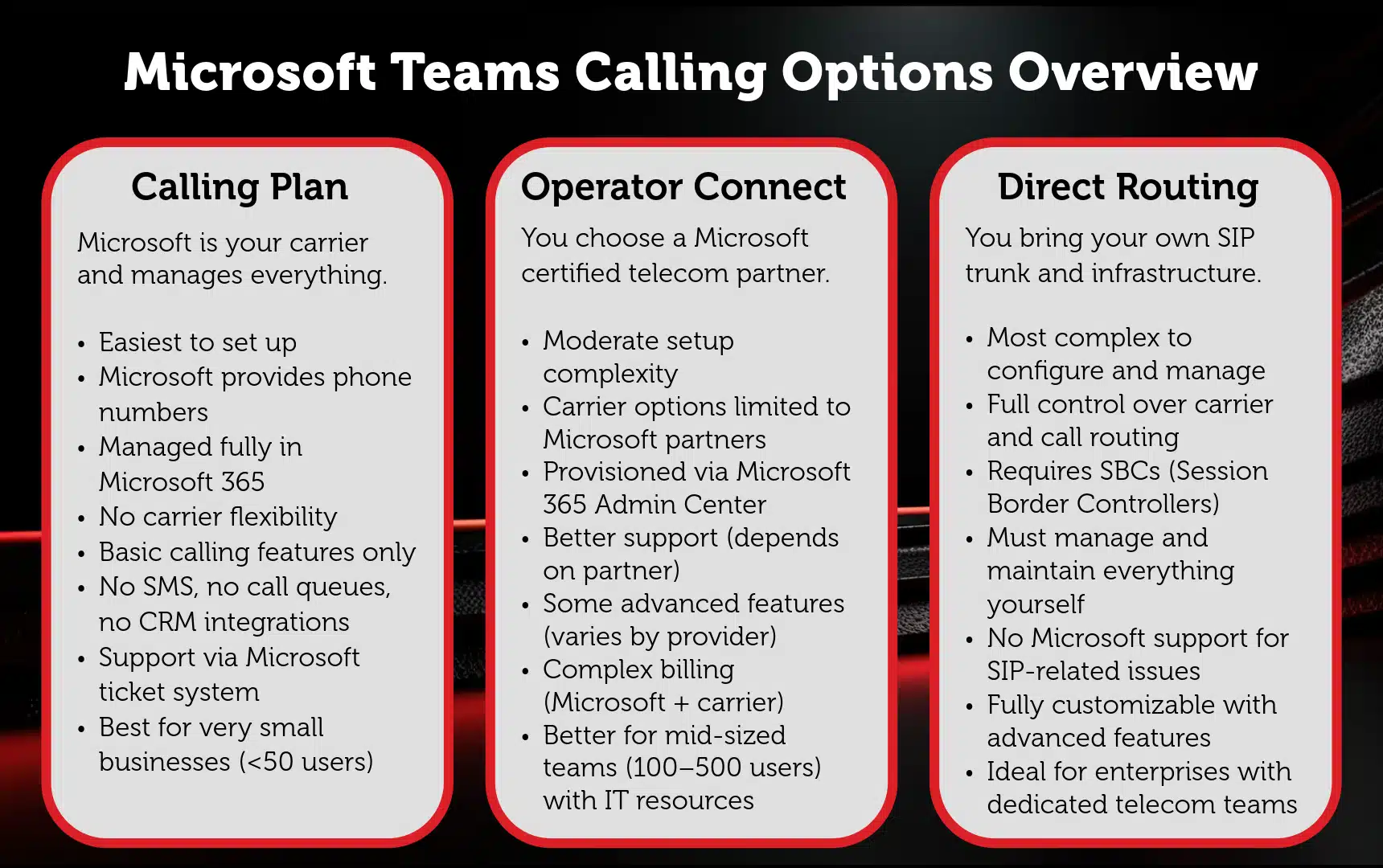
5. Did we choose the wrong architecture for our Teams Phone deployment?
This question rarely comes up during planning but frequently after issues appear.
What’s really happening
Architecture decisions (Direct Routing, Operator Connect, Calling Plans) introduce trade-offs between:
- Control
- Complexity
- Cost
- Supportability
Cloud Revolution POV
There’s no “best” architecture. There’s only the right fit for your operating model. Problems arise when decisions are driven by cost or legacy constraints rather than long-term manageability.
What to do next
Leading organizations:
- Align architecture to business outcomes
- Minimize unnecessary routing layers
- Prioritize simplicity over flexibility where possible
6. Why does Teams Phone behave inconsistently across users, devices, and call scenarios?
Inconsistency is often more damaging than outright failure.
When users experience:
- Different behaviors across devices
- Unpredictable call handling
- Inconsistent feature availability
Confidence in the platform drops quickly.
What’s really happening
Variability is introduced through:
- Multiple routing paths
- Device diversity
- Policy differences
- Network conditions
Cloud Revolution POV
Inconsistency is usually a symptom of overly complex design. The more variation you introduce, the harder it is to control outcomes.
What to do next
Reduce variability by:
- Standardizing configurations
- Limiting routing scenarios
- Monitoring real user experience (not just system health)
7. Why is the Teams Phone user experience worse than our legacy telephony?
This is where technical issues become business issues.
Because from a user perspective, the expectation is simple:
The new system should be better.
What’s really happening
Legacy systems were built specifically for voice. Teams is a broader collaboration platform, and voice needs to be deliberately optimized within it.
Cloud Revolution POV
User experience doesn’t improve by default. It improves by design. Most migrations focus on enablement, not experience.
What to do next
Focus on:
- Call flows and user journeys
- Training and adoption
- Continuous optimization post-migration
8. Why is it so difficult to diagnose and resolve Teams Phone issues?
This is where many IT teams feel stuck.
What’s really happening
Teams Phone troubleshooting spans:
- Microsoft cloud
- Internal network
- Carrier infrastructure
- End-user devices
No single tool provides full visibility.
Cloud Revolution POV
You can’t manage what you can’t see. Lack of observability is one of the biggest barriers to stable Teams Phone environments.
What to do next
Leading organizations:
- Implement end-to-end monitoring
- Correlate data across all layers
- Shift from reactive troubleshooting to proactive insight
9. Why can’t our vendors provide clear answers on Teams Phone issues?
This question often reflects deeper frustration than the technical issue itself.
What’s really happening
Each vendor operates within their own scope:
- Microsoft focuses on the cloud
- Carriers focus on connectivity
- Partners focus on implementation
No one has full ownership of the outcome.
Cloud Revolution POV
Fragmented ecosystems require intentional coordination. Without it, escalation becomes circular and slow.
What to do next
Organizations that avoid this:
- Establish a single escalation path
- Work with partners who can operate across the full stack
- Align vendors around shared accountability
10. How do we regain control and confidence in our Teams Phone platform?
This is the turning point: from reactive to strategic.
What’s really happening
Loss of confidence is rarely caused by a single issue. It’s the result of:
- Repeated inconsistencies
- Slow resolution times
- Lack of visibility and ownership
Cloud Revolution POV
Recovering control isn’t about fixing individual issues. It’s about resetting how Teams Phone is operated.
What to do next
Successful organizations focus on four areas:
- Visibility: End-to-end insight into performance and experience
- Control: Simplified, standardized architecture
- Ownership: Clear accountability across the ecosystem
- Strategy: Treating voice as an ongoing service, not a one-time migration
Conclusion
Teams Phone migrations don’t fail because the technology doesn’t work.
They fail because organizations:
- Underestimate complexity
- Fragment ownership
- Treat voice like software
The CIOs who succeed take a different approach.
They don’t ask:
“How do we migrate telephony?”
They ask:
“How do we operate Teams Phone as a critical business service?”
Understand the Real Business Impact of Teams Phone
If you’re asking these questions, you’re not alone. And, more importantly, you’re at the point where technical issues start becoming financial and operational risks.
Before making further changes to your Teams Phone environment, it’s critical to understand:
- The true cost of your current setup
- Where inefficiencies are impacting ROI
- What the financial upside of optimization looks like
? Take the next step
Use our Teams Phone ROI Calculator to quantify the impact of your current environment—and identify where improvements will deliver the most value.
It takes just a few minutes, and gives you a clear, data-driven view of:
- Cost savings opportunities
- Productivity gains
- Optimization priorities
You must be logged in to post a comment.