

 Business Process

When researching what Copilot can do for your business, it’s important to understand both the basic use cases (quick wins, easy to adopt) and the complex, long-term, planning-required changes.
The basic use cases are going to be the ones your users pick up quickly once enabled and likely make up the bulk of your Copilot use.
The advanced Copilot use cases are where you’re going to see real business change. These may take longer to implement and you may need help from a Microsoft partner — but they’re worth it.
Let’s dive into the first 10 basic Copilot use cases. Or, if you’re already familiar, skip to the 10 advanced use cases using this link.
To make this blog post more fun, I’ve asked Copilot to provide the use cases (and included two of our own case studies at Cloud Revolution).
10 Basic Copilot Use Cases
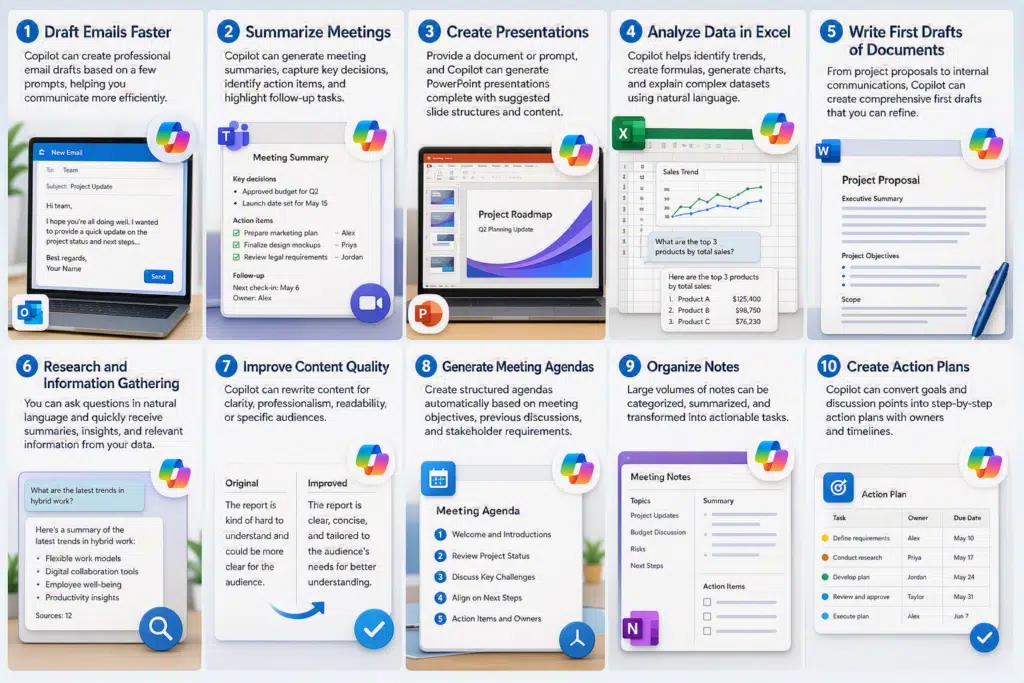
1. Draft Emails Faster
Copilot can create professional email drafts based on a few prompts, helping users communicate more efficiently while maintaining tone and consistency.
2. Summarize Meetings
Copilot can generate meeting summaries, capture key decisions, identify action items, and highlight follow-up tasks from Teams meetings.
3. Create Presentations
Provide a document or prompt, and Copilot can generate PowerPoint presentations complete with suggested slide structures and content.
4. Analyze Data in Excel
Copilot helps identify trends, create formulas, generate charts, and explain complex datasets using natural language.
5. Write First Drafts of Documents
From project proposals to internal communications, Copilot can create comprehensive first drafts that users can refine and personalize.
6. Research and Information Gathering
Users can ask questions in natural language and quickly receive summaries, insights, and relevant information from organizational data.
7. Improve Content Quality
Copilot can rewrite content for clarity, professionalism, readability, or specific audiences.
8. Generate Meeting Agendas
Create structured agendas automatically based on meeting objectives, previous discussions, and stakeholder requirements.
9. Organize Notes
Large volumes of notes can be categorized, summarized, and transformed into actionable tasks.
10. Create Action Plans
Copilot can convert goals and discussion points into step-by-step action plans with owners and timelines.
10 Advanced Copilot Use Cases
1. Automated Service Desk Ticket Creation
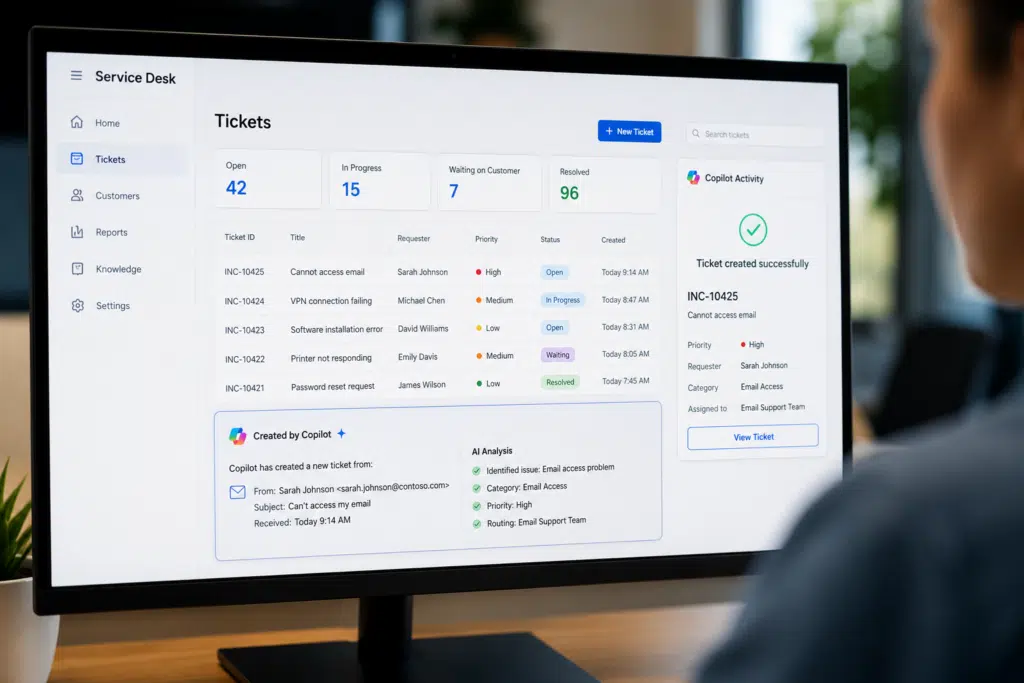
Copilot can monitor emails, conversations, and support requests, automatically creating and categorizing service desk tickets while populating key information and routing them to the correct teams.
Benefits
- Reduces manual ticket creation effort
- Improves ticket accuracy and consistency
- Accelerates issue resolution
- Enhances customer service efficiency
Real World Example
Cloud Revolution developed a Copilot-powered solution that automatically generates service desk tickets from incoming emails and requests. Rather than requiring support staff to manually read messages, identify the issue, create a ticket, and populate fields, the solution uses AI to interpret the request and create a structured ticket automatically.
This approach reduces repetitive administrative tasks, improves data quality, and ensures tickets reach the appropriate teams more quickly. Organizations benefit from faster response times, greater consistency in ticket categorization, and increased productivity among service desk personnel.
Read the case study: https://www.cloudrevolution.com/reduce-manual-ticket-creation/
2. Enterprise Knowledge Management
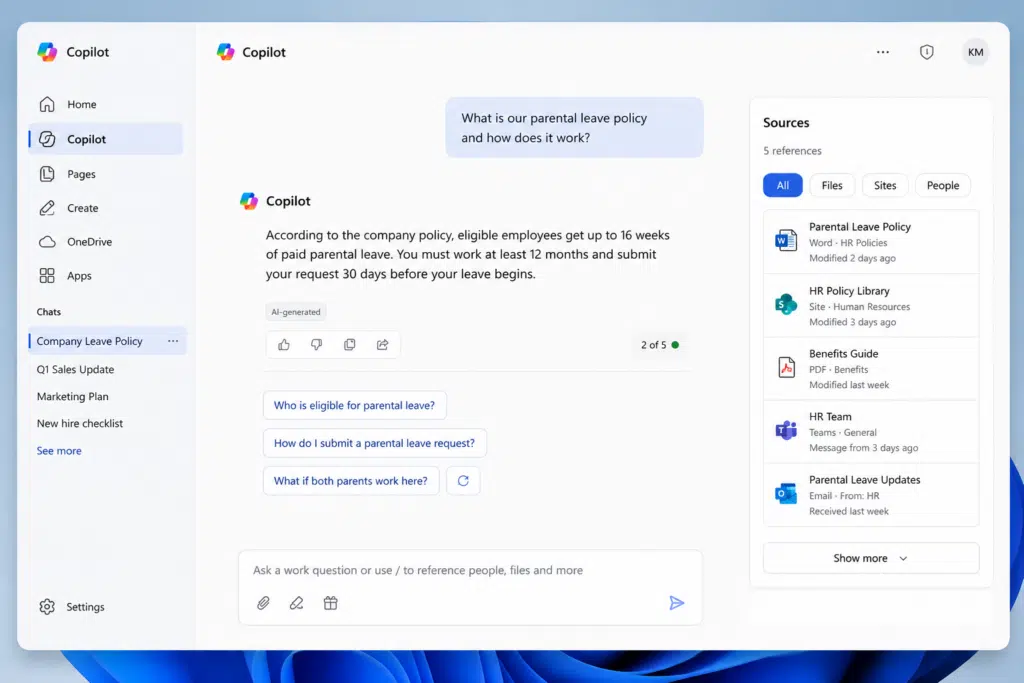
Copilot can act as an intelligent organizational knowledge assistant, helping employees find policies, procedures, documentation, and subject matter expertise across multiple repositories.
Benefits
- Faster access to information
- Reduces time spent searching for answers
- Improves knowledge sharing across teams
- Enhances employee productivity
Real World Example
Many Microsoft customers are leveraging Copilot to transform how employees access knowledge across the organization. Instead of searching through SharePoint sites, Teams conversations, documents, and emails individually, employees can ask natural language questions and receive contextual answers based on information they already have permission to access.
This capability is particularly valuable for large organizations where institutional knowledge is often spread across multiple repositories and departments. By reducing time spent searching for information, businesses can improve productivity, accelerate decision-making, and shorten onboarding times for new employees.
Read the case study: https://www.microsoft.com/en-us/customers/
3. Contract Review and Legal Analysis
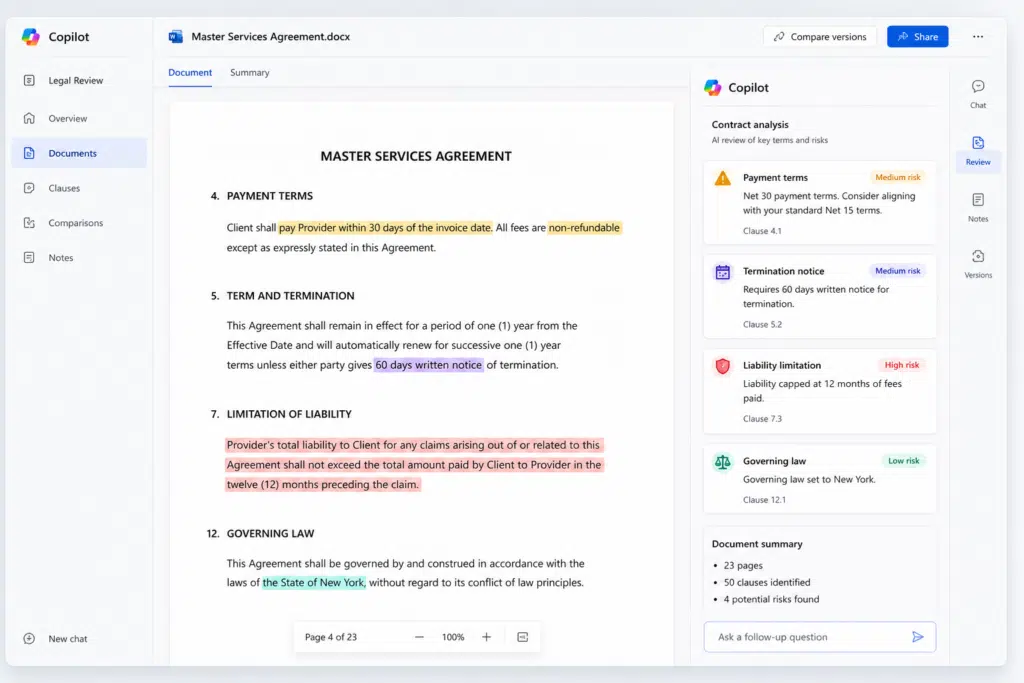
Copilot can analyze contracts, identify risks, summarize terms and conditions, highlight obligations, and assist legal teams during document review processes.
Benefits
- Accelerates contract reviews
- Reduces time spent on legal research
- Improves consistency in document analysis
- Helps identify compliance and risk issues
Real World Example
PwC has invested heavily in Microsoft Copilot to enhance productivity across its global workforce. Within professional services environments, consultants and legal professionals often spend significant time reviewing contracts, summarizing documents, and identifying key clauses.
By leveraging Copilot, teams can quickly generate summaries, compare versions of documents, identify key obligations, and surface potential risks for further review. While human expertise remains essential for legal decision-making, Copilot helps professionals spend less time on administrative analysis and more time delivering value to clients.
Read the case study: https://www.pwc.com/us/en/library/case-studies/pwc-microsoft-copilot-enterprise-ai.html
4. Sales Proposal Generation
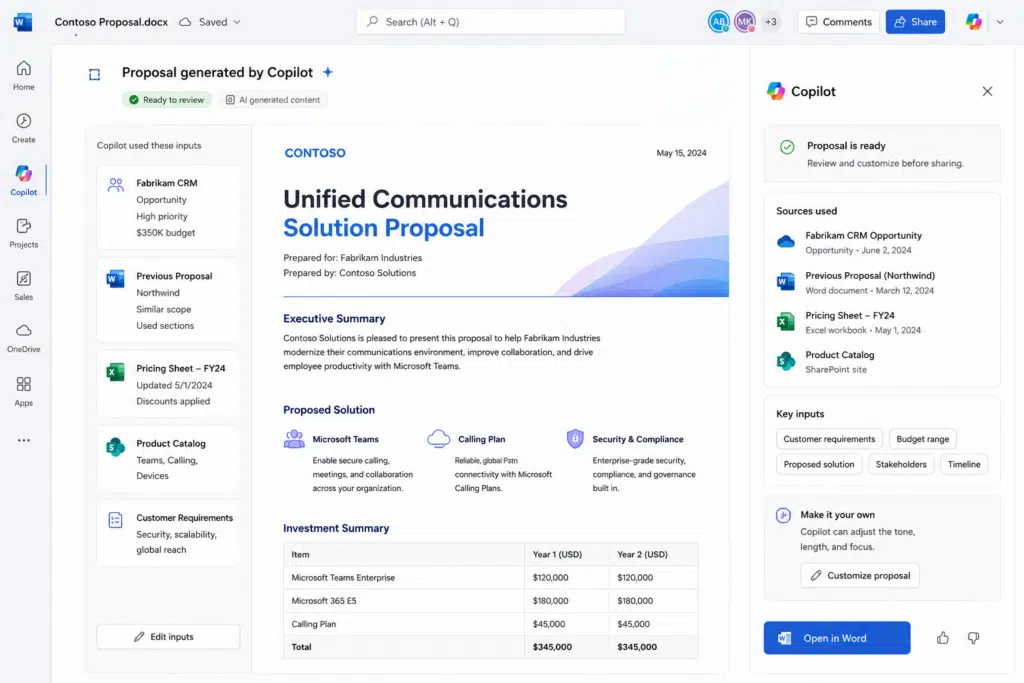
Copilot can generate personalized sales proposals by combining CRM data, previous proposals, pricing information, customer requirements, and product specifications.
Benefits
- Faster proposal creation
- Increased personalization
- Improved sales productivity
- Consistent branding and messaging
Real World Example
Organizations using Microsoft Copilot have accelerated proposal development by utilizing AI to combine customer requirements, previous proposals, CRM records, pricing data, and product information into tailored sales documents.
Instead of starting from a blank page, sales teams can generate high-quality first drafts in minutes. This enables account managers to focus their time on customer engagement, solution design, and relationship building rather than document preparation. The result is faster proposal turnaround times and more consistent customer communications.
Read the case study: https://microsoft.github.io/Analytics-Hub/case-studies/
5. Financial Reporting Automation
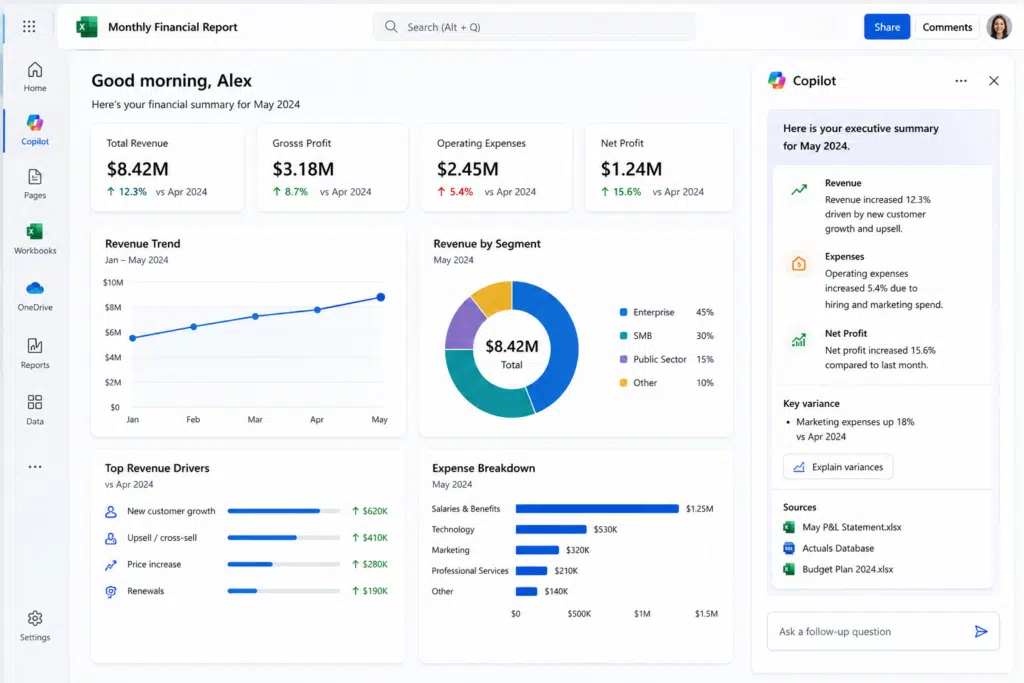
Copilot can consolidate financial data, generate executive summaries, explain variances, and assist finance teams with monthly, quarterly, and annual reporting activities.
Benefits
- Reduces reporting effort
- Speeds up analysis cycles
- Improves reporting consistency
- Supports faster decision-making
Real World Example
Financial services organizations are increasingly exploring Copilot to improve financial reporting and analysis processes. Finance teams often spend considerable effort gathering data from multiple sources, validating information, and producing management reports.
Copilot can help summarize findings, identify trends, explain variances, and support report creation using data already available within Microsoft 365. This enables finance professionals to spend more time interpreting results and providing strategic recommendations instead of manually producing reports.
Read the case study: https://microsoft.github.io/Analytics-Hub/case-studies/
6. HR Onboarding and Employee Support
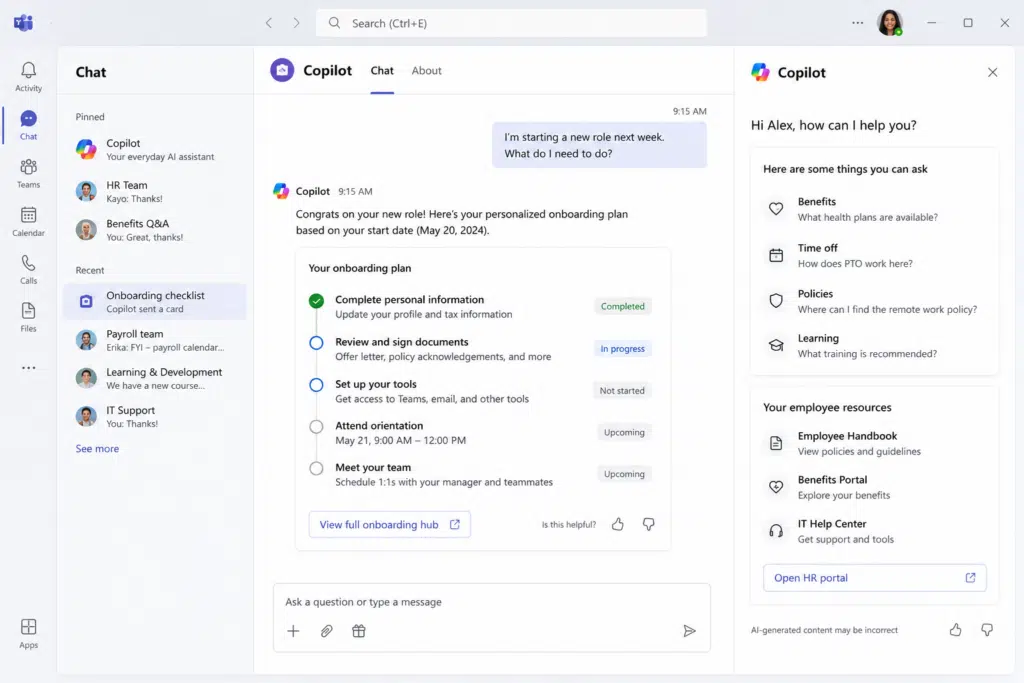
Copilot can answer employee questions, guide new hires through onboarding tasks, surface company policies, and recommend learning resources.
Benefits
- Improves employee experience
- Reduces HR administrative workload
- Accelerates onboarding
- Provides consistent support and guidance
Real World Example
Lenovo’s implementation of Microsoft 365 Copilot demonstrates how employees can benefit from faster access to information and improved productivity. HR teams typically spend substantial amounts of time answering common employee questions related to policies, benefits, onboarding processes, and learning resources.
Copilot enables organizations to deliver self-service support experiences where employees can obtain answers immediately without needing to wait for HR responses. This enhances employee satisfaction while allowing HR professionals to focus on strategic initiatives and employee development.
Read the case study: https://www.lenovo.com/sg/en/case-studies-customer-success-stories/lenovo-powers-lenovo-m365/
7. Customer Support Virtual Agents
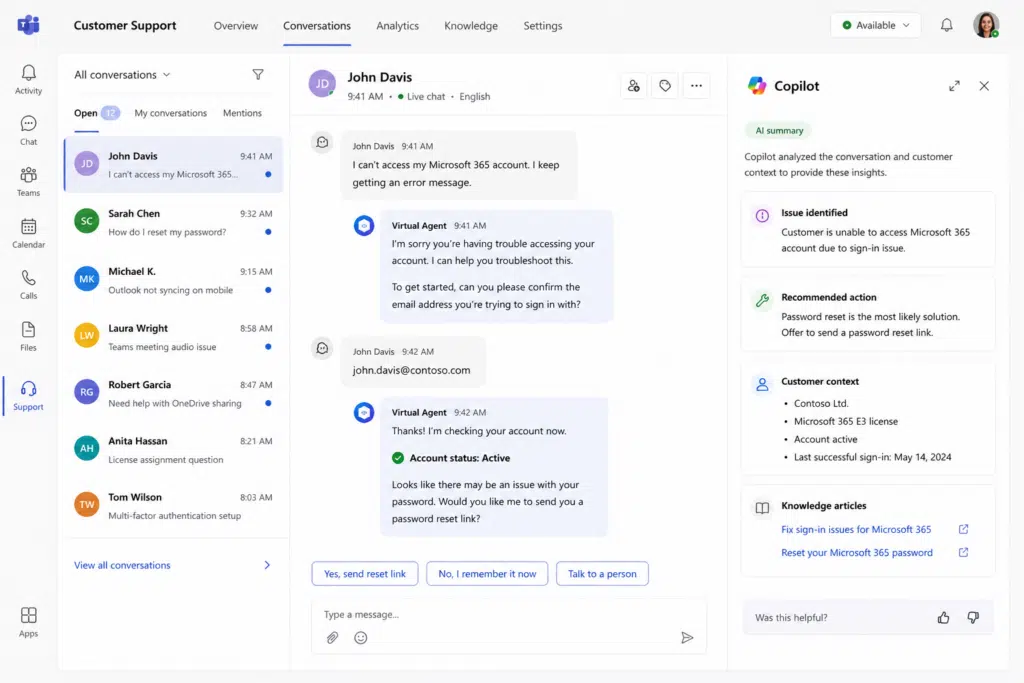
Copilot can be used to build AI-powered virtual agents that answer customer questions, guide users through common processes, and escalate more complex requests to the appropriate support teams.
Benefits
- Provides 24/7 customer support
- Improves response times
- Reduces support costs
- Enhances customer satisfaction
Real World Example
Organizations using Copilot Studio have developed AI-powered support assistants that handle high volumes of customer or citizen inquiries. These virtual agents can answer frequently asked questions, provide step-by-step guidance, collect information, and escalate issues when human intervention is required.
The result is a more scalable support operation capable of providing assistance around the clock. By automating routine requests, organizations can reduce support costs while improving responsiveness and customer satisfaction.
Read the case study: https://learn.microsoft.com/en-us/microsoft-copilot-studio/guidance/adoption-case-studies
8. Compliance and Regulatory Research
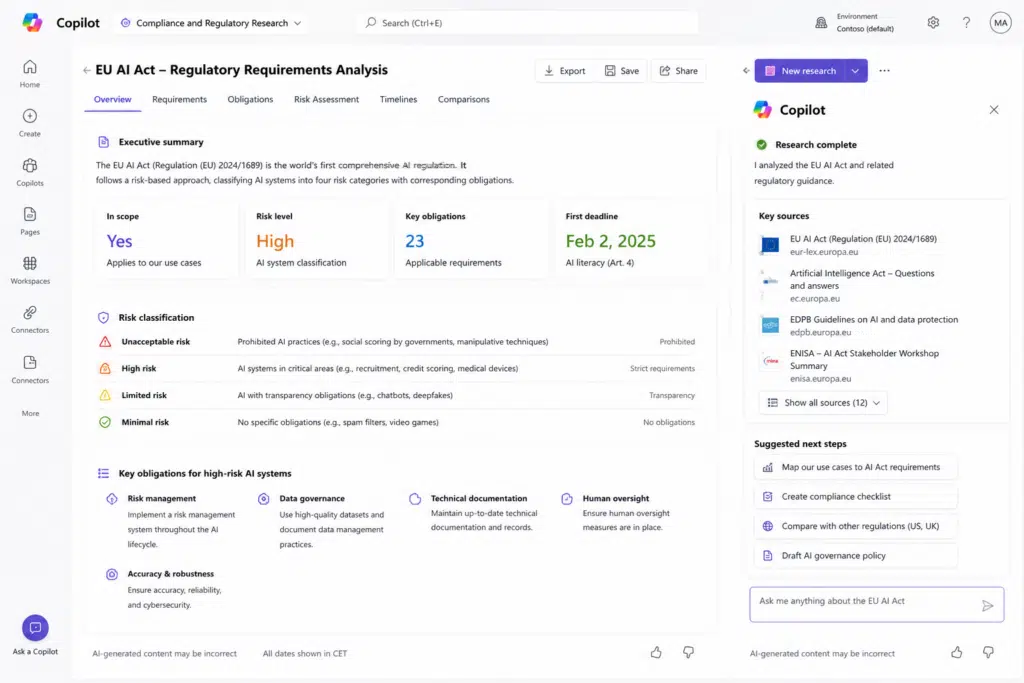
Copilot can analyze regulatory content, summarize policy updates, compare requirements across jurisdictions, and support compliance teams with research tasks.
Benefits
- Accelerates regulatory reviews
- Improves compliance readiness
- Reduces manual research effort
- Supports risk management initiatives
Real World Example
Organizations operating in highly regulated industries often struggle to keep employees informed about evolving regulations, standards, and compliance requirements. Copilot can simplify this challenge by helping teams locate relevant information, summarize lengthy regulatory documentation, and answer compliance-related questions.
Companies using Copilot-powered solutions have been able to reduce research time, improve knowledge accessibility, and support more consistent decision-making across compliance teams. This allows professionals to focus on interpretation and risk management rather than document searches.
Read the case study: https://learn.microsoft.com/en-us/microsoft-copilot-studio/guidance/adoption-case-studies
9. Executive Briefing Preparation
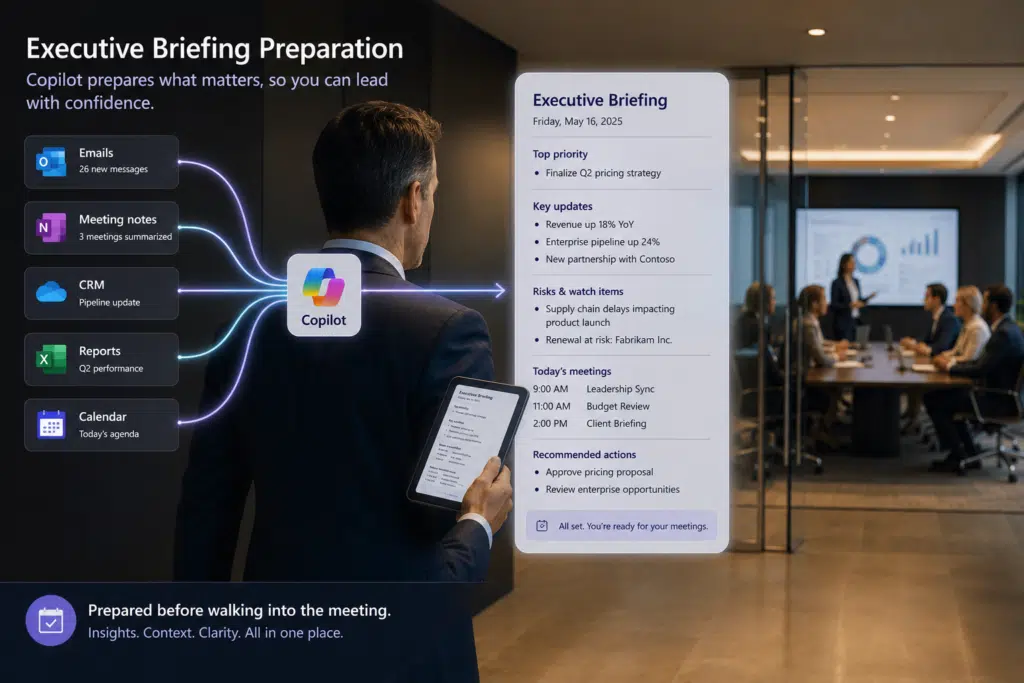
Copilot can gather information from emails, meetings, reports, and business systems to create concise executive briefings before important meetings and strategic discussions.
Benefits
- Improves leadership preparedness
- Saves administrative time
- Creates consistent briefing materials
- Supports better decision-making
Real World Example
Large enterprises generate vast amounts of information through meetings, email conversations, project updates, business reports, and collaboration platforms. Executives often struggle to stay informed while balancing numerous responsibilities.
Organizations using Microsoft Copilot have enabled leaders to quickly gather critical insights from multiple sources and generate concise summaries before key meetings. This reduces preparation time while ensuring decision-makers have access to the most relevant information, risks, opportunities, and action items.
Read the case study: https://www.microsoft.com/en-us/customers/
10. Copilot Adoption, Coaching, and Change Management
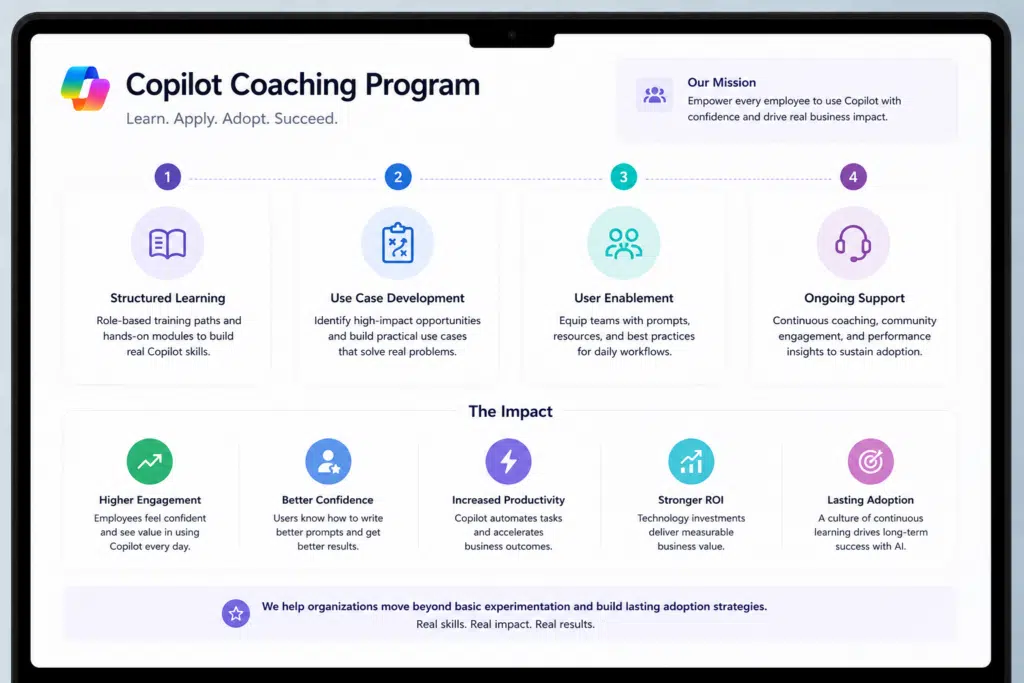
Organizations can use structured Copilot coaching programs to accelerate adoption, improve user confidence, establish governance practices, and maximize return on investment from AI initiatives.
Benefits
- Increases user adoption
- Accelerates time-to-value
- Improves employee confidence with AI
- Maximizes Copilot ROI
- Supports sustainable organizational change
Real World Example
One of the largest challenges organizations face is not implementing Copilot but ensuring employees understand how to use it effectively. Cloud Revolution’s Copilot Coaching program addresses this challenge by providing structured learning, practical use case development, user enablement, and ongoing support.
The program helps organizations move beyond basic experimentation and establish lasting adoption strategies. Employees learn how to write better prompts, identify automation opportunities, and integrate Copilot into their daily workflows. The result is higher user engagement, improved confidence with AI, increased productivity, and a stronger return on technology investments.
Read the case study: https://www.cloudrevolution.com/copilot-coaching/
Ready to Turn Copilot Use Cases Into Measurable Business Outcomes?
Knowing what’s possible with Microsoft Copilot is the easy part. The real challenge is identifying the right use cases, building a practical adoption strategy, and ensuring your teams achieve lasting value from their investment.
That’s where Cloud Revolution can help.
As a Microsoft Partner of the Year, we help organizations move beyond experimentation and adopt AI with confidence. Our team works alongside IT leaders and business stakeholders to reduce risk, accelerate user adoption, and deliver meaningful outcomes through proven Microsoft-aligned methodologies, governance, training, and implementation expertise.
For IT leaders, the goal isn’t simply deploying another technology platform. It’s delivering successful transformation without unnecessary risk.
We provide the expertise, proven processes, and Microsoft alignment needed to help your organization modernize with confidence while ensuring stakeholders see tangible results.
If you’re ready to move beyond the hype and discover how Copilot can create real business impact, learn more about Cloud Revolution here.
We’ll help you identify the highest-value opportunities, build a practical roadmap, and turn AI ambition into measurable outcomes.
You must be logged in to post a comment.