

 Communication, Collaboration, Thought Leadership, Business Process
I’ve spent the past 18 years configuring handsets, provisioning licenses, rolling out phone systems, and most recently writing marketing materials about how Microsoft Teams has changed the face (and back end) of PBX, voice, and unified communications.
Yet, the major conversation inside organizations that have adopted Teams (and specifically on the path to Teams Phone) remains achieving feature parity with my previous phone system.
In conversation, this seems fine. We want what we already had as a baseline for success measurement, procurement criteria, and technical execution.
In production, this causes implementation and blockages — leading to poor Teams Phone ROI and often underused E5 licenses.
You see, we’ve fallen into the feature parity trap:
- Overly focused on replicating existing features: Treating parity as the objective rather than a means to an outcome.
- Lack of understanding about how new features replace legacy functionality: Assuming every old workflow must be copied instead of rethinking the workflow.
- Treating UI and device behavior as the same as business value: Measuring success by whether a handset button exists, not whether a process is faster or cheaper.
- Underestimating operational change: Ignoring provisioning, identity, network, and training work required to make cloud calling actually work for users.
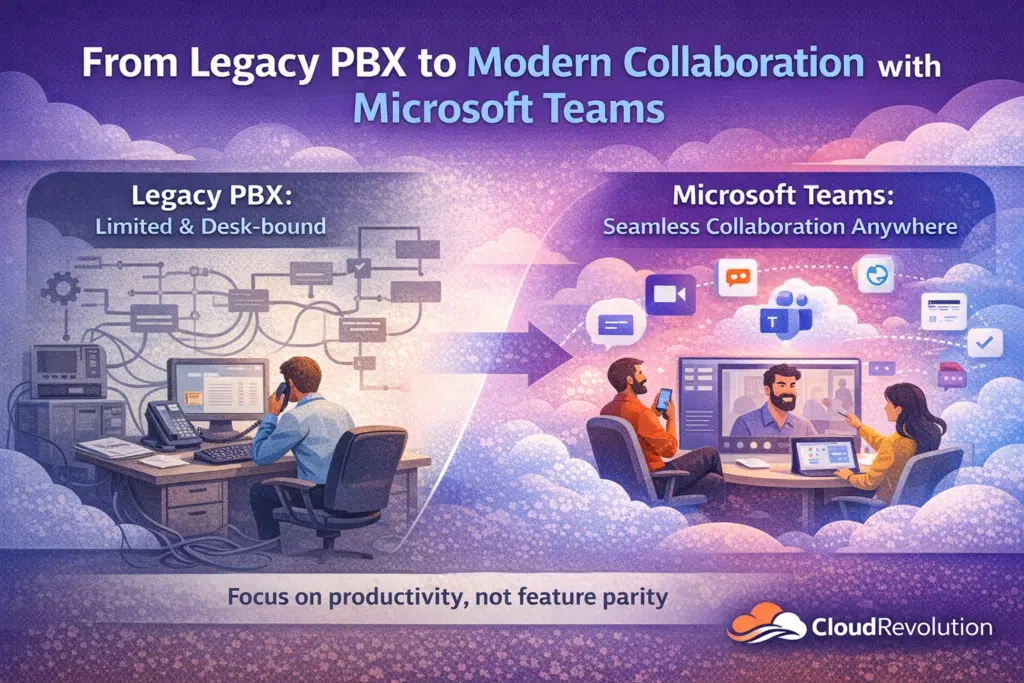
The result is predictable: long migrations, expensive hybrid band‑aids, and a cloud telephony deployment that looks like the old PBX but doesn’t deliver the collaboration or cost benefits Teams promises.
In this guide, I’ll map common PBX features to Teams equivalents, call out where parity is straightforward, where it requires SBCs or partners, and where you should stop chasing a checkbox and start redesigning the workflow for real production value.
Key Differences Between Teams Phone and Legacy PBX Deployments
Before diving into specific features, it pays to appreciate the major differences outside of checkbox features.
When you appreciate the vast difference and progress between on-premises and even mature VoIP solutions compared to a SaaS or hybrid-style Teams Phone deployment, you start to understand the bigger picture of why Teams Phone doesn’t need to achieve feature parity with your existing phone system.
| Attribute | Legacy PBX | Microsoft Teams Phone | Recommendation Impact |
| Deployment model | On‑prem hardware; appliance lifecycle. | Cloud native with optional Direct Routing for carriers. | Cloud reduces hardware OPEX; keep hybrid if strict on‑prem needs. |
| Upfront and ongoing cost | High capital expenditure; maintenance contracts. | Subscription and per‑user calling plans; lower hardware spend. | Cloud usually lowers TCO over 3–5 years. |
| Scalability | Limited by hardware and site capacity. | Dynamic scaling across tenants and regions. | Teams better for rapid growth and distributed offices. |
| Feature set | Core telephony features; vendor add‑ons for voicemail, queues. | Unified calling, voicemail transcription, auto attendants, advanced routing. | Teams adds collaboration features beyond voice and replaces legacy communication methods. |
| Management and provisioning | Local PBX admin tools; manual provisioning. | Centralized admin portal and automation via Microsoft 365. | Teams reduces IT effort for moves/changes. |
| Integration with apps | Integrations require middleware or custom work. | Native integration with Microsoft 365 apps and APIs. | Teams improves workflows and reporting. |
| Security and compliance | Physical control; patching burden; variable encryption. | Microsoft security stack, cloud updates, conditional access. | Cloud offers modern security but requires identity controls. |
| Reliability and call quality | Predictable local PSTN quality; single‑site failure risk. | Dependent on internet and Microsoft cloud; global resiliency options. | Use SBCs and QoS to match PBX reliability. |
| Migration complexity | Low for staying put; high for multi‑site consolidation. | Planning for number porting, Direct Routing or Calling Plans, and user training. | Hybrid coexistence often needed during transition. |
| Contact center readiness | Mature on‑prem contact center solutions available. | Modern cloud contact center integrations and Teams Contact Center partners. | Evaluate contact center feature parity before |
The Major Features You No Longer Need With Microsoft Teams
Setting the Scene
To help accept that we don’t need to retain every feature when migrating your PBX to Teams Phone, we must look at the wider Teams collaboration feature set.
For example, while voicemail is very much a staple of Teams Phone, leaving internal voicemails is a thing of the past. Likewise, internal missed calls and busy tones can be completely eradicated if your staff are using Teams following best practices communicated by IT and Microsoft champions.
Now, this may be drifting away from feature parity but it’s very relevant to adopting new collaboration habits.
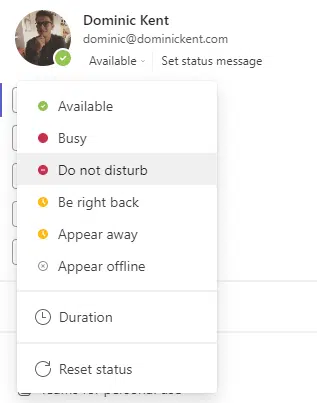
In generations newer to the office (or virtual office), this is the norm rather than a new habit. They wouldn’t dare phone someone if they saw your presence indicator was red. Likewise, why leave a voicemail asking to call me back when you can send a 30-second chat message that explains everything they need to do that task.
Using research conducted by IntCalling and Slack, we can estimate that you save six minutes per interaction per user when working this way.
Example scenarios (per user) — daily, monthly, yearly
Use these formulas where N = number of short interactions per day that could be replaced.
- Daily time saved=N⋅(minutes saved per interaction)
- Monthly (20 workdays)=20⋅Daily time saved
- Yearly (240 workdays)=240⋅Daily time saved
Example numbers (assume N=4 short interactions/day)
- Per interaction saved: 4.5 min (phone→chat).
- Daily: 4×4.5=18 minutes saved.
- Monthly: 18×20=360 minutes = 6 hours.
- Yearly: 18×240=4,320 minutes = 72 hours (9 workdays).
We digressed massively emphasizing this point. But it helps paint the picture of why we don’t always need to strive for feature parity when migrating our PBX systems to Teams.
PBX Features (And Behaviors) That Don’t Need To Be Carried Over
- Dedicated voicemail as the primary update channel: Replace with short Teams chat messages, voice notes, or @mentions for faster, searchable updates.
- Short internal status calls (2–5 minutes): Use presence plus a 20–30 second chat or quick call instead of habitual ring‑and‑talk.
- Ad‑hoc conference bridge dialing: Use Meet Now, channel meetings, or instant screen share for faster, contextual collaboration.
- Static “who’s available” phone lists: Rely on org charts, presence, and the searchable Teams directory instead of maintaining manual lists.
- Manual call chaining / multiple short handoffs: Centralize context in a channel or thread so handoffs happen in one place without repeated calls.
- Voicemail for confirmations or simple asks: Swap for persistent chat with attachments and checkboxes to create an auditable action trail.
- Physical handset‑centric presence cues: Use calendar status and Teams presence rather than assuming availability from a desk phone.
- Email threads for quick coordination: Move short coordination to channel conversations or group chats to reduce latency and inbox clutter.
- Dedicated on‑prem provisioning workflows for routine moves/changes: Automate common moves and number assignments via Azure AD and Intune to cut helpdesk load.
- Separate systems for presence, calendar, and voice: Consolidate into Teams so presence, calendar, and calling are integrated and reduce context switching.
- Static hunt‑group workarounds for collaboration: Replace with dynamic call queues, presence‑aware routing, and channel‑based escalation for better routing and visibility.
- Relying on handset features for basic collaboration (e.g., transfer buttons as the only workflow): Train users on Teams client flows and shortcuts so collaboration isn’t tied to a physical device.
- Local-only voicemail archives as the single record of conversations: Use Teams’ searchable history, transcription, and compliance features for retention and discovery.
- Multiple point solutions for simple tasks (separate chat, file share, and call tools): Consolidate into Teams channels where chat, files, and calls live together for context and speed.
These items aren’t about removing capability. They’re about optimizing how work happens. In most cases you’ll get better outcomes by enabling Teams features (presence, chat, meetings, transcription, directory) and training users to use them, rather than trying to recreate legacy PBX behavior exactly.
Achieving PBX Feature Parity In Microsoft Teams
This table highlights common PBX scenarios where IT teams often get hung up when moving to Teams Phone. Below are features that Teams either does provide feature parity, provides a better option, or provides slightly different functionality that achieves the same outcomes.
I’ve used a three-tier scale to help understand how to achieve feature parity in each scenario:
- Parity: replicate and validate during cutover.
- Partner: requires SBC or certified third‑party solution; test early.
- Optimize: enable and use Teams native capabilities (low‑effort changes) instead of rebuilding legacy behavior.
| Feature | Teams equivalent | Parity | Requires SBC or partner | Recommendation |
| Voicemail transcription | Teams voicemail transcription | Better in Teams | ❌ | Optimize: enable transcription for searchable messages and faster resolution. |
| APIs and integrations | Microsoft Graph and Teams APIs | Better in Teams | ❌ | Optimize: use Graph/Teams APIs to embed voice into Microsoft 365 workflows. |
| Provisioning and directory integration | Azure AD and Teams admin center | Better in Teams | ❌ | Optimize: automate common moves/changes with Azure AD and Intune. |
| Basic call hold | Teams hold in client and desk phones | Straightforward | ❌ | Parity: replicate and train users on client flow. |
| Blind transfer | Blind transfer from Teams client | Straightforward | ❌ | Parity: map handset shortcuts to Teams actions. |
| Consultative transfer | Attended transfer in Teams | Straightforward | ❌ | Parity: update user guides for consult flow. |
| Call park and retrieve | Teams Call Park with retrieval codes | Mostly parity | ❌ | Parity: configure park slots and document codes. |
| Call pickup group | Call pickup policies and group pickup | Mostly parity | ❌ | Parity: configure policies and train teams. |
| Hunt groups ring strategies | Call queues and routing policies | Mostly parity | ❌ | Parity: implement call queues and routing in Teams. |
| Auto attendant and IVR | Auto attendants with DTMF and menus | Parity | ❌ | Parity: rebuild IVR trees in Teams admin. |
| Voicemail | Teams voicemail in client and Exchange integration | Parity | ❌ | Parity: enable voicemail policies and retention. |
| Music on hold | Custom audio in Call Queues and Auto Attendants | Parity | ❌ | Parity: upload media and manage centrally. |
| Call transfer to external PSTN | Calling Plans or Direct Routing | Parity | ✅ | Parity: prefer Direct Routing for carrier control. |
| Onsite PSTN breakout and low latency routing | Direct Routing with SBC and local breakout | Parity | ✅ | Parity: use SBCs for local breakout and regulatory needs. |
| Paging and overhead paging | SIP paging via SBC or certified phones | Partial parity | ✅ | Partner: use SBC or third‑party paging solutions. |
| Intercom door phone | SIP intercom via gateway or certified devices | Partial parity | ✅ | Partner: plan ATA/SBC gateway for door systems. |
| Call recording | Teams cloud recording or partner solutions | Partial parity | ✅ | Partner: use certified recording for regulated needs. |
| Emergency E911 and location routing | Emergency locations and dynamic mapping | Partial parity | ❌ | Optimize: configure and test location mapping and emergency workflows. |
| Analog devices fax and alarms | ATA or SBC gateway to support analog endpoints | Partial parity | ✅ | Partner: migrate critical analog via gateways; replace where possible. |
| Contact center ACD and skill routing | Call queues plus certified Teams contact center partners | Partial parity | ✅ | Partner: evaluate cloud contact center for advanced ACD. |
| Wallboards and supervisor tools | Partner solutions or Power BI dashboards | Partial parity | ✅ | Partner: replace legacy wallboards with integrated analytics. |
Conclusion: Feature Parity Isn’t The Be All and End All
Focus on where parity is necessary (basic calling, transfers, auto attendants), where partners or SBCs are required (paging, analog devices, regulated recording, local PSTN breakout), and where you should redesign (voicemail transcription, APIs, provisioning, presence‑driven workflows).
We’re not saying rolling out Teams Phone is straight forward. In enterprises with thousands of users, there’s a ton of complexity. And, yes, there will be people who are stuck in their ways and ask for a feature that doesn’t exist (or need to exist). That’s where training, adoption, and self-service support comes up trumps.
On paper, when you really study it, there’s no need to strive for typical “feature parity”. You must approach rolling out Teams Phone — and Teams and Microsoft 365 as a whole — as genuine transformation.
After all, if you just wanted the same thing, why are you moving to Teams in the first place? 😉
Teams is hard if you’re not implementing it every single day. That’s where Cloud Revolution comes in.
We’re recognized as Microsoft Partner of the Year finalists from 2022 – 2025 (winning the overall award in 2023) because we’re the Teams people.
You deserve to get the absolute most from Microsoft Teams and Copilot. With us by your side, your Teams projects will deliver real business value — seamlessly, confidently, and with expert guidance every step of the way.
Need help with your Teams Phone rollout?
