

 Business Process

While Microsoft Copilot has received plaudits and praise from one section of the Microsoft world (users, commentators, leaders alike), there’s another portion of disgruntled folk who don’t share the same sentiment.
The problems aren’t always what you’d expect.
Sometimes Copilot itself is the problem. More often, Copilot exposes problems that were already hiding inside the organization.
Poor permissions. Messy data. Undefined processes. Low adoption. Difficult-to-measure ROI.
We’ve asked Microsoft professionals, IT leaders and Copilot practitioners what they’ve found hardest about deploying Copilot. We’ve also looked at what the wider Microsoft community is saying.
These are the 10 problems with Copilot that businesses need to solve before they can get the value they’re expecting.
| # | Problem | Core question |
| 1 | It’s not that intelligent | Can Copilot actually do what I need? |
| 2 | Nobody has time to audit first | Is our environment ready? |
| 3 | Permission sprawl | Who can actually access what? |
| 4 | ROI is hard to measure | Is this investment paying off? |
| 5 | Adoption fails | Will people actually use it? |
| 6 | The pace of change | Can IT keep up? |
| 7 | Usage/cost is unpredictable | What will this actually cost? |
| 8 | Another thing to manage | Who owns all this AI? |
| 9 | Verification tax | How much time does checking AI cost? |
| 10 | It doesn’t know your history | How much organizational knowledge is missing? |
I wanted to make sure this guide is genuinely useful outside of “it doesn’t work” or “it’s not very good” but I will start with one major flaw pointed out time and again by users on Reddit, in the Microsoft online community, and in general conversation with peers. I will only cover this once then we’re onto more nuanced, business-process-type problems.
1. For artificial intelligence, it’s not that intelligent
The technical among us will point out that prompt engineering is a skill and the success of Copilot agents can transform your business.
Even without those technical skills and complex workflows, the value of Copilot has been proven by Microsoft’s own internal rollouts and modelling as well as its flagship case studies.
But those are examples where Microsoft resources and partners have been on hand to develop Copilot into the tool it can be.
For the average user, or for a user opting to explore Copilot Chat before going all-in on a paid license, the same grumbles occur time and again.
✅ Information retrieval is great
✅ Answers are presented with confidence
❌ No decisions get made
❌ Confidence does not equal competence
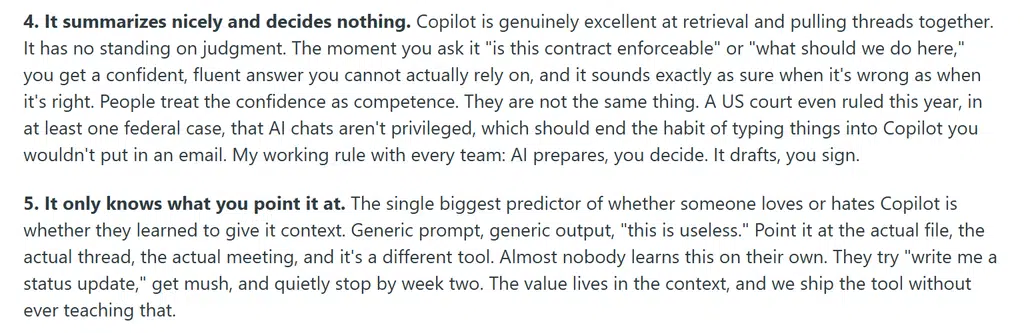
Again, these can be fixed with thorough prompt engineering and user training (or perhaps resetting user expectations). But when rolling out Copilot to thousands of users, they expect to just use the tool you’re giving them. That’s where Copilot falls short of many people’s expectations today.
What to do about this Copilot problem: Don’t expect Copilot to become useful simply because you’ve assigned someone a license. Give users a small number of proven, repeatable use cases that are relevant to their role, then build from there.
The goal isn’t to turn every employee into a prompt engineer. It’s to remove the need for them to be one.
Start with straightforward tasks where Copilot is already useful, then move toward more complex workflows and agents as users become more confident.
Useful resource: 👉 Hey Copilot, Give Me 20 Copilot Use Cases
2. Nobody has time to audit their environment first
In a race to do the most AI, nobody wants to hear that they need to spend six months cleaning up SharePoint first.
But that’s effectively what many organizations discover when they start preparing for Copilot.
The problem isn’t necessarily Copilot itself. Copilot works within the permissions a user already has. The problem is that those permissions often aren’t as clean as everyone assumes.

One recent Microsoft 365 Copilot administrator described Copilot as “turning previously buried permission mistakes into searchable information”.
That’s the uncomfortable part.
You might have:
- Old SharePoint sites nobody owns anymore
- Teams created for projects that finished years ago
- Sensitive HR, finance or legal documents with overly broad permissions
- External users who still have access
- Thousands of files nobody has reviewed in years
- Sharing links and unique permissions that have accumulated over time
None of those problems were necessarily caused by Copilot.
Copilot just makes them much easier to find.
And this is where the traditional approach to Microsoft 365 governance starts to struggle. A business might have accepted a messy permission model because finding the wrong document through conventional search was difficult.
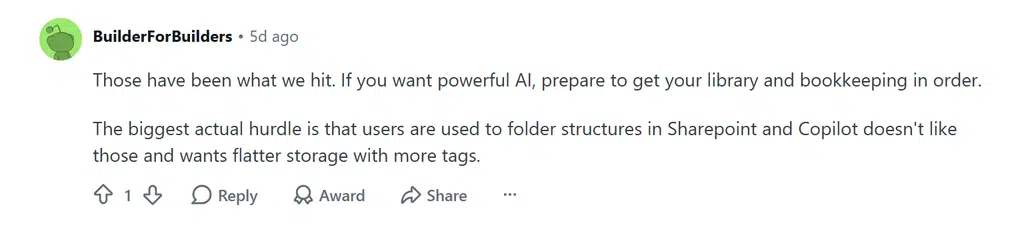
Give everyone an AI assistant that can understand natural-language questions, and the risk becomes much more obvious.
The answer isn’t to put your Copilot rollout on hold until your entire Microsoft 365 environment is perfect. That’s unrealistic for most enterprises.
Instead, identify and remediate the highest-risk areas first.
Microsoft’s current deployment guidance recommends identifying high-risk sites and files, fixing access issues, applying appropriate restrictions and continuing to enforce governance as Copilot rolls out.
What to do about this Copilot problem: Don’t treat Copilot readiness as a giant, one-off Microsoft 365 cleanup project. Start with a risk-based assessment.
Look at the data Copilot is most likely to surface, identify where permissions are too broad, and prioritize sensitive or heavily used sites first. Then put a process in place to keep permissions, data and content governance under control as Copilot adoption grows.
The goal isn’t perfect data hygiene before AI. It’s enough visibility and control to deploy AI safely.
Useful Resource: 👉 Take your free Copilot readiness assessment
(Takes less than 5 minutes.)
3. Permission sprawl is a bigger challenge than tool sprawl
IT teams are used to dealing with tool sprawl.
Too many applications, overlapping functionality, unused licenses and employees finding their own ways of getting work done.
But Copilot introduces another kind of sprawl that’s much harder to see: permission sprawl.
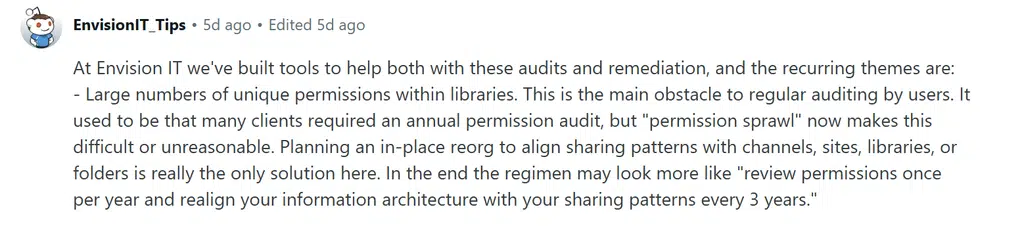
The problem isn’t necessarily that people have access to the wrong information today. It’s that access tends to accumulate over time.
Someone joins a project and gets added to a Team. They move departments but keep some of their previous access. An external consultant gets added to a SharePoint site. A security group grows without anyone reviewing who’s still in it.
One permission at a time, the environment becomes harder to understand.
And unlike an application sitting unused on someone’s laptop, excessive permissions can be almost invisible.
This is why permission management can’t be treated as a one-off Copilot exercise.
Microsoft 365 environments are constantly changing. New Teams are created. Projects finish. People change roles. External users come and go. New SharePoint sites and libraries appear.
Unless permissions are regularly reviewed, the access model gradually becomes a historical record of everything someone has ever needed rather than a reflection of what they need now.
Copilot simply raises the stakes.
What to do about this Copilot problem: Treat permissions as something that needs an owner and a lifecycle.
Define who is responsible for reviewing access to sensitive information, establish sensible rules for external and temporary access, and make it easy to remove permissions when they’re no longer required.
Most importantly, don’t assume that the permissions you set today will still make sense in 12 months.
Permission sprawl is a moving target. Your governance needs to move with it.
Useful resource: 👉 How to Ensure Data Sovereignty as You Scale Microsoft 365 Copilot
4. Measuring ROI is new and hard
Despite numerous models provided by Microsoft, no business is the same when it comes to leveraging the benefits of Copilot.
You can estimate the potential value of saved time, increased productivity and improved output, but that doesn’t necessarily mean you’ve proven a return on investment.
And that’s the problem.
Copilot usage is relatively easy to measure:
- How many people are using it?
- How often?
- Which applications are they using it in?
But usage isn’t ROI.
Someone generating 50 emails with Copilot doesn’t automatically mean they’ve created 50 times the value of someone who generates five.
Microsoft’s own guidance now makes this distinction, recommending that organizations connect Copilot activity to their own business metrics rather than relying on usage data alone.
That means establishing a baseline before you start:
- How long does a process currently take?
- How many people are involved?
- What’s the error rate?
- How much does it cost?
- What happens after Copilot is introduced?
Without that baseline, it’s incredibly difficult to say whether Copilot actually improved anything.
There’s another complication: saved time isn’t necessarily saved money.
If Copilot saves an employee two hours a week but that employee simply uses those two hours to clear their inbox, you’ve created capacity, not necessarily a financial saving.
The real value comes from what the organization does with that capacity.
That might mean processing more work, responding to customers faster, producing more proposals, reducing overtime or allowing employees to focus on higher-value work.
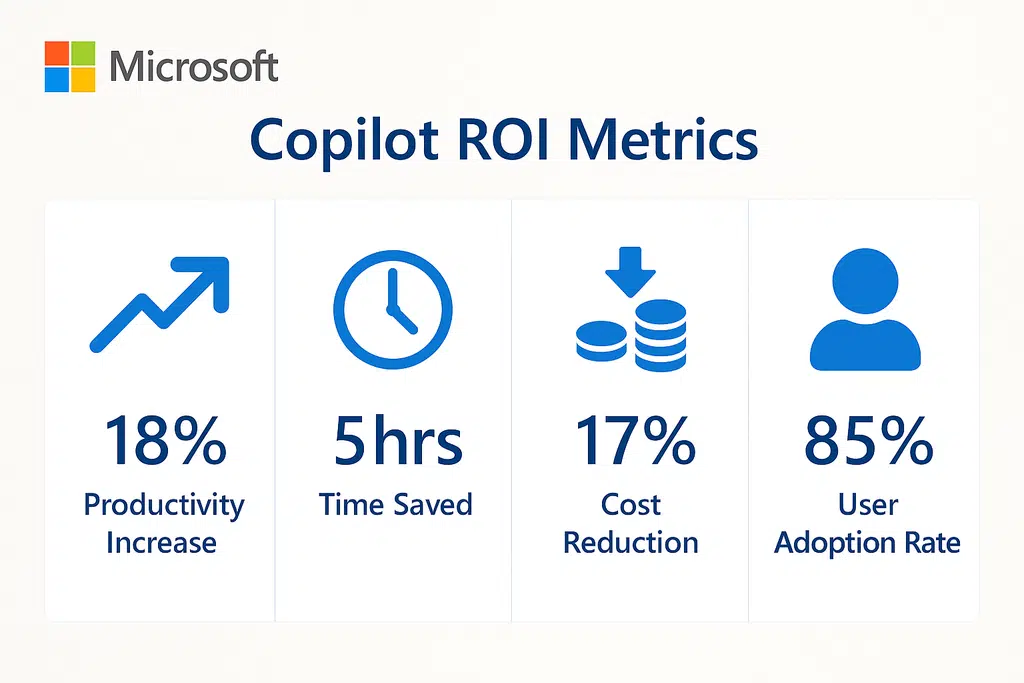
So calculating your Copilot return on investment isn’t about taking Microsoft’s headline ROI figures and applying them to your organization.
It’s about working out what Copilot changes in your business.
What to do about this Copilot problem: Start with the business process, not the Copilot feature.
Choose a small number of high-value workflows and establish a baseline before introducing Copilot. Measure the time, cost, quality or volume associated with that process, then measure the same things after deployment.
Useful Resource: 👉 Calculate the ROI of Microsoft 365 Copilot
5. Adoption can fail at the first hurdle
There are three repetitive issues with Copilot adoption:
- Very few businesses know where to start
- Users don’t trust the answers
- Users don’t like change
And all three can happen before someone has had a chance to discover whether Copilot is actually useful to them.
The first problem is perhaps the easiest to understand.
Give someone a Copilot license and tell them to “start using AI” and what exactly are they supposed to do?
Most employees don’t spend their working day looking for opportunities to use generative AI. They have meetings, emails, spreadsheets, presentations and deadlines.
If you don’t show them where Copilot fits into that work, the license can quickly become another unused piece of software.
Then there’s trust.
Copilot can produce an answer that looks convincing while still being wrong, incomplete or missing important context. If a user’s first few experiences require them to correct the output, they’ll quickly decide that checking Copilot takes longer than doing the work themselves.
Finally, there’s change.
Even when Copilot genuinely can make someone’s job easier, that doesn’t mean they’ll automatically use it. People develop habits around the tools they already know. Asking them to change those habits requires a reason.
This is why a successful Copilot rollout is as much a change management exercise as a technology deployment.
Microsoft’s own rollout guidance recommends tailored training, communication, workshops and AI champions rather than simply assigning licenses and waiting for adoption to happen.
And the businesses seeing the strongest results tend to start with real workflows rather than generic demonstrations.
- Show someone how Copilot can turn their weekly reporting process from an hour into 20 minutes and you’ve given them a reason to care.
- Show them a 45-minute presentation about everything Copilot can do and you’ve probably given them homework.
What to do about this Copilot problem: Don’t launch Copilot with a license and a login guide.
Start with the people, roles and processes where Copilot can solve an obvious problem.
Give each group a small number of practical use cases, provide role-specific training and create somewhere users can get help when the output isn’t what they expected.
Then use your early adopters as champions. Let them demonstrate what actually works within your organization, rather than relying entirely on generic AI examples.
Useful Resource: 👉 Told to “Do AI”? Here’s a Safe Starting Point with Microsoft Copilot
6. The pace of change is rapid
Copilot keeps changing underneath you. For any IT administrator, that’s a problem.
You can spend weeks building training materials, documenting processes and getting users comfortable with a particular Copilot workflow, only for Microsoft to change the experience underneath it.
- New features arrive
- Existing features move
- Models change
- Agents gain new capabilities
- Interfaces get redesigned
- Features get renamed, combined or retired
And Copilot isn’t changing in isolation.
Microsoft 365 itself is an evergreen platform, so the changes affecting Copilot can overlap with changes to Teams, SharePoint, Dynamics 365, Copilot Studio and the wider Microsoft 365 ecosystem.
You’re no longer managing a product that gets an occasional major upgrade. You’re managing a service that is continuously evolving.
And some of those changes require action.
For example, Microsoft recently announced changes to Copilot Studio that included new agent harnesses, new models, new agent identity capabilities and new ways for agents to connect to organizational data.
For an organization with hundreds or thousands of users, keeping track of what has changed is a job in itself.
What to do about this Copilot problem: Don’t try to keep up with every Microsoft announcement manually.
Establish a process for identifying the changes that actually affect your organization, assessing their impact and assigning someone to deal with them.
That might mean using the Microsoft 365 Message Center and roadmap, creating clear ownership for Copilot and AI changes, and having a regular process for reviewing what is coming.
For larger organizations, dedicated change management tooling can make this considerably easier.
That’s where ChangePilot comes in.
ChangePilot is built specifically around Microsoft 365 change management. It tracks Message Center and Roadmap changes, summarizes what’s happening, highlights potential impact and can help organizations identify which changes actually require attention.
The goal isn’t to stop Microsoft changing Copilot.
It’s to make sure your organization isn’t surprised when it does.
Useful Resource: 👉 ChangePilot
7. Usage (and associated cost) is hard to predict
Copilot used to be relatively easy to budget.
You bought the licenses, multiplied the price by the number of users and had a reasonable idea of what the investment would look like.
That becomes more complicated as organizations start using Copilot agents and consumption-based features.
Copilot Credits introduce a usage-based element to some AI workloads. Instead of simply paying for access, organizations can also find themselves paying according to how much certain Copilot capabilities are actually used.
And that’s difficult to predict.
One employee might use Copilot occasionally to summarize meetings. Another might use it throughout the day. An agent might be triggered automatically, run against large amounts of data or be used by hundreds of employees.
The cost isn’t necessarily proportional to the number of people with a Copilot license.
This creates a new problem for IT and finance.
You need to understand not only who has access to Copilot, but what they’re doing with it.
That makes forecasting difficult.
It’s also easy to make the mistake of treating Copilot Credits like another software license. They’re closer to a consumption model, which means usage patterns matter.
What to do about this Copilot problem: Don’t wait for the first unexpected bill before you start monitoring consumption.
Before rolling out consumption-based Copilot features, understand which capabilities generate usage, which users and agents are likely to consume the most credits, and what your expected usage looks like.
Start small, establish a baseline and monitor consumption as adoption grows.
Useful Resource: 👉 Microsoft Copilot Credits: What You Need to Know
8. Copilot can become another thing to manage
In the future, will we see job titles like “Copilot Manager”?
It sounds ridiculous.
But the more Copilot evolves, the more reasonable the question becomes.
At first, Copilot looks like another application to roll out. Assign licenses, provide some training and let people get on with their work.
Then you add agents.
Suddenly there are prompts to maintain, agents to review, permissions to manage, usage to monitor, new features to test and users asking why something that worked last month suddenly behaves differently.
And that’s before you consider who is responsible for all of it.
- Who owns an agent created by an employee who has since left the business?
- Who decides whether an agent should be available to everyone or just one department?
- Who reviews the data it’s connected to?
- Who tests it when Microsoft changes the underlying capabilities?
- Who decides when an agent is no longer useful and should be retired?
These aren’t hypothetical questions.
As organizations move from individual Copilot usage toward hundreds of agents performing specific business tasks, AI starts to look less like a single application and more like another technology estate.
That’s the trap.
You introduce Copilot to reduce the amount of work people have to do, then discover that someone has to manage the growing collection of Copilot capabilities you’ve created.
The answer isn’t to centralize every decision with IT.
That would defeat much of the point of giving employees the ability to build their own AI solutions.
Instead, organizations need enough governance to let people experiment safely without creating an unmanaged collection of agents, data connections and AI workflows.
What to do about this Copilot problem: Treat Copilot agents like software, not like documents.
Give them an owner, a purpose and an appropriate lifecycle.
For anything that moves beyond experimentation, establish a simple process covering creation, testing, approval, deployment, monitoring and retirement.
You don’t need a committee to approve every prompt. You do need to know which agents exist, what they do, what information they can access and who is responsible for them.
Useful Resource: 👉 Copilot Agent Development: The Complete Enterprise Guide
9. Copilot creates a verification tax
Even if we don’t move to a world where Copilot admins have a full-time job, what we have already witnessed is
Verification.
Copilot can produce an answer, summarize a meeting, draft an email or create a document in seconds.
But that doesn’t mean you can immediately trust the output.
- Someone still needs to read it.
- Check the source.
- Make sure it hasn’t misunderstood the question.
- Look for information it has missed.
And, where the output is important, verify that the underlying facts are correct.
This creates what we might call a verification tax.
The more important the task, the more verification it requires.
A quick internal email might need a glance. But a customer proposal, financial analysis, HR document or executive briefing needs considerably more scrutiny.
And this creates an uncomfortable productivity equation.
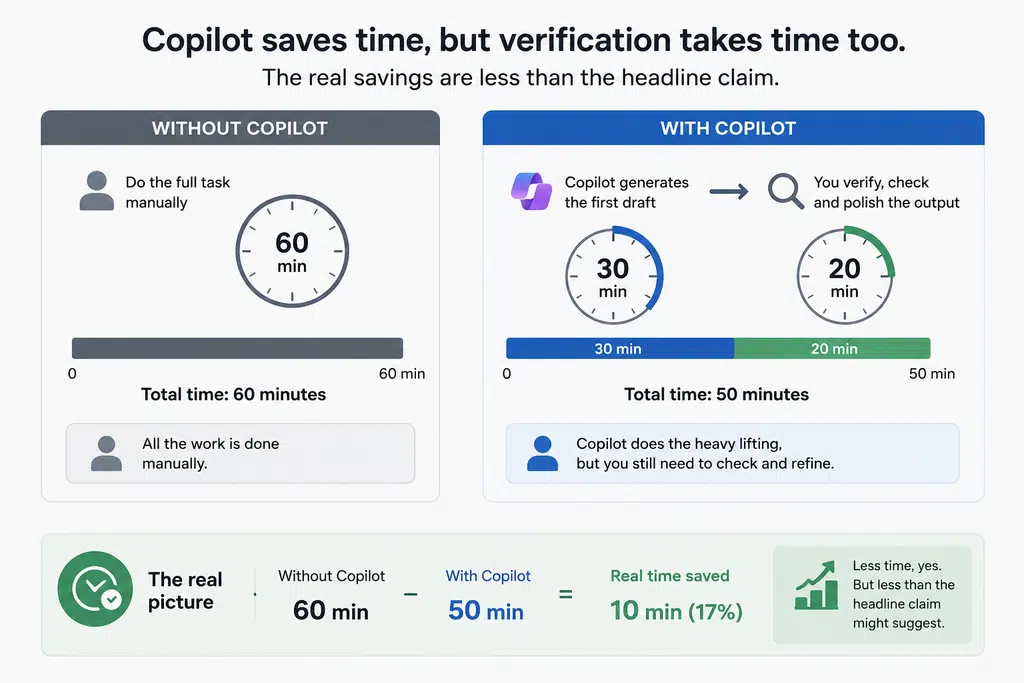
If Copilot takes 30 minutes out of a task but requires 20 minutes of checking, you’ve still saved time. But you’ve saved considerably less than the headline claim might suggest.
In some cases, the verification can become so frustrating that users stop using Copilot altogether.
That doesn’t make Copilot useless.
It means we need to change what we expect it to do.
Copilot is often at its best as a first pass rather than a final authority.
Use it to get the work moving, then apply human judgment where it matters.
What to do about this Copilot problem: Don’t measure Copilot purely on how quickly it generates an output.
Measure how long the complete process takes.
If Copilot drafts a report in five minutes but someone spends another 15 minutes checking and correcting it, that 20-minute workflow is the number that matters.
Give users clear guidance on when verification is essential and what they should check.
The goal isn’t to remove humans from the process. It’s to make the human part more valuable.
Copilot should reduce the amount of work people have to do, without reducing the amount of judgment they apply.
Useful Resource: 👉 10 Microsoft 365 Copilot Gotchas To Avoid
10. Copilot doesn’t know your entire company history
Things like business processes, user preferences and context nuances from 10 years ago don’t exist in Copilot.
Even when you’ve uploaded documentation until your eyes bleed, the personal experiences and preferences that live in human minds aren’t necessarily written down anywhere.
- Someone in finance knows why a particular process exists.
- Someone in sales remembers why a customer stopped buying from you.
- Someone in IT knows that a particular workaround was introduced five years ago because the “proper” solution caused another problem.
- Someone who’s been with the business for 15 years knows that the process documented on SharePoint isn’t actually how the business works anymore.
That knowledge is incredibly valuable.
And it’s difficult to capture.
Copilot can work with the information available to it. It can summarize documents, find information, connect related content and help people make sense of what’s already there.
But it doesn’t have the lived experience of working in your organization.
This matters because business decisions rarely happen in a vacuum.
A document might tell Copilot what the official process is. It might not tell it why the process exists, which exceptions matter, who tends to push back, or what happened the last time someone tried to change it.
That’s where the human still has an advantage.
There’s also a danger in assuming that because you’ve documented something, you’ve captured everything that matters.
You haven’t.
Some of the most useful organizational knowledge lives in conversations, relationships, experience and intuition.
That’s why the goal shouldn’t be to make Copilot the source of truth for everything.
It should be to combine what AI is good at with what humans are good at.
What to do about this Copilot problem: Don’t try to replace organizational knowledge with AI.
Instead, use Copilot to make the knowledge you have easier to find, understand and apply.
Document important processes and decisions where possible. Give Copilot access to trusted sources. Encourage teams to capture useful knowledge rather than leaving it exclusively in people’s heads.
But keep humans involved where context, judgment and organizational history matter.
- Use Copilot for the heavy lifting.
- Use people for the nuance.
A balance of AI and human will always be the winner compared to leaving Copilot to its own devices.
Useful Resource: 👉 Book Your Free Copilot Strategy Call
You must be logged in to post a comment.