
 Business Process

You didn’t invest in Microsoft Copilot so employees could write emails a little faster.
You invested because leadership expects AI to improve the way your business operates.
For many IT teams, that isn’t happening.
Copilot can summarize meetings, rewrite documents, and answer questions. Those are useful productivity gains, but they’re difficult to measure. After the initial excitement fades, many leaders start asking the same question.
“Where’s the return on our investment?”
The answer isn’t better prompts.
It’s better processes.
The companies seeing the biggest impact from Microsoft Copilot aren’t simply helping employees work faster. They’re building AI agents that complete work on their behalf.
Think about your IT service desk.
Today, an employee reports an issue. Someone reads the request, creates a ticket, categorizes it, assigns a priority, and routes it to the right team.
Now imagine an AI agent doing all of that automatically.
Or picture your HR onboarding process.
Instead of multiple teams creating accounts, requesting equipment, and chasing approvals, an AI agent coordinates the entire workflow while keeping everyone informed.
These aren’t futuristic ideas.
They’re already happening.
Microsoft Copilot agents can retrieve information, make decisions based on business rules, and trigger actions across Microsoft 365 and connected business systems. Instead of simply responding to a prompt, they complete meaningful business tasks with the appropriate level of human oversight.
If you’re already using Microsoft 365, you have an opportunity to automate repetitive work without replacing existing platforms or redesigning every business process.
The challenge isn’t the technology.
It’s knowing where to start.
Questions like:
- Which processes should you automate first?
- How do you build agents securely?
- How do you prove business value before expanding across your business?
This guide answers those questions.
Drawing on Microsoft’s guidance, real-world customer implementations, and Cloud Revolution’s own experience, you’ll learn how to develop Copilot agents that solve genuine business problems. You’ll see how one company reduced manual ticket creation through intelligent automation. More importantly, you’ll learn the framework behind that success so you can apply it to your own business.
By the end of this guide, you’ll know how to identify the right opportunities, build agents your employees trust, and deliver measurable outcomes that leadership can see.
- What Is Copilot Agent Development?
- Why Copilot Agents Matter
- How Copilot Agents Work
- Choosing Your First Copilot Agent
- Copilot Agent Development Lifecycle
- The Building Blocks of a Copilot Agent
- 10 Enterprise Copilot Agent Use Cases
- Copilot Agent Development Best Practices
- How To Build Copilot Agents Securely
- Common Copilot Agent Development Mistakes to Avoid
- How to Measure the ROI of Copilot Agent Development
What Is Copilot Agent Development?
One of the biggest misconceptions about Microsoft Copilot is that every AI experience works the same way.
It doesn’t.
There’s a big difference between using Copilot to assist an employee and building a Copilot agent that completes work on their behalf.
Think about your IT service desk.
An employee reports an issue.
A standard Copilot experience might help them write a clearer support request.
A Copilot agent can take it much further. It can understand the request, create a ticket, assign the correct priority, and notify the support team automatically.
The difference is simple:
- Copilot assists employees.
- Copilot agents automate business processes.
That’s why more companies are moving beyond personal productivity and investing in AI-powered automation.
Your Microsoft 365 environment already contains valuable business context. Copilot agents can securely use information from services like Teams, SharePoint, and Outlook. They can also connect to platforms like ServiceNow, Dynamics 365, or your own line-of-business applications.
The goal isn’t to automate everything.
It’s to automate the right things.
Successful Copilot agents usually have three things in common:
- They solve a repetitive business problem.
- They follow clearly defined business rules.
- They involve people when approval or judgment is needed.
That’s what Copilot agent development is all about.
It’s the process of designing, building, testing, and improving AI agents that solve real business problems securely, reliably, and at scale.
The technology matters.
Your business processes matter more.
Work out the difference: Microsoft 365 Copilot vs Copilot Agents: How Do They Compare?
Why Copilot Agents Matter
According to Microsoft’s Work Trend Index, 62% of employees say they spend too much time searching for information during the workday.
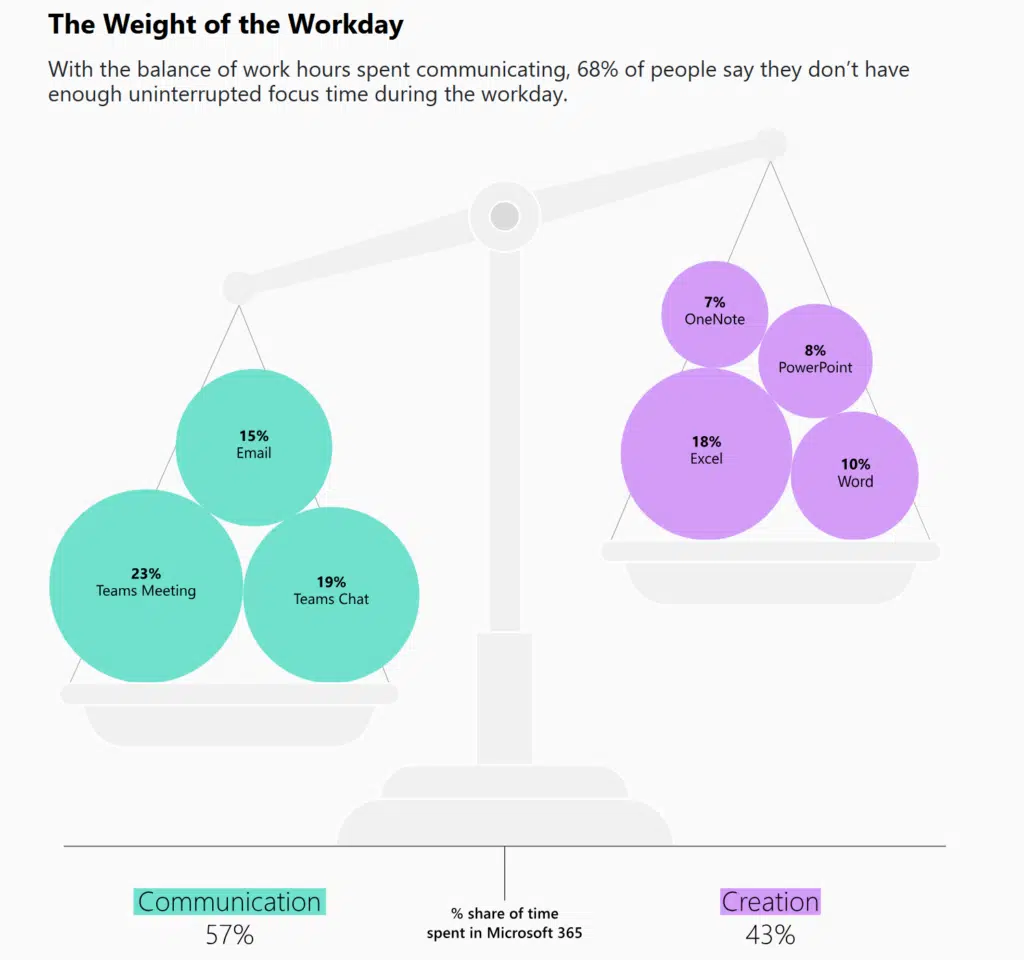
That’s only part of the problem.
Every day, your employees move between applications, chase approvals, and update multiple systems with the same information. They’re often doing the work around the work.
Think about your own business.
How many hours are spent every week:
- Creating or updating tickets?
- Moving information between systems?
- Looking for documents or answers?
Individually, each task only takes a few minutes.
Together, they consume hundreds of hours every month.
Traditional automation has tried to solve this problem for years.
The challenge is that most business processes aren’t predictable. Employees describe issues differently. Documents arrive in different formats. Customers rarely ask the same question twice.
That’s where Copilot agents make the difference.
Instead of relying on fixed rules, they understand context, reason over information, and decide what action to take next. They combine the flexibility of generative AI with the reliability of structured business workflows.
The biggest opportunity isn’t replacing your employees.
It’s removing the repetitive work that prevents them from focusing on higher-value activities.
Once you start looking at your business through that lens, you’ll quickly identify processes that are ideal candidates for a Copilot agent.
Choosing Your First Copilot Agent
One of the biggest mistakes you can make is trying to automate everything.
Not every process needs an AI agent.
In fact, your first Copilot agent should solve one well-defined business problem. That makes it easier to measure success, build confidence, and expand into other areas later.
So, where should you start?
Look for processes that have three characteristics:
- They happen frequently.
- They follow clear business rules.
- They require manual effort.
IT service desks are a great example.
Every day, employees report issues, support teams create tickets, and requests are routed to the right people. The process is repetitive, but it still relies on people copying information between systems and making routine decisions.
HR onboarding is another good candidate.
Many businesses still create accounts, assign equipment, and schedule training manually. An AI agent can coordinate those tasks while keeping the right people informed.
The same applies to finance.
Processing invoices, validating information, and requesting approvals often follows the same pattern every time.
On the other hand, avoid highly complex processes that rely on experience, negotiation, or subjective decision-making.
Your goal isn’t to replace expertise.
It’s to remove repetitive work so your employees can spend more time applying it.
Before you build your first Copilot agent, ask yourself three questions:
- Does this process happen often enough to justify automation?
- Can the agent access the information it needs?
- Will automating this process create a measurable business outcome?
If you can answer “yes” to all three, you’ve probably found a strong candidate for your first Copilot agent.
You may also like: From Call Notes to Coaching Engine: How Teams Are Using Copilot to Turn Everyday Conversations Into Scalable Coaching
How Copilot Agents Work
If you’ve ever documented a business process, you’ll already understand the basics of a Copilot agent.
A request comes in.
Information is gathered.
A task is completed.
The difference is that a Copilot agent can understand natural language, retrieve business context, and decide what to do next before triggering the appropriate workflow.
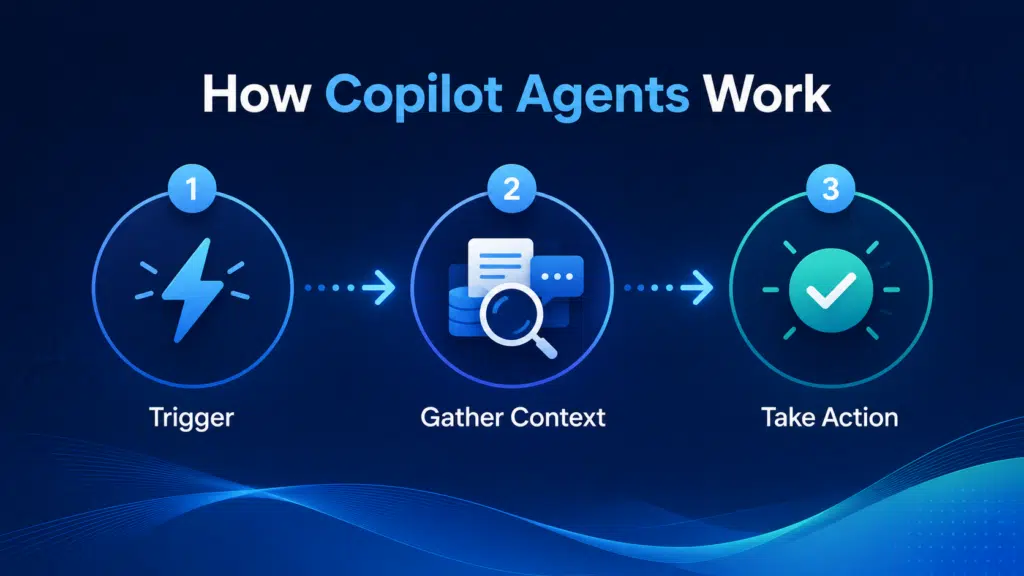
Most Copilot agents follow three stages.
1. Receive a Trigger
Every agent starts with an event.
That could be an employee asking a question in Microsoft Teams, an email arriving in a shared mailbox, or a new document being uploaded to SharePoint.
The trigger tells the agent it’s time to begin.
2. Build Context
Before taking action, the agent collects the information it needs to make an informed decision.
Depending on the task, it might review a SharePoint document, retrieve customer information from Dynamics 365, or check previous support requests in your IT service management platform.
Instead of relying on one source of information, it builds context from the systems your business already uses.
3. Take Action
Once the agent has enough information, it can complete the next step in the process.
That might involve:
- Creating a support ticket.
- Updating a business application.
- Starting an approval workflow.
Some tasks can be completed automatically.
Others may require human approval before the workflow continues.
That’s one of the biggest advantages of Copilot agents.
You decide where automation starts, where people stay involved, and how much authority an agent has to complete work on your behalf.
Copilot Agent Development Lifecycle
Building a successful Copilot agent isn’t about writing the perfect prompt.
It’s about understanding the business process you’re trying to improve.
The best projects follow a structured approach that balances business outcomes, technical implementation, and user adoption.
Here’s the lifecycle we recommend.
1. Identify the Opportunity
Start with the business problem, not the technology.
Look for a repetitive process that’s slowing your team down, follows defined business rules, and has a measurable outcome.
Your first agent doesn’t need to transform the entire business.
It just needs to solve one problem well.
2. Design the Workflow
Once you’ve identified the process, map how it works today.
Understand what triggers the process, where information comes from, and which decisions are made along the way.
This is also where you’ll identify where people should remain involved and where automation can safely take over.
3. Build and Connect
Now it’s time to develop the agent.
That includes defining its instructions, connecting it to the right data sources, and integrating it with the business applications it needs to complete work.
The focus shouldn’t be on connecting everything.
It should be on connecting the systems that matter to the process.
4. Test and Refine
Before deploying your agent, test it using real business scenarios.
Check how it handles incomplete information, unexpected requests, and situations where human approval is required.
Small improvements at this stage often have the biggest impact after deployment.
5. Measure and Improve
Deployment isn’t the finish line.
Track how often the agent is used, how much manual effort it removes, and where users still need to intervene.
The best Copilot agents improve over time as your business processes evolve.
That’s why successful agent development isn’t a one-time project.
It’s an ongoing process of optimization.
The Building Blocks of a Copilot Agent
A Copilot agent is only as good as the architecture behind it.
If you give an agent poor instructions, unreliable knowledge, or access to the wrong systems, it won’t deliver the outcomes you’re expecting.
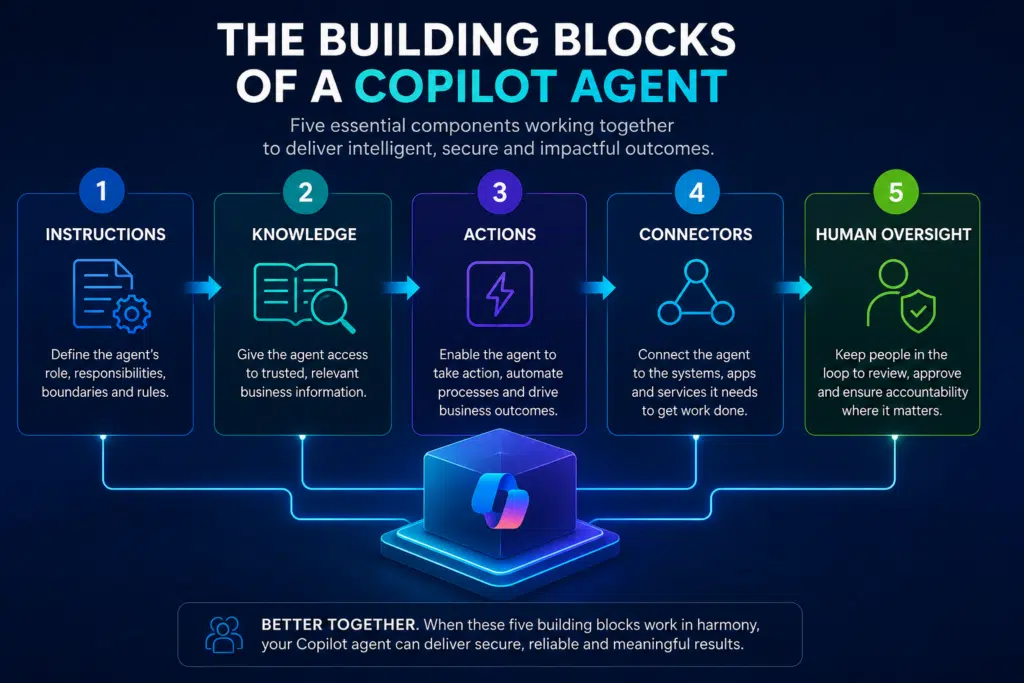
Let’s break down the five components that matter most.
Instructions
Every Copilot agent starts with a set of instructions.
Think of these as the operating principles that define the agent’s role, responsibilities, and limitations.
For example, an IT support agent might be instructed to create tickets, check for duplicate incidents, and escalate high-priority issues. It should never reset user passwords or approve access requests without human approval.
Clear instructions produce more reliable outcomes.
Knowledge
Next, the agent needs access to trusted business information.
That knowledge can come from sources like SharePoint, Teams, Microsoft 365 files, or approved websites. It can also be grounded in business data stored in systems like Dynamics 365 or Dataverse.
The quality of your knowledge directly affects the quality of your agent.
If your documentation is outdated, duplicated, or incomplete, your agent will make poorer decisions.
Actions
Understanding a request is only part of the job.
The real value comes from taking action.
Actions allow a Copilot agent to create tickets, update records, send notifications, start approval workflows, or call APIs.
Without actions, your agent can answer questions.
With actions, it can automate business processes.
Connectors
Connectors give your agent access to the systems it needs to complete work.
Microsoft provides hundreds of pre-built connectors for business applications, cloud services, and databases. If a connector doesn’t exist, you can build your own using APIs.
That doesn’t mean every system should be connected.
Only connect the applications that support the business process you’re automating.
Keeping your architecture focused makes your agents easier to manage, test, and secure.
Human Oversight
The best Copilot agents don’t replace people. They remove repetitive work while keeping people involved where experience, judgment, or accountability is required.
For example, an agent might prepare an access request, recommend a response to a customer, or draft a contract for review.
A person makes the final decision.
That’s one of the biggest reasons Copilot agents are being adopted across enterprise businesses. They improve speed and consistency without removing governance.
Bringing Everything Together
Successful Copilot agents combine five elements:
- Clear instructions.
- Trusted business knowledge.
- Connected business systems.
Once those foundations are in place, actions and human oversight determine how much work an agent can complete safely.
Get those building blocks right and you’ll build agents your employees trust, your IT team can support, and your leadership team can confidently scale across the business.
10 Enterprise Copilot Agent Use Cases
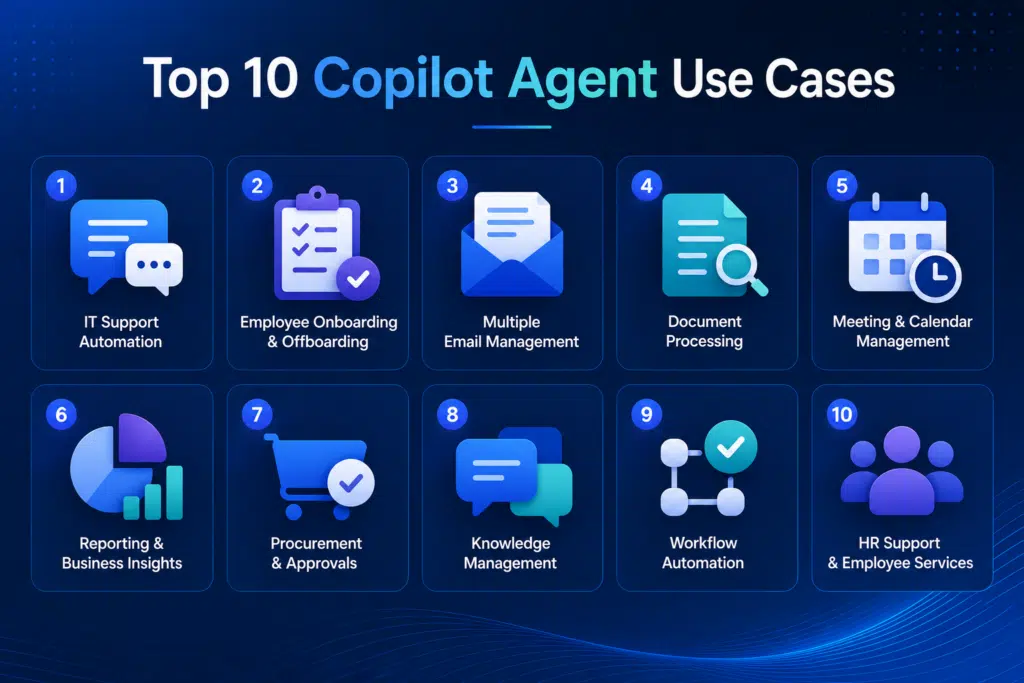
1. IT Service Desk: Eliminate Manual Ticket Creation
Manual ticket creation slows down every service desk.
A Copilot agent can understand an employee’s request, ask follow-up questions if information is missing, and create a structured ticket automatically. It can categorize the issue, assign the correct priority, and route it to the appropriate support team before a service desk analyst gets involved.
The result is faster response times, more consistent ticket quality, and less administration for your IT team. Cloud Revolution recently developed a Copilot agent to automate this process, reducing manual ticket creation while maintaining human oversight where it mattered most.
Read the case study: How BCU Saved $57,000 Per Year by Eliminating Manual Ticket Creation
2. HR: Automate Employee Onboarding
Onboarding often involves multiple departments completing the same process every time a new employee joins.
A Copilot agent can coordinate onboarding by requesting equipment, creating accounts, scheduling training, sending welcome information, and tracking outstanding tasks across HR, IT, and hiring managers.
Instead of relying on spreadsheets and email chains, every stakeholder follows the same process, helping new employees become productive sooner.
3. Finance: Streamline Invoice Processing
Invoice processing is repetitive, time-consuming, and often delayed by manual approvals.
A Copilot agent can extract information from invoices, validate supplier details, match purchase orders, and route approvals to the right people. If information is missing, it can request clarification before the process continues.
This reduces manual effort while improving accuracy and speeding up payment cycles.
4. Sales: Qualify New Opportunities
Sales teams lose valuable time reviewing inbound inquiries that aren’t ready for a conversation.
A Copilot agent can analyze new inquiries, identify buying intent, enrich customer information, and prioritize opportunities before assigning them to the right salesperson.
That allows your sales team to spend more time selling and less time qualifying leads manually.
5. Customer Service: Improve Case Resolution
Customer service teams often spend as much time finding information as they do helping customers.
A Copilot agent can retrieve relevant knowledge articles, summarize previous interactions, recommend responses, and update customer records as the conversation progresses.
Agents resolve cases faster because the information they need is already in front of them.
6. Procurement: Accelerate Approval Workflows
Procurement teams frequently manage repetitive approval requests that follow established business policies.
A Copilot agent can validate requests, check spending limits, identify the correct approvers, and keep requesters informed throughout the process.
Approvals move faster while maintaining governance and reducing unnecessary administration.
7. Compliance: Simplify Policy Management
Keeping employees aligned with changing policies can be difficult, especially across large businesses.
A Copilot agent can answer policy questions using approved documentation, surface the latest guidance, recommend next steps, and escalate complex scenarios when required.
Employees receive consistent answers while compliance teams spend less time responding to routine requests.
8. Executive Knowledge Assistant
Senior leaders often need information from multiple systems before making decisions.
A Copilot agent can retrieve reports, summarize project updates, surface business metrics, and prepare executive briefings using trusted business data.
Instead of searching across multiple applications, leaders receive the information they need in one place.
9. Project Management: Reduce Administrative Work
Project managers spend significant time updating plans, documenting meetings, and chasing actions.
A Copilot agent can summarize meetings, update project documentation, assign actions, and notify stakeholders when deadlines change.
This keeps projects moving while reducing the administrative burden on delivery teams.
10. Field Service: Coordinate Work in Real Time
Field engineers rely on accurate information to complete jobs efficiently.
A Copilot agent can retrieve service history, recommend troubleshooting steps, update work orders, and notify customers about appointment changes while engineers are on site.
The result is faster issue resolution, better communication, and a more consistent customer experience.
Copilot Agent Development Best Practices
The technology behind Copilot agents is evolving quickly.
The principles behind successful implementations aren’t.
Whether you’re building your first agent or your fiftieth, these best practices will help you deliver measurable business value while avoiding common pitfalls.
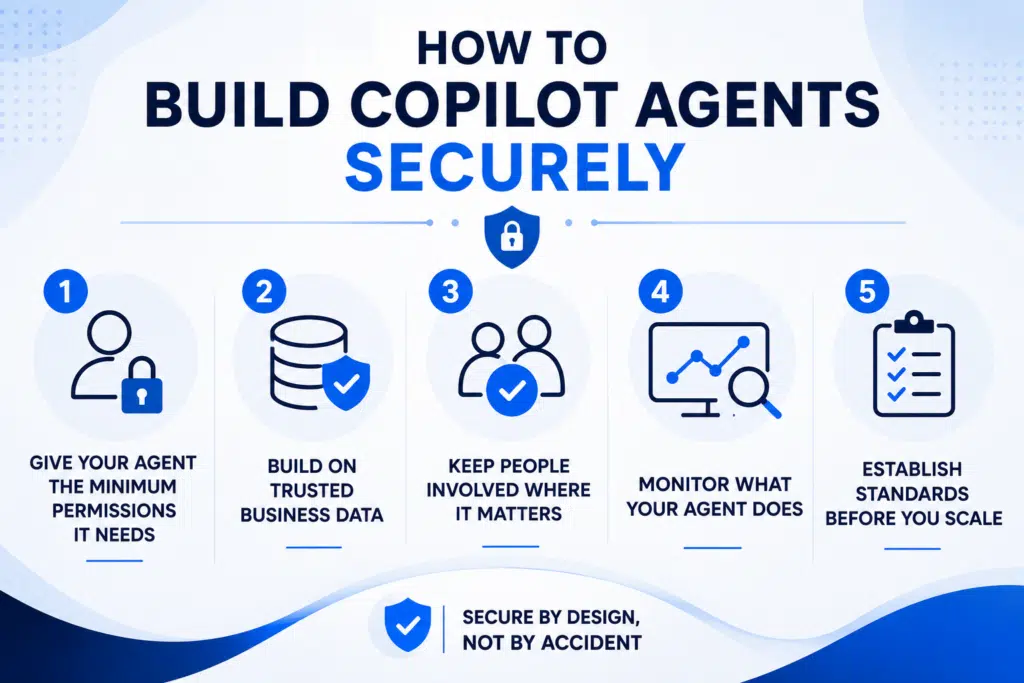
1. Start with a Business Problem
The most successful Copilot agents don’t start with a feature.
They start with a problem.
Focus on a process that’s repetitive, measurable, and already follows defined business rules. If you can’t explain the business outcome you’re trying to achieve, you’re not ready to build an agent.
2. Keep Your First Agent Focused
Avoid the temptation to build an agent that does everything.
A single-purpose agent is easier to develop, test, and improve than one responsible for multiple business processes.
Build confidence first.
Expand later.
3. Trust Your Data Before Your AI
Your agent is only as good as the information it can access. If you ensure Copilot data sovereignty, you tee your agents up for greater success.
Review your SharePoint sites, knowledge bases, and business systems before connecting them to an agent. Outdated or duplicated content will lead to inconsistent responses and unreliable outcomes.
4. Keep People in the Loop
Not every task should be automated.
Use human approval for activities involving financial decisions, sensitive information, or business-critical actions.
Automation should improve decision-making, not replace accountability.
5. Measure Business Outcomes
Success isn’t measured by how many agents you’ve built.
It’s measured by the value they create.
Track metrics like time saved, manual effort removed, ticket resolution times, or employee satisfaction to demonstrate the impact of every deployment.
6. Improve Continuously
Your first deployment isn’t the finished product.
Review how employees interact with your agent, identify where it struggles, and refine it over time.
The best Copilot agents continue to improve long after they’re deployed.
7. Scale with Governance
Once you’ve proven success, establish standards for how new agents are designed, tested, secured, and monitored.
A consistent governance framework makes it easier to scale AI across your business without introducing unnecessary risk.
How to Build Copilot Agents Securely
Security shouldn’t be something you think about after you’ve built a Copilot agent.
It should influence every decision you make, from the data your agent can access to the actions it’s allowed to perform.
The good news is that building secure Copilot agents doesn’t mean limiting what they can do.
It means giving them the right level of access, the right safeguards, and the right oversight.
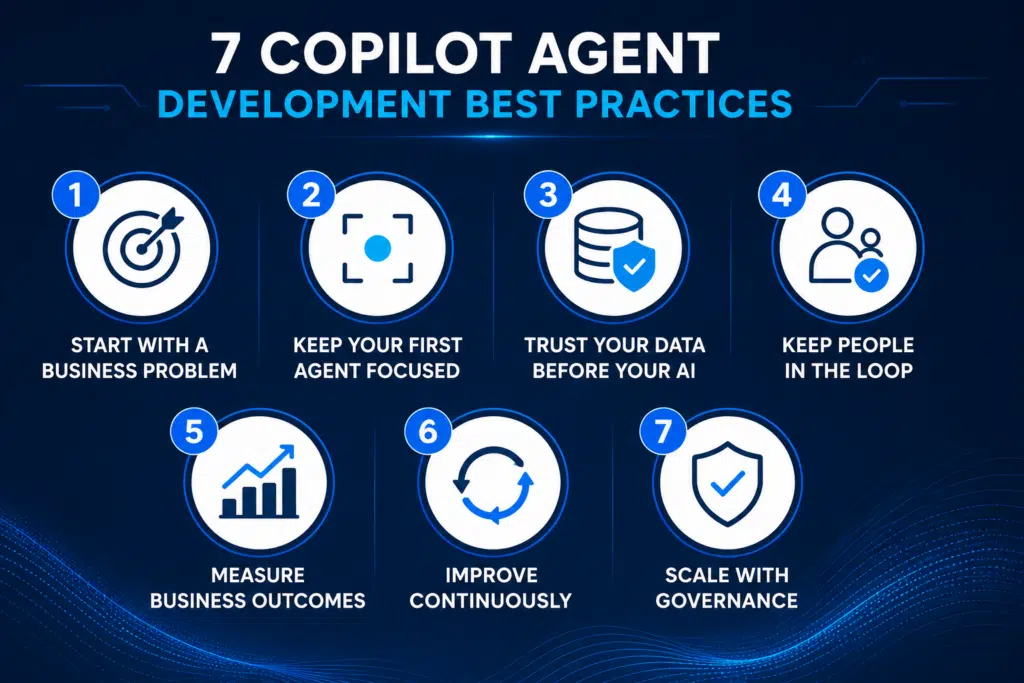
1. Give Your Agent the Minimum Permissions It Needs
Every Copilot agent should have a clearly defined role.
If it’s responsible for creating IT support tickets, it doesn’t need access to payroll information or financial systems.
Limiting permissions reduces your attack surface, protects sensitive information, and makes your environment easier to manage.
2. Build on Trusted Business Data
Your agent is only as reliable as the information it’s using.
Before connecting SharePoint sites, Teams channels, or business applications, make sure the content is accurate, current, and governed appropriately.
Better data leads to better decisions.
3. Keep People Involved Where It Matters
Not every action should be automated.
If an agent is processing financial approvals, changing security settings, or accessing sensitive customer information, introduce a human approval step before the action is completed.
Automation should increase confidence, not reduce accountability.
4. Monitor What Your Agent Does
Once your agent is live, monitor how it’s being used.
Review the actions it performs, identify where users intervene, and look for opportunities to improve its instructions or workflow.
The most successful Copilot agents continue to evolve long after deployment.
5. Establish Standards Before You Scale
One Copilot agent is easy to manage.
Fifty isn’t.
As adoption grows, define consistent standards for development, testing, security reviews, and ongoing ownership. That way, every new agent follows the same proven approach instead of introducing unnecessary risk.
Secure by Design, Not by Accident
Security isn’t a feature you add at the end of a project.
It’s something that’s built into every stage of your Copilot agent, from the first conversation about the business problem through to deployment and continuous improvement.
Get those foundations right, and you’ll build agents that your employees trust, your IT team can support, and your leadership team can confidently roll out across the business.
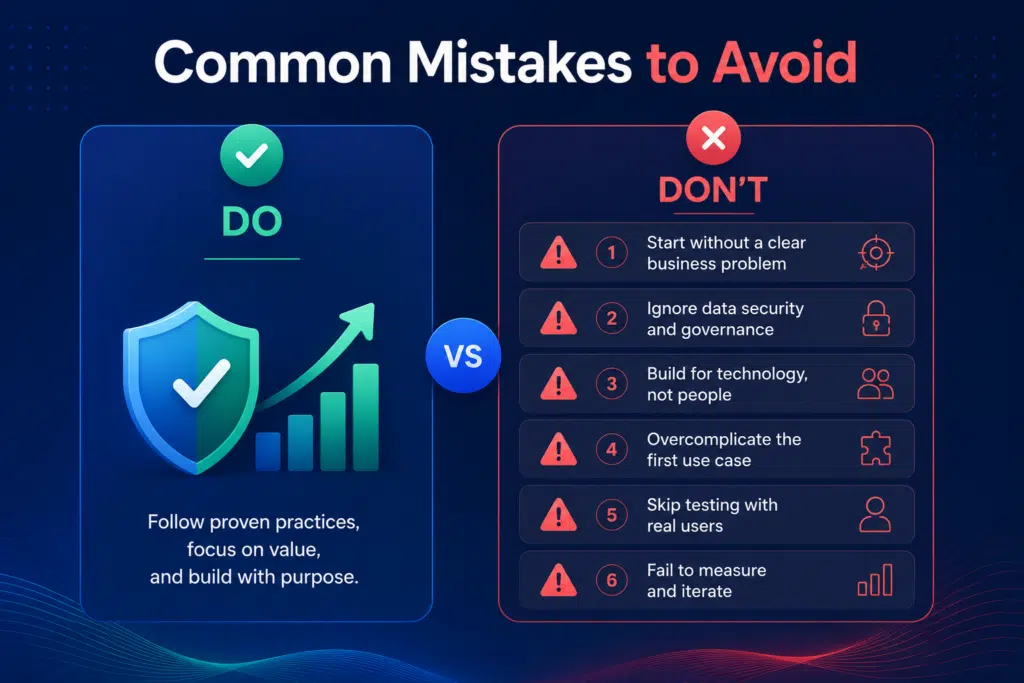
Common Copilot Agent Development Mistakes to Avoid
Building a Copilot agent has never been easier.
Building one that delivers lasting business value is a different challenge.
Many projects fail because teams focus on the technology before they understand the business process they’re trying to improve.
Avoid these common mistakes when planning your first deployment.
- Building an agent without a clear business outcome: Define success before development begins. Whether your goal is reducing ticket creation time, accelerating approvals, or improving productivity, every agent should have measurable business objectives.
- Trying to automate everything: Start with one well-defined process. Smaller projects are easier to build, test, govern, and scale than trying to automate an entire department from day one.
- Connecting to poor-quality data: Your agent can only work with the information it’s given. Review and improve your knowledge sources before deployment to ensure accurate and consistent responses.
- Removing human oversight too early: Keep people involved in decisions involving finance, security, compliance, or customer commitments. As confidence grows, you can gradually increase the level of automation.
- Failing to measure success: Track metrics like time saved, manual effort removed, adoption, and process completion times. Measuring outcomes helps demonstrate ROI and identify opportunities for improvement.
- Treating Copilot agents as a one-time project: Review performance regularly, update instructions as business processes evolve, and refine your agents using employee feedback. The most successful deployments improve continuously.
Be best prepared: 10 Microsoft 365 Copilot Gotchas To Avoid
How to Measure the ROI of Copilot Agent Development
One of the biggest misconceptions about Copilot agents is that success is measured by how many you’ve built.
It isn’t.
The businesses seeing the greatest return are the ones measuring outcomes, not deployments.

Before you begin development, establish a baseline for the process you’re trying to improve. Once your agent is live, compare those metrics to understand the impact it’s making.
Focus on outcomes like:
- Time saved: Measure how much manual effort has been removed from repetitive tasks.
- Process efficiency: Track improvements in cycle times, response times, or ticket resolution.
- Business value: Monitor metrics like employee productivity, customer satisfaction, or operational costs.
Remember that ROI isn’t always financial.
Reducing repetitive work gives employees more time to focus on higher-value activities. Improving the consistency of business processes can reduce errors and increase customer confidence. Faster access to information helps employees make better decisions.
Those benefits often create value that’s just as important as direct cost savings.
The most successful organizations don’t stop measuring after deployment.
They continue monitoring performance, gathering employee feedback, and refining their agents over time. Every improvement strengthens the business case for future Copilot agent projects and helps build momentum for wider AI adoption.
Why Experience Matters in Copilot Agent Development
Building a Copilot agent is relatively straightforward. But building one that employees trust, leadership supports, and the business continues to invest in is much harder.
The challenge isn’t usually the technology.
It’s identifying the right opportunities, protecting your data, integrating with existing business processes, and delivering measurable outcomes that justify the investment.
That’s why successful Copilot projects start with business objectives, not AI features.
At Cloud Revolution, we help organizations take a practical approach to Copilot agent development. Rather than experimenting with isolated use cases, we identify where automation will create the greatest business impact, define how success will be measured, and build agents that fit naturally into the way your teams already work.
Every project is guided by Microsoft’s best practices for security, governance, and responsible AI, giving you a clear path from your first deployment through to enterprise-wide adoption.
Whether you’re deploying your first Copilot agent or planning a broader AI strategy, our focus remains the same:
- Reduce risk: Build on proven approaches that prioritize security, governance, and user adoption.
- Deliver measurable outcomes: Create agents that solve real business problems and demonstrate clear value.
- Support long-term success: Establish the foundations to scale AI confidently across your organization.
If you’re ready to explore where Copilot agents can make the biggest impact, take our free Copilot Readiness Assessment.
We’ll help you identify the highest-value opportunities and provide a practical roadmap for your next steps.